
business resources
Best Visual Studio Code SQL Server Extension for SQL Formatting (2026)
07 May 2026

Excerpt: Bad SQL formatting hides bugs, slows reviews, and turns simple queries into detective work. The right extension fixes that instantly. This guide compares the best SQL formatters and SQL Server extensions for Visual Studio and VS Code, showing which tools help developers write cleaner queries and move faster every day.
Best Visual Studio Code SQL Server Extension and SQL Formatter Tools Compared
Inconsistent SQL is a productivity killer, but a robust Visual Studio Code SQL Server extension can instantly bring structure and efficiency to your queries. With the right extension, developers can automatically format SQL code, apply consistent indentation, and maintain readable queries across their projects.
Without these tools, SQL code quickly becomes harder to work with. As SQL code moves between developers, different formatting styles and long, unstructured queries make scripts harder to review and maintain. What should take seconds to scan can turn into minutes just to understand the logic.
To avoid these headaches, this guide breaks down the top SQL formatter tools and Visual Studio Code SQL Server extensions available in 2026. This should help you choose the perfect one for your workflow.
Why SQL extensions matter for Visual Studio and VS Code
Adding SQL extensions to Visual Studio and Visual Studio Code makes it much easier to write and keep track of queries. They add features that the default editor doesn't have, like formatting queries, IntelliSense suggestions, and database navigation.
Without tools, formatting SQL can get out of hand. When you join, the lines get messed up, and clauses like SELECT, WHERE, or GROUP BY are harder to read. SQL extensions fix this by automatically formatting queries with consistent indentation, capitalizing keywords, and aligning clauses.
Many developers specifically search for ways to format SQL in Visual Studio Code or enable Visual Studio Code's auto-format SQL behavior. SQL extensions make this simple. Queries can be formatted with a shortcut or automatically structured when a file is saved.
Formatting is only part of what these tools provide. Most SQL extensions also include productivity features such as:
- Intelligent SQL autocomplete and IntelliSense.
- Query execution with result grids.
- Database object navigation and schema browsing.
- SQL refactoring tools.
- Code analysis and basic performance hints.
For SQL Server developers, these capabilities remove much of the manual overhead from writing and reviewing queries. Instead of fixing layout and syntax details, developers can focus on query logic, performance, and database design.
Now, let’s look at some of the most widely used SQL formatter extensions for Visual Studio and VS Code.
List of the best Visual Studio SQL formatter extensions
The following tools are widely used Visual Studio SQL formatter extensions that help developers format queries and improve SQL development inside Visual Studio and Visual Studio Code.
1. dbForge SQL Complete
Rating: 4.7/5 (G2)

Company: Devart
Compatibility: Windows (Visual Studio, SQL Server Management Studio)
Best for: SQL Server developers who need advanced SQL formatting and productivity tools inside Visual Studio or SSMS
Description
dbForge SQL Complete is an add-in for Microsoft Visual Studio and SQL Server Management Studio that adds advanced coding assistance features to them. It helps developers, DBAs, and analysts write and keep up with complex SQL queries more quickly by giving them tools for context-aware code completion, automatic formatting, and refactoring.
As developers type, the extension looks at the database metadata and suggests tables, columns, and SQL statements that are relevant. It also has built-in Visual Studio format SQL features that make sure that indentation, clause alignment, and keyword casing are all the same in all projects. This makes queries easier to read and more consistent.
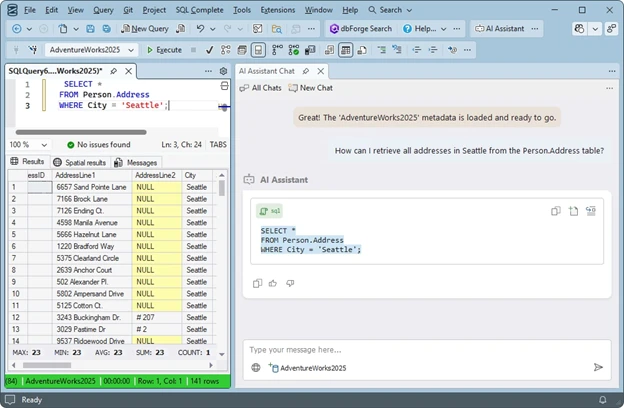
Alt text: dbForge SQL Complete in SQL Server Management Studio is showing SQL query execution and AI Assistant generating a SELECT query.
Features
- Context-aware SQL code completion based on database metadata.
- Automatic SQL formatting with customizable formatting rules.
- SQL snippets library for reusable query templates.
- Automatic JOIN clause generation.
- Custom alias mapping for faster query writing.
- Instant SQL syntax validation.
- T-SQL refactoring tools.
- Query execution notifications and analysis.
- AI-powered SQL generation and optimization via integrated AI Assistant.
Pros
- Advanced Visual Studio SQL Formatter with customizable formatting rules.
- Intelligent autocomplete for tables, columns, and joins.
- Built-in SQL snippets for faster query writing.
- Refactoring tools improve query maintainability.
- Works directly inside Visual Studio and SQL Server Management Studio.
Cons
- Designed specifically for SQL Server environments.
- Advanced capabilities require paid editions.
- Not available for Visual Studio Code.
Price
dbForge SQL Complete is available in multiple editions:
- Express Edition: Free
- Standard: starts from $129.95 per year
- Professional: starts from $149.95 per year
- Enterprise: starts from $199.95 per year
A 14-day free trial is available for paid editions.
What do users say?
“dbForge SQL Complete enhances productivity with intelligent code suggestions, reducing syntax errors. It provides relevant suggestions based on query context, includes a library of code snippets for quick insertion, and automatically beautifies SQL code for readability.” — G2
2. SQL Server (mssql) Extension for VS Code
Rating: 3.5/5 (Visual Studio Marketplace)

Company: Microsoft
Compatibility: Windows, macOS, and Linux (Visual Studio Code).
Best for: Developers using VS Code who need lightweight SQL Server editing and database connectivity.
Description
The SQL Server extension Visual Studio Code (mssql) is Microsoft’s official SQL development extension for Visual Studio Code. It lets developers connect to SQL Server, Azure SQL Database, and other Microsoft database platforms that are supported directly from the VS Code editor.
The extension adds basic database development features like editing T-SQL, running queries, managing connections, and exploring objects. With the built-in Object Explorer, developers can run SQL queries, see the results in a grid, and look through database objects.
One of the key features is IntelliSense support, which suggests tables, columns, keywords, and parameters as developers type SQL queries. This helps reduce syntax errors and speeds up query writing.
Developers looking to format SQL in Visual Studio Code will find this extension a useful starting point, though pairing it with a dedicated Visual Studio Code SQL formatter extension is recommended for more advanced formatting needs.
While this SQL extension for Visual Studio Code supports basic document formatting through VS Code commands, it is not primarily designed as a SQL formatting tool. Many developers pair it with dedicated SQL formatting extensions when they need more advanced formatting rules or style enforcement.
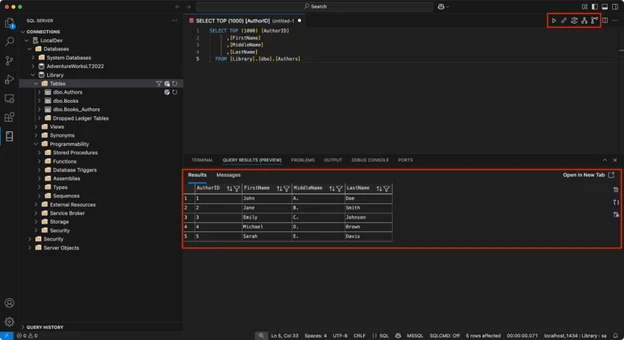
Alt text: SQL Server (mssql) extension in Visual Studio Code showing query execution results and database object explorer.
Features
- IntelliSense for SQL keywords, tables, columns, and parameters.
- Execute T-SQL queries directly inside VS Code.
- Database connection management for SQL Server and Azure SQL.
- Object Explorer for browsing database objects.
- Query results viewer with export options (CSV, JSON, Excel).
- Query execution plans and performance insights.
- Integration with SQL notebooks and database projects.
Pros
- Free and officially maintained by Microsoft.
- Works across Windows, macOS, and Linux.
- Lightweight SQL development environment inside VS Code.
- Good IntelliSense support for T-SQL queries.
- Supports Azure SQL and SQL Server connections.
Cons
- Limited built-in SQL formatting capabilities; need a dedicated Visual Studio Code SQL extension for advanced formatting.
- Fewer advanced productivity features than SSMS add-ins.
- Requires additional extensions for advanced SQL formatting.
Price
The SQL Server (mssql) extension is free and available through the Visual Studio Code Marketplace.
What do users say?
“It works really great and is super practical to work with SQL and Python at the same place at the same time. Helps a lot with the workflow.” — Visual Studio Marketplace
3. Redgate SQL Prompt
Rating: 4.7/5 (G2)

Company: Redgate
Compatibility: Windows (SQL Server Management Studio, Visual Studio)
Best for: Enterprise SQL Server teams that need advanced SQL formatting, autocomplete, and code analysis tools
Description
Redgate SQL Prompt is a productivity extension for SQL Server development in SQL Server Management Studio and Visual Studio. It enhances the SQL editing experience with advanced IntelliSense-style code completion, customizable SQL formatting, and automated refactoring tools.
The extension analyzes database metadata to suggest tables, columns, and SQL keywords as developers type queries. Its SQL formatting engine allows teams to apply consistent formatting styles across projects, helping enforce coding standards and improve query readability.
SQL Prompt also includes code analysis tools that detect potential SQL issues and enforce best practices during development. Developers can use built-in snippets, automated JOIN generation, and refactoring features to write queries faster and maintain cleaner database code.
It also supports the ability to format SQL code in Visual Studio with a single click, making it easy to standardize queries across large teams.
Recent versions also introduce optional AI-powered features that can generate SQL queries, explain existing SQL code, and suggest performance improvements.
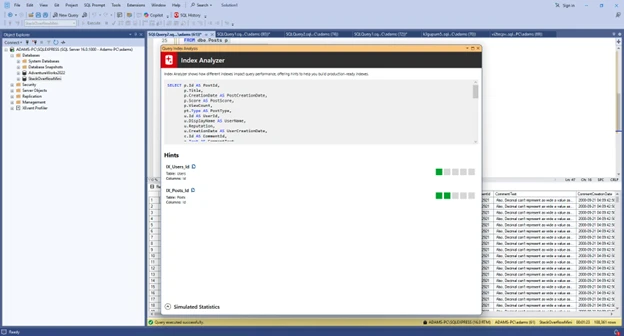
Alt text: Redgate SQL Prompt Index Analyzer in SQL Server Management Studio showing index suggestions and query performance hints
Features
- IntelliSense-style SQL code completion.
- One-click SQL formatting with customizable style profiles.
- SQL snippets for reusable query templates.
- Automated JOIN clause generation.
- SQL refactoring tools.
- Static SQL code analysis and issue detection.
- Query history and tab management.
Pros
- Very powerful SQL formatting engine.
- Intelligent autocomplete improves SQL productivity.
- Static code analysis helps enforce SQL standards.
- Refactoring tools simplify object renaming and reference updates.
- Widely used in enterprise SQL Server environments.
Cons
- Paid tool.
- Designed specifically for SQL Server development.
- Only works inside SSMS and Visual Studio.
- AI-powered features require an active subscription and are not available with perpetual licenses.)
Price
Redgate SQL Prompt is a commercial tool with subscription licensing, starting at roughly $210 per year, with a free trial available.
What do users say?
“I’ve been using Redgate tools for nearly a decade, and they’ve become essential to my workflow. SQL Prompt alone saves me hours every week. The updates are seamless, the features keep improving, and honestly, the value far outweighs the cost. I always recommend Redgate to colleagues—it's a must-have for SQL developers at any experience level.” — G2
To make the differences of these tools clearer, here’s a quick comparison of the tools discussed above.
SQL development tools comparison table
The following table summarizes the key differences between the SQL formatter tools discussed above, including their IDE compatibility, formatting capabilities, and pricing.
Tool | Best for | IDE | SQL formatter | Auto format | SQL Server support | Azure SQL Support | Price | Free version |
dbForge SQL Complete | SQL Server developers | Visual Studio / SSMS | Advanced | Yes | Yes | Yes | starts from $129.95 per year | Yes |
SQL Server Extension | VS Code users | VS Code | Basic | No* | Yes | Yes | Free | Yes |
Redgate SQL Prompt | Enterprise SQL teams | Visual Studio / SSMS | Advanced | Yes | Yes | Yes | Start at $210 per year | Only trial |
However, choosing the right extension depends on your development environment and workflow.
How to choose the right SQL formatter extension for Visual Studio
The best SQL formatter extension depends on your development environment and workflow. Factors such as IDE compatibility, formatting flexibility, and built-in productivity features all play a role in choosing the right tool.
Consider your IDE environment
The first factor to consider is the IDE your team uses. Visual Studio and Visual Studio Code support different extension ecosystems, and most SQL tools are designed for one environment or the other.
Visual Studio is commonly used for enterprise development and integrates closely with SQL Server tools such as SQL Server Management Studio. Extensions like dbForge SQL Complete and Redgate SQL Prompt are built specifically for this environment and provide advanced SQL formatting, code completion, and refactoring capabilities. dbForge SQL Complete, in particular, provides one of the most complete SQL formatting solutions for SQL Server and Azure SQL development inside Visual Studio.
Visual Studio Code is a lightweight editor that supports SQL development through extensions. Most VS Code workflows rely on the SQL Server extension Visual Studio Code (mssql), sometimes combined with additional SQL formatter plugins. Developers wondering how to format SQL in Visual Studio Code will find that pairing mssql with a formatting plugin delivers the best results.
If your team works primarily in Visual Studio, a full SQL productivity extension usually provides the most advanced formatting and coding features. VS Code users often prefer lighter extensions that combine query editing, format SQL file in Visual Studio Code, and database connectivity in a simpler environment.
SQL formatting customization
Another important factor is how much control the extension provides over SQL formatting rules. Different teams often follow different SQL style conventions, so the ability to customize formatting behavior is essential.
Most SQL formatter extensions allow developers to control elements such as:
- Keyword capitalization (SELECT vs select).
- Clause alignment and indentation.
- Line breaks for joins and conditions.
- Spacing rules for expressions.
Tools such as SQL Prompt and dbForge SQL Complete provide detailed formatting settings that allow teams to define a consistent SQL style and apply it across projects.
This is particularly useful for teams that want to enforce shared coding standards and maintain consistent query structure in collaborative environments.
Automation and productivity features
Modern SQL extensions do more than format queries. Many tools also include features that help developers write SQL faster and reduce repetitive work.
Common productivity features include:
- Visual Studio Code format SQL shortcuts for on-demand formatting.
- Code snippets for frequently used queries.
- IntelliSense suggestions for tables and columns.
- Built-in query execution tools.
- SQL refactoring and code analysis capabilities.
These features improve everyday development workflows. Instead of spending time fixing formatting or rewriting common query patterns, developers can focus on writing queries and improving database performance.
Takeaway
Keeping SQL code readable becomes more important as queries grow and multiple developers work on the same database scripts. Consistent formatting helps teams review queries faster, maintain coding standards, and avoid errors caused by poorly structured SQL.
Tools such as dbForge SQL Complete, the SQL extension for Visual Studio Code (mssql), and Redgate SQL Prompt give developers different ways to improve their SQL workflow. While VS Code users often rely on lightweight extensions, developers working inside Visual Studio typically benefit from more advanced productivity tools. Teams comparing formatting options can also review the Best SQL formatter online to understand which tools fit different SQL editing workflows.
For SQL Server development in Visual Studio, dbForge SQL Complete provides one of the most complete solutions, combining SQL formatting, intelligent code completion, and refactoring tools in a single extension. It also supports the Visual Studio SQL extension ecosystem smoothly, making it a natural fit for teams already invested in the Visual Studio environment.
Download dbForge SQL Complete and improve SQL formatting and query productivity in Visual Studio.
Share

Ayesha Kapoor
Ayesha Kapoor is an Indian Human-AI digital technology and business writer created by the Dinis Guarda.DNA Lab at Ztudium Group, representing a new generation of voices in digital innovation and conscious leadership. Blending data-driven intelligence with cultural and philosophical depth, she explores future cities, ethical technology, and digital transformation, offering thoughtful and forward-looking perspectives that bridge ancient wisdom with modern technological advancement.


