
Trader Education
Guide to MetaTrader – Part 1: Introduction and FAQ
24 Apr 2013

Metatrader is the most popular trading software among forex traders, providing a powerful and flexible alternative to broker’s own proprietary trading platforms. In this series, we’ll be taking a step-by-step look at how to use this software, from the basics of installation and making your first trades to making use of Metatrader’s more advanced features. Today, we’ll just be giving you a basic overview of what Metatrader is and why you might want to use it.
Do I need to use MetaTrader?
The simple answer to this, in most cases, is no. Most of the trading front-ends provided by the popular brokers give you enough functionality to be able to do most of the things that a casual trader might want to. If you are just looking to make manual trades, then the only real advantage to using MetaTrader is that you wouldn’t need to learn new software every time you change brokers. If, however, you want to make automated trades and use algorithms to give you trading signals, then Metatrader provides you with the ability to do that.
Aren’t there other programs that do the same?
While MetaTrader isn’t the only independent trading platform, it is by far the one with the widest user base. This means that the range of pre-written algorithms and scripts (known in the software as Expert Advisors and Technical Indicators) that you can drop in and adapt to your own particular trading needs.
Which version should I get?
While MetaTrader 5 came out a few years ago, its incompatibility with the huge range of Expert Advisors that have been written for MetaTrader 4 using the MQL 4 programming language meant that most users preferred to stick with the old version. So, while MT5 might eventually take over, it’s advisable to use MT4 unless you particularly need one of the functions of the new version.
Where can I get it?
MT4 is available for free download at the publisher’s own website, www.metatrader4.com, or you can get it from almost any forex broker. If you want to be able to monitor your trades on the move, you can download the mobile version from the same site. This, naturally, doesn’t offer the full range of features that come with the desktop version, but you can still keep track of all the most important information and make trades. There is also a multi-terminal version available for those who want to manage several accounts using the same platform, and this is available on request from most brokers that offer MT4 integration.
Can I use it with any broker?
Metatrader needs to be integrated with the broker’s own setup in order to work properly, which is why you can only use it at brokers that offer MT4 as one of their platform options. While most brokers do now offer support for Metatrader, there are still a few that don’t.
Can I use it to write my own trading algorithms?
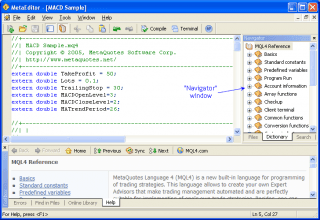
MetaTrader 4 comes with a component called MetaEditor that enables you to write your own MQL scripts for use with the software. All MQL scripts are open-source, which means that you can pretty much take any script that already exists and customize it to your own needs, rather than building one from scratch. It’s not the easiest thing in the world to do, but if you are confident with things like HTML then it isn’t really any trickier than that to write or customize your own scripts. On the other hand, writing one that actually makes you money – that’s the really tricky part!
That’s all for today. Tomorrow, we’ll be taking you through the installation process to ensure that the software is properly set up before we start making any trades…
Part 2 – Installation Guide
Part 3 – The Home Screen
Part 4 – Placing Trade Orders


