
Trader Education, Trading Strategies & Tech
Guide to MetaTrader Part 5 – Expert Advisors, Scripts, and Custom Indicators
30 Apr 2013

In the fifth installment of our Guide to Metatrader, we’ll be taking a look at the MQL4 programming language, and the Expert Advisors, Scripts, and Indicators that it can be used to create. If the thought of having to write a computer program brings you out in a cold sweat, don’t worry – there’s already plenty of free programs out there available for free. In fact, the availability of these is probably the main reason for the popularity of MT4.
Expert Advisors, Scripts, and Custom Indicators are enhancements for MetaTrader that are written in a proprietary programming language called MQL4 (MetaQuotes Language 4). These can be used to automate trades, perform one-off tasks, or help you to perform technical analysis. For example, you might write a script that enabled you to place simultaneous buy and sell orders in an attempt to capture a breakout.
If you’re feeling confident in your programming abilities, you can use MT4’s ‘MetaEditor’ feature to write your own custom strategies and indicators in the MQL4 programming language. To open the programming environment, click on the ‘MetaEditor’ icon in the toolbar or click on ‘Tools’ and select ‘MetaQuotes Language Editor’.
As programming languages go, MQL4 isn’t the most complex, but it is sufficiently so that it would require an entire series all to itself just to explain the basics. If you want to learn more about it, click the ‘Help’ button in the ‘MetaEditor’ window and select one of the sub-headings under ‘MQL4 Community’. Here you can find links to the MQL4 website, articles, books, documentation, the code base, and a dedicated user forum.
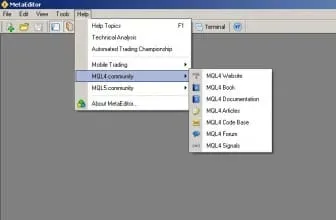
The forum is perhaps the best way to find out solutions for any specific problems you might be having with using or writing Expert Advisors, Scripts, or Indicators. It’s a very active and knowledgeable community, and there are always people that are willing to contribute advice.
The ‘MQL4 Code Base’ is a massive online library of free EAs that have been written by members of the community. Each entry comes with a description of the code in terms of its purpose and application. You don’t need to know how MQL4 works in order to download and use these, and there are now so many available that you should be able to find something that does what you want, even if it seems quite obscure. They are all open-source, so if you know a bit of MQL4 you can adapt them to your own specific needs.
As well as the help menu in the MetaEditor window, you can find more information about creating and using EAs, Scripts, and Custom Indicators in the MT4 User Guide. This can be located by clicking ‘Help’ in the MT4 window and selecting ‘Help Topics’.
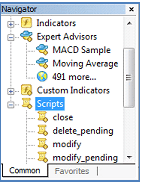
Once you have acquired or written a suitable program, you can attach it to any chart to perform a number of different functions, such as automating trades or providing technical analysis indicators. You can add EAs, Indicators, and Scripts, which are programs that perform a single action on request, to any chart by selecting the chart and double-clicking the program name in the ‘Navigator’ window, or by clicking and dragging it onto the desired chart.
Other articles in this series:
Part 1 – Introduction and FAQ
Part 2 – Installation Guide
Part 3 – The Home Screen
Part 4 – Placing Trade Orders


