
business resources
How Android Handheld Scanners Are Transforming Modern Business Operations
16 Oct 2026

As businesses manage growing product catalogs, faster fulfillment expectations, and increasingly complex inventory networks, accurate data collection has become essential to daily operations. From retail stockrooms to distribution centers, companies need reliable ways to identify products, update records, and coordinate workflows without relying entirely on manual data entry.
Modern operations often require more than barcode recognition alone. Employees may also need to access inventory applications, review product information, update records, and communicate with other team members while moving between workstations. Android handheld scanners address these requirements by combining barcode scanning capabilities with a mobile computing platform. For businesses seeking to streamline operational processes, these devices offer a practical way to bring data collection closer to where work happens.
Five Business Applications for Android Handheld Scanners
1. Warehouse Inventory Management
Warehouse teams must maintain accurate records of product quantities, storage locations, incoming stock, and outgoing shipments. Manual processes can become difficult to manage as the number of stock-keeping units (SKUs) increases or inventory moves across multiple storage areas.
Android handheld scanners can help employees capture product information directly at the point of activity. During receiving, a worker can scan a barcode to identify an item and verify it against a purchase order. During put-away, scanning can support location confirmation. When picking products for an order, workers can scan items to help verify that the correct products have been selected.
When connected to compatible warehouse management software, these workflows can reduce repetitive typing and help maintain more consistent records. For businesses operating several storage zones, mobile scanning can also support cycle counting. Instead of interrupting normal operations for a complete physical inventory, teams can count selected products or locations on a planned schedule and reconcile discrepancies through their inventory system.
The effectiveness of this approach depends on barcode quality, application configuration, network availability, and the accuracy of the underlying inventory records.
2. Retail Stock Control and Replenishment
Retail employees often divide their time between serving customers, replenishing shelves, receiving deliveries, and checking stock availability. When inventory information is outdated, staff may struggle to determine whether a product is available in the stockroom or needs to be reordered.
A mobile barcode scanning workflow can make routine stock checks more efficient. Employees can scan product labels, retrieve item information through a compatible application, and record stock movements without repeatedly returning to a fixed workstation.
Retailers may also use mobile scanners for shelf replenishment, price verification, stock transfers, and inventory audits. These applications are particularly relevant to businesses with large product ranges or multiple storage locations.
For stores that support both in-person and online sales, accurate inventory data can help teams coordinate available stock across sales channels. However, real-time visibility requires appropriate software integration; the scanner itself does not automatically synchronize every inventory system.
3. E-Commerce Order Picking and Fulfillment
Online retailers face pressure to process orders accurately while meeting shipping deadlines. Picking errors can lead to incorrect deliveries, additional shipping costs, returns, and customer service workload.
Barcode scanning can introduce verification steps at key points in the fulfillment process. A worker may scan a product when picking it from a shelf, confirm the item against an order, and scan it again during packing if the workflow requires a second check.
Android handheld scanners can support these steps through compatible order management, warehouse management, or fulfillment applications. Because the device can also display instructions and product details, employees may have access to more information than a basic scanner provides.
For growing e-commerce businesses, mobile scanning can help standardize procedures across employees and shifts. It can also support more structured training by guiding workers through consistent scanning and confirmation steps.
The greatest benefits are typically achieved when scanning procedures are designed around actual fulfillment requirements rather than adding unnecessary scans to every task.
4. Logistics, Shipping, and Receiving
Logistics operations depend on accurate identification as goods move between suppliers, warehouses, carriers, and delivery destinations. Missing or incorrect information can complicate receiving, shipment verification, and exception handling.
Mobile scanning allows employees to capture barcode data at different checkpoints. For example, receiving teams can verify incoming cartons, warehouse staff can confirm staging locations, and dispatch teams can check items before loading.
When integrated with a suitable transportation or warehouse management platform, these records can improve traceability and help teams investigate discrepancies.
Android-based devices may also support workflows that combine scanning with forms, photographs, notes, or other data captured through compatible applications. This can be useful when a shipment arrives damaged, or a delivery requires additional documentation.
Before deployment, logistics businesses should evaluate wireless coverage, device durability, scanning performance, and compatibility with their existing systems. Operations that take place in cold storage, dusty warehouses, or demanding industrial environments may require additional attention to environmental specifications.
5. Asset Tracking and Equipment Management
Businesses often manage equipment that moves between departments, employees, offices, or job sites. Without consistent identification procedures, it can be difficult to establish where an asset is located, who is responsible for it, or when it was last inspected.
Barcode labels provide a straightforward identification method for many types of business assets. An Android handheld scanner can help employees record equipment checkouts, confirm asset locations, and conduct periodic audits through compatible asset management software.
Applications may include tracking tools in manufacturing facilities, IT equipment in offices, reusable containers in distribution centers, and supplies used by field service teams.
By standardizing how assets are scanned and recorded, organizations can improve record consistency and make routine audits easier to manage. The value of the system depends on maintaining readable labels, assigning unique identifiers where appropriate, and keeping asset records up to date.
Choosing the Right Android Handheld Scanner for Your Business
Not every business needs the same scanning device. A small retail operation may prioritize portability and straightforward application access, while a high-volume warehouse may place greater emphasis on scanning ergonomics, connectivity, and performance during long shifts.
Several factors deserve consideration before purchasing a device.
Operating system and software compatibility: Confirm that the scanner supports the business applications employees need. Android version, application permissions, security updates, and compatibility with existing systems should be reviewed before deployment.
Barcode requirements: Identify the barcode formats used in daily operations. Businesses may need support for both one-dimensional barcodes and two-dimensional codes, depending on their products, labels, and workflows.
Connectivity: Wi-Fi and other supported connection options affect how devices communicate with business systems. Evaluate coverage throughout the work area and determine whether any processes must continue when connectivity is interrupted.
Ergonomics and scanning frequency: Employees who scan hundreds or thousands of items during a shift may benefit from a form factor designed for their working style. Grip design, weight, screen visibility, and trigger placement can influence comfort and productivity.
Battery and durability: Consider expected shift length, charging arrangements, drop exposure, and environmental conditions. Check the manufacturer's specifications rather than assuming that all mobile scanners offer the same protection or endurance.
Total cost of ownership: Purchase price is only one part of the investment. Software licensing, accessories, maintenance, staff training, replacement devices, and integration costs may also affect long-term value.
MUNBYN Android Scanners for Different Operational Needs
Businesses exploring mobile barcode data collection can consider MUNBYN's range of Android scanning devices, which includes options for different workflows and handling preferences.
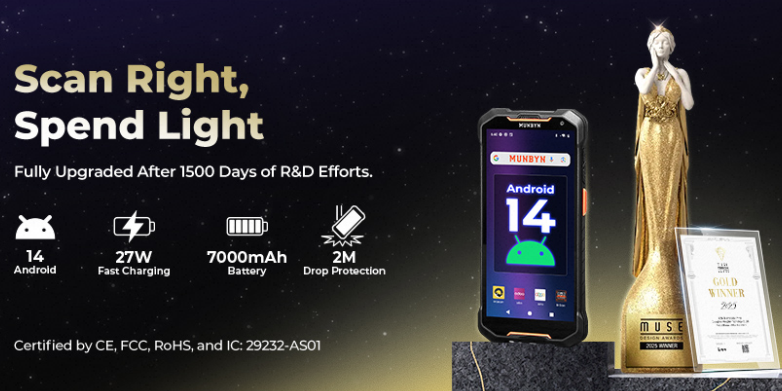
The MUNBYN AS01P barcode scanner is an option for organizations evaluating Android-based barcode scanning for inventory, retail, and operational data collection. Its product offering is built around Android 14, making operating system and application compatibility important considerations for businesses planning a deployment. Organizations can review the MUNBYN AS01P barcode scanner to assess its specifications against their application and scanning requirements.
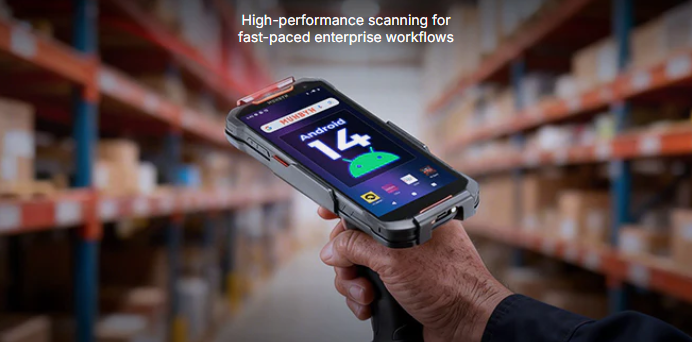
For workflows that involve frequent scanning and repetitive picking tasks, the MUNBYN IPDA101P mobile handheld scanner offers a pistol-grip form factor. This design may be worth evaluating for warehouse picking, stock verification, and other applications where workers repeatedly capture barcode data throughout a shift. Businesses can review the MUNBYN IPDA101P mobile handheld scanner for detailed product specifications and suitability.
Base the choice on the work being performed, not brand or form factor alone. A practical evaluation can include testing the scanner with representative barcodes, running the intended business applications, checking wireless coverage, and collecting feedback from employees who will use the equipment daily.
Best Practices for Implementing Mobile Scanning
Introducing handheld scanners is most effective when supported by clear procedures and appropriate software. Start by identifying the operational problem, such as inventory discrepancies, picking errors, slow receiving, or inconsistent asset records. Establish baseline measurements before deployment so the business can evaluate whether the new workflow improves performance.
Next, standardize barcode formats and label placement where possible. Damaged, poorly printed, or inconsistently positioned labels can undermine scanning reliability regardless of device quality.
The business should also test its software integration before expanding deployment. Confirm how the system validates scanned information, where it stores records, how it handles exceptions, and what happens when the network is unavailable.
Finally, train employees on both the scanning device and the underlying business process. Clear instructions for correcting errors, handling damaged labels, and reporting device issues help ensure that mobile scanning supports reliable operations over time.
Conclusion
Android handheld scanners are becoming practical tools for businesses that need mobile access to barcode data and operational applications. From warehouse inventory and retail replenishment to e-commerce fulfillment, logistics, and asset tracking, they can help organizations standardize data collection and reduce reliance on manual entry.
For businesses considering an upgrade to mobile data collection, MUNBYN's Android barcode scanning range provides a starting point for comparing device formats and capabilities against real operational requirements. A focused pilot project can help determine whether a particular scanner is suitable before a wider rollout.
Share

Peyman Khosravani
Industry Expert & Contributor
Peyman Khosravani is a global blockchain and digital transformation expert with a passion for marketing, futuristic ideas, analytics insights, startup businesses, and effective communications. He has extensive experience in blockchain and DeFi projects and is committed to using technology to bring justice and fairness to society and promote freedom. Peyman has worked with international organisations to improve digital transformation strategies and data-gathering strategies that help identify customer touchpoints and sources of data that tell the story of what is happening. With his expertise in blockchain, digital transformation, marketing, analytics insights, startup businesses, and effective communications, Peyman is dedicated to helping businesses succeed in the digital age. He believes that technology can be used as a tool for positive change in the world.


