
business resources
How to Choose the Right Digital Signage Software for Your Business
02 Dec 2025

Picking digital signage software is a big choice that can shape your communication plan and day-to-day efficiency. With the market expected to reach $25 billion by 2029, digital signage has moved from a niche tool to a strong way to connect with employees, customers, and visitors. The number of options-from new startups to well-known platforms-can feel overwhelming.
By knowing your needs and checking a short list of key points, you can work through the options and find a system that fits current needs and can grow with you. For example, if you run a grocery store and want to improve the shopper experience and simplify promotions, choosing the right grocery store digital signage software is very important for success.
This guide makes the process clear. We’ll cover types of software, the features that matter most, security and costs, and a simple way to compare vendors so you can make an informed choice.
What Is Digital Signage Software and Why Does Your Business Need It?
Digital signage software, often called a Content Management System (CMS), is the control center for your screens. It powers the messages, images, and videos you see in stores, offices, schools, and more.
With it, you can manage, display, and schedule content across many screens, turning static signs into an engaging, interactive experience. In short, it runs the flow of information so the right message reaches the right people at the right time.
Businesses use digital signage software because it improves communication. Unlike posters or other static media, it offers great flexibility and impact. You can share real-time updates, eye-catching visuals, and interactive content that grabs attention and explains information clearly.
From automating tasks to personalizing customer touchpoints, digital signage software is a practical way to connect with people inside and outside your organization.
Key Benefits for Businesses
- More engagement: Promotions, company news, and wayfinding maps are more effective on screens than on static signs. This can lead to more foot traffic, better conversion rates, and stronger brand loyalty.
- Smoother communication: Remote content management lets you update displays from anywhere with internet access, keeping messages current and consistent across locations.
- Data and insight: Analytics and reports show content performance, audience interaction, and screen uptime, helping you fine-tune your messaging over time.
What Types of Digital Signage Software Are Available?
There are many software options, each with different strengths for different needs. Knowing the main types helps you pick a platform that fits your setup and goals.
Cloud-Based vs On-Premise Solutions
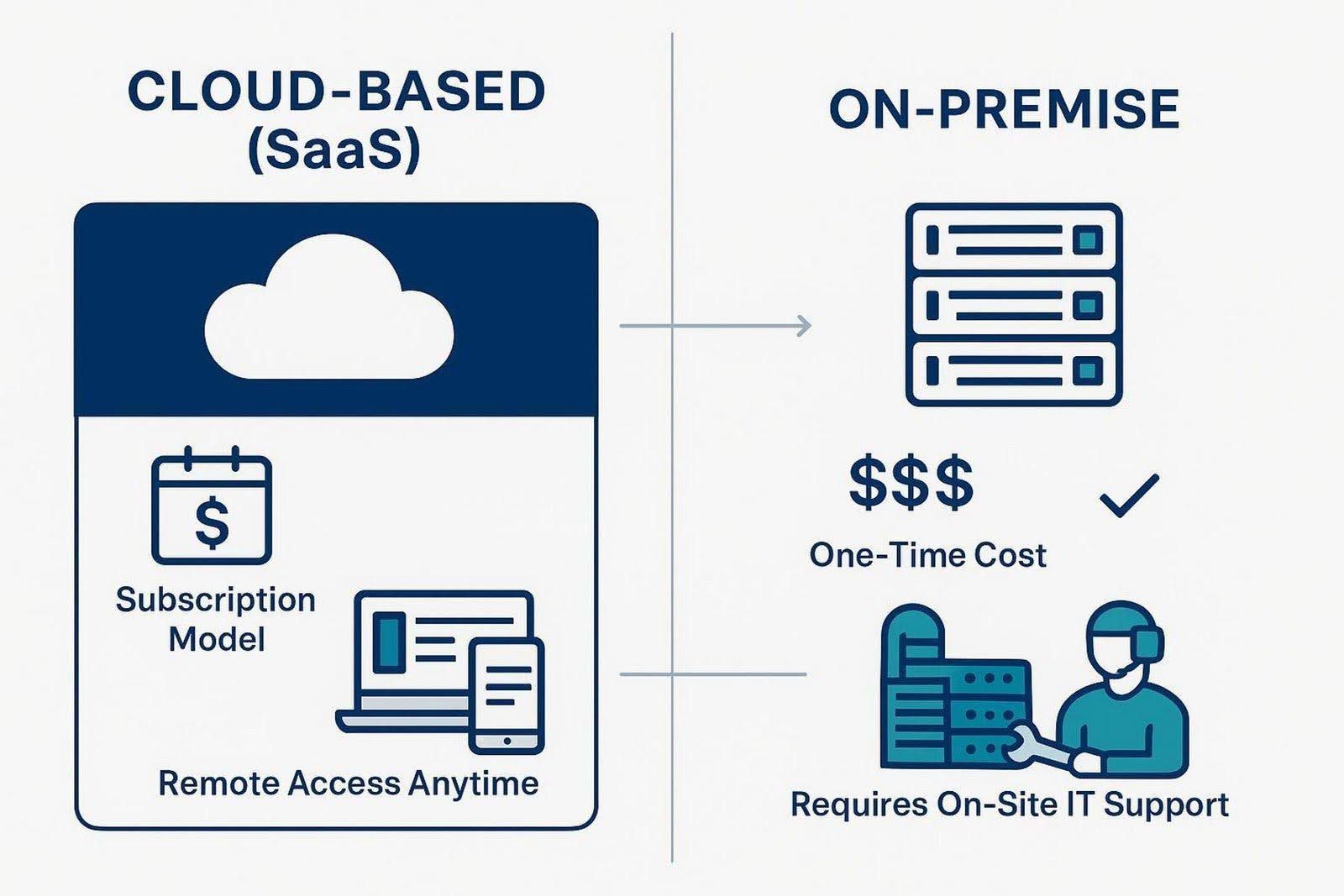
One major choice is where the software runs: in your own environment (on-premise) or in the cloud (SaaS). On-premise systems run on your servers and are managed by your IT team, which gives you maximum control but requires higher upfront costs and ongoing upkeep.
Cloud-based (SaaS) systems are popular, especially for small and midsize teams, because they are flexible and easy to scale. Scheduling, monitoring, and updates run on a cloud server, and pricing is usually a monthly fee per device. Remote access is built in, so you can manage screens from almost any device, including a phone.
Option | Costs | Control & Maintenance | Access | Good Fit For |
| On-Premise | Higher upfront; ongoing IT costs | You manage servers and updates | Local network; remote access needs setup | Teams with strong IT resources |
| Cloud (SaaS) | Monthly/annual per device | Vendor manages platform | Anywhere with internet | Most businesses that want easy scaling |
Integration with Existing Hardware and Systems
It’s important that your CMS works well with your displays, media players, and other tools you already use. Not all hardware works with all software, so make sure your choice fits your setup. Solutions like Look Digital Signage are designed to integrate smoothly with a wide range of devices, which helps avoid compatibility issues.
For real-time data and automation, look for a CMS with an API. An API lets systems talk to each other. For example, you can show manufacturing KPIs on screens as they update, or connect to your POS to change menu boards automatically. You can also automate calendars or social feeds. Strong integration—something platforms such as Look Digital Signage support—opens more content options and reduces manual work.
Compatibility with Different Operating Systems
Check which operating systems the software supports (Windows, Android, or others). If you already use a specific OS, pick a platform that supports it. Some tools are hardware-agnostic, which gives you more freedom and can lower costs by reusing what you have. This helps you avoid compatibility headaches and makes rollout smoother.
Which Features Should You Prioritize in Digital Signage Software?
The best choice is the one that meets your goals, not the one with the longest feature list. Define what you want your screens to do, then focus on the features that matter to your business.
User-Friendly Content Management and Scheduling
Ease of use is often the most important feature. A tool can be powerful but still slow you down if it’s hard to use. Look for a simple interface, drag-and-drop editing, and ready-made templates so anyone on your team can build good-looking layouts. Strong scheduling tools let you run different messages by time of day or day of week, so content stays timely and relevant.
Support for Diverse Content Types and Formats
Your CMS should handle the content you want to show: images, videos, animations, HTML5, RSS/MRSS, and live info like weather, traffic, or social feeds. If you use high-res screens, you may want 4K support. Interactive elements and real-time data can increase impact and keep content useful for different audiences.
Scalability for Multi-Screen and Multi-Location Management
Plan for growth. A scalable platform lets you start small and add screens or locations without a major rebuild. A strong CMS gives you central control over layouts, schedules, and branding across all displays, whether in one building or across many sites. Planning ahead helps you avoid costly changes later.
Remote Access and Real-Time Updates
Fast changes matter. Cloud systems let you update screens from anywhere with internet access. This is helpful for urgent notices, time-sensitive offers, or keeping content fresh without visiting each site. Real-time updates keep every display current.
Advanced Analytics and Performance Metrics
To get the most from your screens, you need to see what works. Built-in analytics can show playback data, audience interaction, and device health. Dashboards and reports help you spot winning messages and improve weaker ones so your content gets better over time.
User Permissions and Role Management
If many people contribute content, you need strong user roles and permissions. Give different access levels to different teams. For example, marketing can edit content, while a store manager can schedule approved items only. This protects your brand and prevents unauthorized changes.
Interactivity and Integration Capabilities
Decide if you want interactive features like touchscreens, QR codes, or simple personalization. Also, look for integrations with calendars, social media, POS, or internal databases to automate updates. Third-party integrations can expand what you can show and cut manual work.
Offline Playback and Content Backup
Internet outages happen. A good CMS plays cached content from the media player when the network drops, so your screens don’t go blank. Also, automatic backups (for example, daily to secure cloud storage) are important to protect layouts and media from loss or hardware problems.
What Are the Key Security and Reliability Considerations?
Cyber risks are rising, so you need strong protection for your content, network, and any customer data. Treat your digital system with the same care as your physical store or office.
Data Protection and Access Controls
- Data protection: Pick software that follows strong security standards and privacy rules, such as ISO 27701. This matters even more in government, healthcare, and large enterprises that handle sensitive data.
- Access controls: Use detailed user roles and permissions so only approved people can edit or publish. Ask vendors about their security audits and update schedule to stay ahead of new threats.
System Uptime and Technical Support
Your screens need to stay on and working. Downtime hurts communication and can hurt sales or operations. Good providers aim to keep outages to a minimum and should be open about their reliability history.
Support matters too. Even the best software can run into issues. Ask about support channels (phone, chat, email), hours (24/7 or business hours), response times, and on-site help options. A vendor with strong training, useful guides, and quick support can make rollout and day-to-day work much smoother.
How Do You Evaluate Costs and Plan Your Budget for Digital Signage Software?
Look beyond the sticker price. Think about total cost over time and how the payment model fits your budget. Different pricing setups can fit different needs.
Upfront Costs vs Ongoing Fees
On-premise tools usually have higher upfront costs for licenses, servers, and installation. They can work well if you prefer a capital expense model, but they still need ongoing maintenance, updates, and IT time.
Cloud (SaaS) tools usually charge a monthly fee per device, similar to a phone plan. Setup costs are often lower. Some offer a free tier with paid upgrades, while open-source options may charge for support and updates and often have fewer features. Pick the model that fits your accounting and cash flow.
Licensing Models and Subscription Options
Look closely at how plans are structured. Some vendors have tiers based on number of screens, features, or storage. Others have enterprise plans for larger needs. Clarify what each tier includes-support, updates, advanced features-so there are no surprise costs later. Many vendors can quote software and maintenance even if you bring your own hardware to lower spend.
Evaluating Return on Investment (ROI)
Your spend should pay off. Some gains are easy to track, like higher sales from promotions, or lower printing costs. Others are less direct, like better brand perception, clearer internal communication, or smoother customer visits.
Set clear goals and decide how you will measure them. Do you want better-informed staff? Fewer lost visitors? More clicks or redemptions on promotions? Track these metrics to see if the software meets your goals. A simple cost review that weighs your resources, the vendor’s services, and expected results will point you to the best path.
How Should You Evaluate and Select a Vendor?
Choosing a vendor is like starting a long-term partnership. Success depends on both the software and the company behind it. Do solid research and compare carefully to find the right fit.
Understanding Provider Reputation and Customer Support
Reputation matters. Look for providers with a strong history and positive feedback. Check industry coverage, thought leadership, blogs, white papers, and case studies to see their focus and depth.
Support is a big factor. Ask about support hours, response times, and contact options (phone, email, chat). See if they provide on-site help or detailed help pages. A vendor with solid training and fast, knowledgeable support will help with issues and content best practices.
References, Case Studies, and User Reviews
Ask for references, ideally from businesses similar to yours. Talk to current customers about setup, ease of use, and support quality. Their real-world feedback is valuable.
Also review case studies and third-party reviews. Case studies show how the software solved specific problems. Independent reviews give a broader view of product performance, service, and value. Use both to gauge fit and quality.
What Questions Should You Ask Before Making a Decision?
Before you sign, ask direct questions that match your goals with the vendor’s strengths. This helps set clear expectations and avoids surprises.
Defining Your Digital Signage Goals
Be clear about your purpose. Why do you want digital signage? Are you sharing product launches, internal KPIs, event info, or wayfinding? Without a clear plan, you might buy an overbuilt CMS and use only a small part of it-or pick a system that doesn’t match your needs. Your goals should guide every choice.
Identifying Must-Have Features for Your Business
Turn your goals into must-have features. Be specific. A restaurant might need POS integration for live menus. An office might need advanced scheduling for room signs and internal updates. Decide how much content you will create, what it should look like, and what formats you need (4K, social, HTML5). Clear requirements help you ignore extras you won’t use.
Planning for Scalability and Future Growth
Ask, “Can this software grow with my business?” You might start small, then add screens, locations, or content types. Check if the platform can handle that without a full rebuild. Planning for growth helps keep your investment useful as your needs change.
Getting Started with the Right Digital Signage Software
Picking the software is step one. Setup and ongoing work decide long-term results and ROI. A clear plan and the right training will bring your screens to life.
Next Steps for Implementation
After you choose a platform, set up the software, configure displays, and connect any third-party tools. Many vendors help with setup-from guided onboarding to full installation. Use the training they offer so your “Digital Signage Champion” and key staff can run the CMS well. This early training is important for a smooth rollout. Include all stakeholders from the start and share updates so everyone moves in the same direction.
Tips for Successful Deployment and Management
- Assign ownership: Pick a person or team to manage content so it stays fresh, accurate, and useful.
- Set a content plan: Define goals, tone, update frequency, and an approval flow. A simple content calendar helps.
- Track performance: Use analytics to see which messages work best and when your audience is most active. Test formats and layouts to improve results.
- Work together: Invite ideas from different departments so screens support many internal and external needs.
With steady management and clear goals, your screens can become a strong asset that drives engagement, improves communication, and supports growth and profit.


