


business resources
How to Measure the ROI of AI-Powered Office Software: A Framework for Business Leaders
24 Sept 2026

Business leaders are spending more on AI than ever, yet most cannot prove what they get back. McKinsey's 2025 State of AI found that 88 percent of organizations use AI in at least one business function, but only 7 percent have scaled it across the enterprise, and more than 80 percent have not yet seen a measurable EBIT impact from generative AI. The picture is even sharper for AI-powered office software, the assistants embedded inside your document, spreadsheet, presentation, and email tools. Unlike a custom model with a named project and a visible deliverable, an embedded assistant produces no standalone output. It quietly saves minutes here and there across every desk, which makes it easy to feel expensive and hard to prove valuable.
Independent research confirms the risk. A joint survey by SAP and Oxford found the average enterprise spends about $38 million on AI but captures only roughly $9.9 million in tangible financial benefit, a return of about 25 percent, which is why the TBM Council frames AI spend as a capital-allocation decision that must be engineered backward from a specific business outcome. For leaders of small and mid-size teams without that scale of spend, the same principle applies: measure against a workflow, not against excitement.
That gap is a decision problem, not a technology problem. When budgets tighten, leaders renew, expand, or cut software based on evidence. This guide gives you a practical framework to measure the ROI of AI-powered office software, built around four steps: set a baseline, count the real cost, track only the metrics that convert to money, and attribute the result honestly. The output is a defensible number you can bring to a finance review and a clear rule for what to do next.
Why the ROI of AI-Powered Office Software Is So Hard to Measure
A customer-support chatbot has a measurable outcome: tickets closed per hour. A fraud model has losses avoided. AI-powered office software has none of these, because its value shows up inside other work. An assistant that drafts a memo, summarizes a report, or generates a slide does not create a new line of revenue. It changes how quickly and how well existing work gets done.
Three structural reasons make office-suite AI harder to value than bespoke AI projects. First, the value is embedded, so there is no obvious unit of AI output to count. Second, time saved does not automatically become money; a team that finishes its emails ten minutes earlier only creates value if those minutes go to productive work. Research on this is blunt about the disconnect, which some call the super-user paradox: individual users get dramatically faster while the company still reports little aggregate return. Third, the true cost is wider than the subscription, once you add rollout, training, governance, and seats nobody actually uses. Each of these is fixable, but only if you measure deliberately from day one.
A good framework does not need to be perfect. It needs to be consistent, because a rough number that holds up beats a precise one you cannot defend.
Step 1: Build a Baseline Before You Judge the Tool
You cannot measure an improvement without knowing the starting point. Before an AI assistant ships to a team, record what work looks like today. For each task the tool is meant to speed up, capture three things: how long it takes, how often it needs a rework or correction, and how many of the team's hours actually go to that task in a typical week.
The simplest way is a two-week observation period. Ask the team to log the time they spend on writing, data cleaning, slide building, PDF processing, and email drafting using a shared tracker or a time-tracking add-in. You are not running a study; you are establishing a reference point. The same baseline gives you a second benefit, a pre-AI sample you can compare against after rollout, which is the foundation of honest attribution later. No baseline means every ROI claim is anecdote.
Step 2: Count the Real Cost, Not Just the Monthly Fee
The most common mistake in software ROI is comparing a small visible price against a large fuzzy benefit. The cost side of AI office software is wider than the license, and every omitted line inflates your return. Capture the full picture across these categories.
| Cost category | What it includes | Why leaders miss it |
| Licensing and seats | Subscription per active user per month or year | Paying for seats that employees never activate |
| Rollout and integration | IT setup, single sign-on, data security review, connectors | Treated as one-off and forgotten in ongoing ROI |
| Training and change | Tutorials, onboarding time, internal champions, support | Absorbed into everyone's calendar, never priced |
| Governance and policy | Usage policy, privacy review, data-handling rules | Invisible to the team buying the license |
| Repeated or unused spend | Duplicate tools, seats with zero logins after 90 days | Hard to see without usage reports |
The discipline here is to attach a number to every row, even an estimate. When you later defend a renewal, a reviewer will accept a reasoned estimate far more readily than a blank cell. If a seat has seen no active use in the last 90 days, count it as cost, not capacity. One useful habit is to reconcile the headcount you pay for against the headcount that logs in, because under-adoption is the quietest cost in office-suite AI.
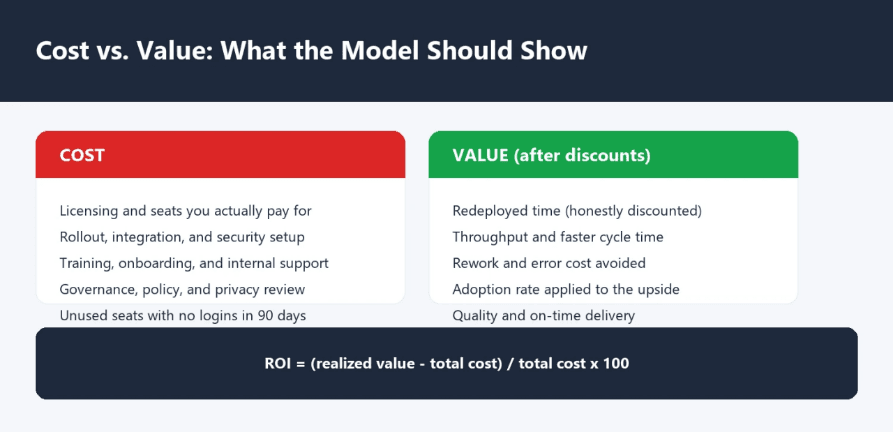
Price every cost line and discount every value stream before you compute the return.
Step 3: Track Only the Metrics That Convert to Money
Vanity metrics feel good and prove nothing. 'Sessions per user' and 'documents generated' describe activity, not value. The metrics that matter are the ones you can multiply by a price or a wage to get a financial figure. Choose a small set, ideally three to five, tied directly to a business goal such as cut costs, lift quality, or reduce rework. The table below shows which metrics convert and how to price them.
| KPI | What to measure | How to convert it to money |
| Time saved and redeployed | Minutes per week per user on a target task | Hours saved x weighted loaded hourly cost x share of hours redeployed to productive work |
| Throughput or cycle time | Documents, reports, or analyses completed per period | Extra units x contribution or value per unit |
| Error and rework reduction | Corrections, rejected drafts, or compliance fixes before vs. after | Reworks avoided x average cost per rework |
| Adoption and engagement | Active users and meaningful use over 90 days | Adoption rate x potential full value, to discount the number you claim |
| Quality and turnaround | Time from request to done, on-time delivery rate | Faster delivery x contract value or customer impact |
The single most important discipline is the redeployment question. An hour saved only becomes money if it is reinvested in revenue work, used to raise throughput, or used to avoid a hire. If the time simply disappears, discount it hard. A practical way to value saved time is to multiply hours saved by the loaded hourly cost of the role, then apply an honest redeployment factor, typically 30 to 50 percent for a first-year estimate, because not every minute is reused.
Step 4: Attribute the Result Honestly
Attribution is where office-suite AI ROI falls apart. If you rolled out an assistant, hired new staff, and changed a process all in the same quarter, you cannot credit the AI with the whole improvement. Over-attributing is the fastest way to lose credibility in a finance review, and it is the reason so many internal AI business cases collapse under scrutiny.
Two techniques keep attribution defensible. First, use a staggered rollout: give one team the tool now and hold an equivalent team as a control for a defined period, then compare the two on the same KPIs. Second, measure the same team before and after while noting the other changes that happened in parallel. When you present the number, state the assumption explicitly: this gain is net of other changes, or this share of the gain is conservatively attributed to the assistant. A number that survives this honesty test is one you can renew with.
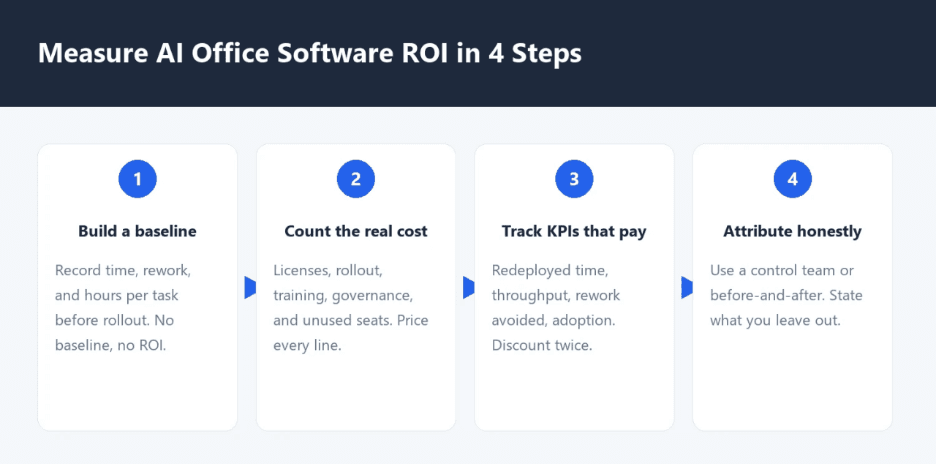
A four-step loop: baseline, cost, value, and honest attribution.
A Worked ROI Model You Can Fill In
Rather than memorize a formula, work through a concrete example. Assume a team of 50 knowledge workers adopts an AI office assistant at a subscription of $20 per user per month. Weekly, each employee saves about 1.5 hours on drafting, summarizing, and data cleanup tasks that are real parts of their job.
· Annual cost: 50 seats x $240 = $12,000 for licenses. Add $8,000 for rollout, training, and governance, for a total cost of $20,000 in year one.
· Time value: 1.5 hours x 48 working weeks = 72 hours per employee per year. At a loaded cost of $45 per hour, that is $3,240 of time per employee per year, or $162,000 across 50 people before any discount.
· Redeployment factor: assume 40 percent of the saved time is actually reinvested in productive work, so the realized value is $162,000 x 0.40 = $64,800.
· Adoption discount: if only 70 percent of seats are active, scale by 0.70, giving $45,360 of realized value.
· ROI: ($45,360 - $20,000) / $20,000 = 127 percent in year one, with upside as adoption improves.
You can adjust every number to your situation. The point of the model is not the precision of the example, it is the structure: every benefit is discounted twice, once for redeployment and once for adoption, and every cost line is visible. If your own numbers come out thin, the model has told you something useful long before you sit in a budget meeting. For teams that want a hands-on way to test these workflows with real documents, the AI tools in WPS Office let employees practice drafting, summarizing, and analysis in a daily work context before you commit to a larger spend.
From the Number to the Decision: Renew, Expand, or Cut
The whole point of a framework is a decision. Set thresholds before you measure, so you are not inventing the goal after you see the result. A common pattern is to test for 90 days, then decide.
| Outcome you observe | Likely signal | Recommended decision |
| Realized ROI clears your hurdle and adoption is above 70 percent | The tool is converting time into value | Renew and broaden to adjacent teams |
| ROI is positive but adoption is concentrated in a small group | You have champions but not scale | Invest in training and workflows, re-test before renewing |
| Costs are controlled but value is thin and seats go unused | The tool is not landing in this context | Cut unused seats, re-scope, or stop before the next renewal |
| Value is strong but governance risk is high | Benefit is real but exposure needs managing | Add policy and controls, keep the benefit |
Build the decision into a calendar. Review adoption at 30 days to catch rollout problems early, review realized value at 90 days for a first decision, and review again at the renewal date with a full year of data. Because office-suite AI touches every function, keep the finance and operations leads in the same room as the buying team. The wider context matters too: how AI fits the company's risk appetite is increasingly a boardroom issue rather than a technology one, and not every task should be handed to automation, as our analysis of business tasks companies should not fully automate explains.
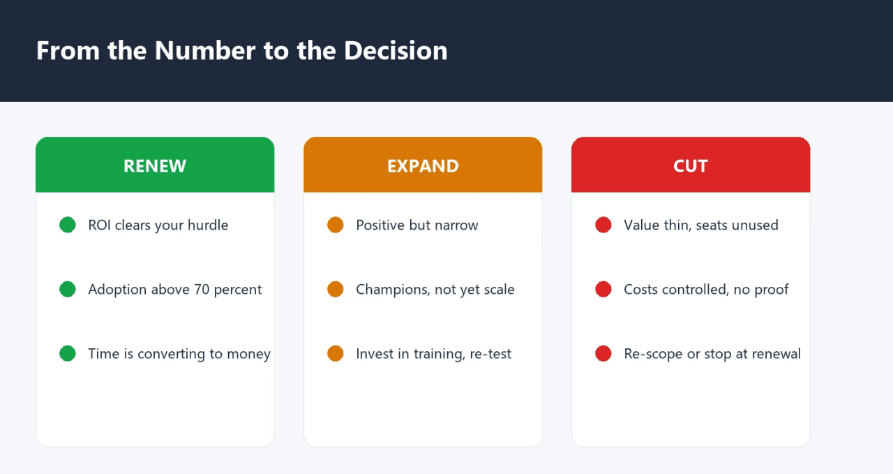
Renew, expand, or cut: choose based on evidence you can defend.
Common Mistakes That Inflate the Number
If a measured ROI looks suspiciously high, one of these mistakes is usually the cause.
· Crediting the AI with gains caused by other changes made in the same period.
· Valuing every hour saved while ignoring whether that time is actually redeployed.
· Omitting hidden costs such as training, governance, duplicate tools, and unused seats.
· Celebrating vanity metrics such as total documents generated instead of financial impact.
· Judging only the first month, before teams learn the tool and real usage patterns form.
Correct for these and the number becomes defensible, which is more valuable than impressive.
Frequently Asked Questions
What is a realistic ROI for AI-powered office software?
It varies widely by role and adoption. A defensible first-year result after discounting for redeployment and adoption is often in the tens of percent, with headroom as usage matures. Be suspicious of claims far above that from a pilot with only a few enthusiastic users.
How long should we measure before deciding on renewal?
Check adoption at 30 days, realized value at 90 days for a first decision, and revisit at the renewal date with a full year of data. Office software needs time for habits to form, so avoid judging on week one.
Do we need a control group for office-suite AI?
Not a formal study, but a staggered rollout gives you a practical comparison. Give one team the tool and hold an equivalent team back for a defined period, then compare them on the same KPIs. It is the cheapest way to avoid over-attribution.
How do we handle seats that go unused?
Reconcile the headcount you pay for against the headcount that logs in. If a seat has had no active use in 90 days, treat it as cost and either reassign, retrain, or remove it before renewal.
What if our ROI is negative but employees love the tool?
Separate sentiment from value. If adoption is high but financial return is thin, the problem is usually redeployment, not enthusiasm. Invest in redirecting saved time to productive work before you abandon the tool.
Final Thoughts
AI-powered office software is not a one-time purchase to be judged by faith. It is a recurring subscription that deserves the same scrutiny as any other line item. Set a baseline, count the full cost, track only the metrics that convert to money, and attribute the result honestly. The number you produce will be conservative, and that is exactly why it will survive a finance review. If you want to build measurement habits and workflows for your team before expanding spend, the free tutorials in WPS Academy cover the document, spreadsheet, and presentation skills that make the adoption side of ROI measurable in the first place. Decide on evidence, not enthusiasm, and you will know exactly what to renew.


