
business resources
Modernizing Mobile Apps Without Disrupting Existing Users
14 Aug 2026

Your app has three million users. Your codebase is five years old. Something has to give.
That’s the exact spot a lot of product teams find themselves in, the framework you built on feels dated. The design system needs a refresh. Half your engineers want to rewrite the networking layer. But you can’t just flip a switch. Real users, on real phones, are relying on that app to work tomorrow morning the same way it worked today. Modernizing it isn’t a technical problem so much as a trust problem. Get the rollout wrong, and you don’t just introduce bugs; you lose the users who were fine with the old version.
Picture the version of this that goes badly. A team spends six months rebuilding the app from the ground up, ships it to everyone at once on a Friday afternoon, and spends the weekend firefighting a crash spike nobody saw coming in testing. Now picture the version that goes well. Same rebuild, same ambition, but it rolls out in careful stages, catches its own mistakes early, and most users never even notice the app changed underneath them. The code was nearly identical in both stories. The rollout strategy is what separated them.
So how do the teams that pull this off actually do it? It starts with understanding something most roadmaps ignore: iOS and Android don’t age the same way.
iOS and Android: Two Very Different Update Realities
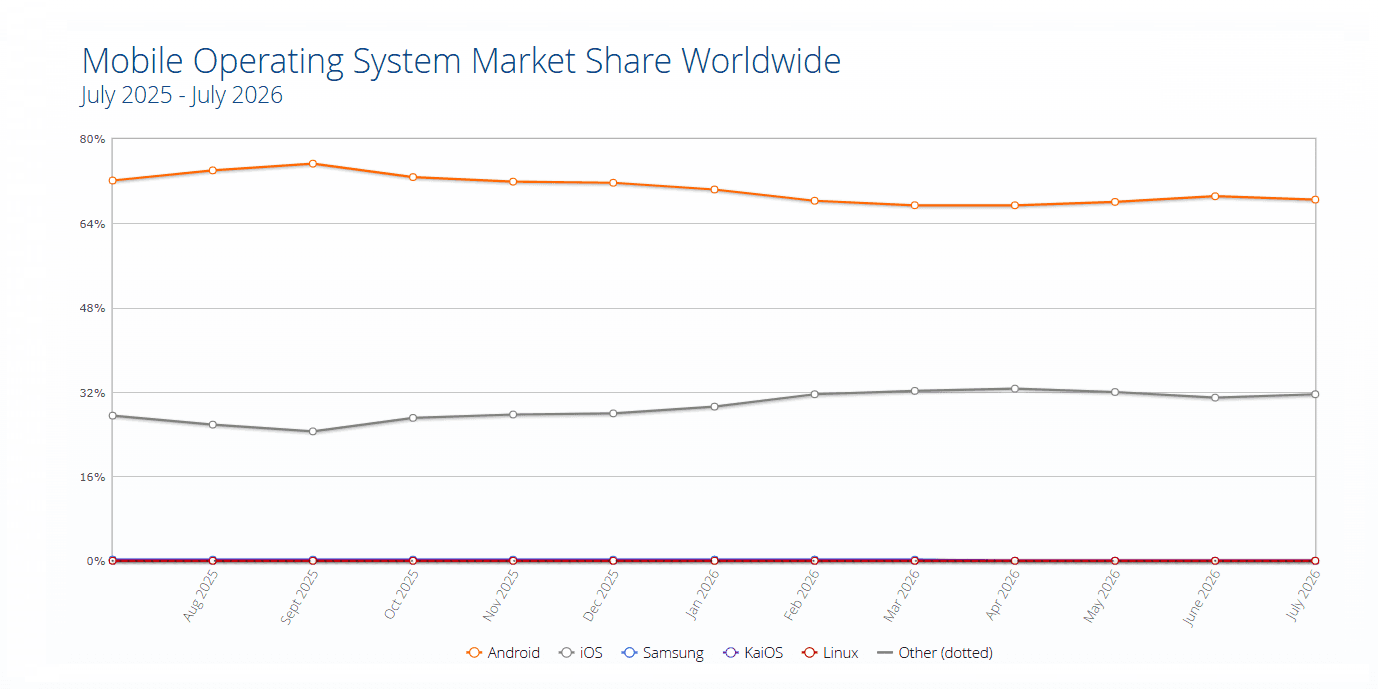
Here’s a question worth asking before you touch a single line of code: who’s actually still running your old app, and why?
iOS Moves Fast
Apple users update quickly. A new major iOS version often reaches somewhere in the high 60s to 80%-plus of active devices within just a few months, especially on newer hardware. This is a part of your user base moving to the new Operating System very quickly. This means you can increase the minimum supported iOS version faster than you think. You can get rid of old compatibility code sooner and use the new APIs without worrying that you are stopping a lot of your users from using your product. The new iOS version is being adopted by a lot of your users so you can focus on the features and not worry about the old ones.
Android Plays the Long Game
Android tells a different story. The newest version might sit at only 20 to 40% share for a long stretch, sometimes over a year. There’s a real, active tail of users still on OS versions from several years back, often because of device fragmentation, budget hardware, or carriers that never push updates through. If you modernize your Android app assuming everyone’s on the latest release, you’ll quietly cut off a chunk of real, paying users. Backward compatibility isn’t optional here. It’s a longer window than most teams plan for.
This isn’t a knock on Android users. It’s just the reality of a platform that runs on thousands of device models, from flagship phones released last month to budget devices that shipped years ago and still work fine for everyday use. Your modernization plan has to make room for that gap instead of pretending it doesn’t exist.
The practical takeaway: your iOS and Android modernization timelines shouldn’t match. iOS can move at the pace of your ambition. Android has to move at the pace of your actual install base.
The Smart Way to Ship: Dark Launches and Gradual Rollouts
Once you know who you’re building for, the next question is how you actually get new code in front of them without breaking anything. The answer isn’t a big-bang release. It’s a slow, careful ramp that gives you an exit at every step.
A pattern that works well in practice looks something like this:
• Ship the code dark. Merge it, deploy it, keep it flagged off. Nobody sees it yet, but it’s live and stable in production.
• Turn it on for your own team first. Internal users catch the obvious problems before a single customer does.
• Open it to 1 to 5% of production traffic. Small enough that a bad build barely registers, big enough to surface real-world edge cases.
• Ramp gradually: 10%, then 25%, then 50%, then everyone. At each step, watch crash rates, ANRs, and the business metrics that actually matter, not just whether the app technically works.
The app stores have basically built this workflow in for you. Apple’s phased release spreads a new build out over about a week, moving roughly from 1% to 2%, then 5%, 10%, 20%, 50%, and finally 100% of users. Google Play’s staged rollouts work similarly but let you set your own custom percentages at each stage, so you can move faster or slower depending on how nervous the release makes you.
None of this is about being overly cautious for its own sake. It’s about giving yourself a rollback button before you need it, instead of discovering you need one after a crash spike hits every user at once. A 1% rollout that goes wrong is a quiet fix. A 100% rollout that goes wrong is a headline in your app store reviews and a very long night for whoever’s on call.
Practical Rules for Modernizing Without Breaking Trust
A few habits make the difference between a smooth modernization and a support-ticket avalanche:
• Set your minimum OS versions separately for iOS and Android. Copying one platform’s policy onto the other is a common, avoidable mistake.
• Keep old and new code paths coexisting during the transition. Deleting legacy support the moment a new feature ships tends to backfire.
• Watch real user feedback, not just dashboards. A crash rate can look fine while your app store reviews quietly turn negative.
• Bring in extra hands for the heavy lifting. Plenty of teams choose to hire mobile app developers for the duration of a modernization push, so the core team can keep supporting existing users while someone else focuses on the rebuild.
That last point is worth sitting with for a second. Modernization work and day-to-day maintenance compete for the same engineers’ attention, and something usually loses. Having short-term support to hire mobile app developers for the migration means that your existing users will not notice the slowdown in your service while it is being rebuilt.
If you are trying to decide whether to do this yourself or get help from outside it's an idea to speak with a mobile app development company that has done old systems turned into new ones before. They have probably dealt with the situations that your group has not seen yet.
The Bottom Line
Modernizing a mobile app well isn’t about moving fast. It’s about moving in a way your users never notice. That means looking at iOS and Android as separate paths putting changes in the background before anyone notices and slowly rolling them out so issues can be found while they're still small. Do the timing ask for more help when the work is too much and the best sign you're doing well is quietness: no sudden increase in support requests, no negative comments, just an app that improved without anyone even realizing it as people kept using it the same way they always did.


