


business resources
SPF Lookup Tool Guide: Find And Fix Email Authentication Issues Fast
14 Jun 2026

The Sender Policy Framework (SPF) is an essential protocol that helps organizations verify the authenticity of email senders, thereby reducing the risk of email spoofing and bolstering overall email security. This mechanism is set up through a DNS TXT record, detailing which mail servers are authorized to send emails on behalf of a specific domain. This crucial step ensures that only verified senders can represent your brand, effectively enhancing defenses against threats like phishing and domain impersonation.
An spf lookup tool, often called an SPF Checker or SPF test tool, is an online resource that allows users to conduct real-time checks of SPF records for their domains. By performing a DNS lookup and analyzing the SPF record for a particular domain, these tools help verify the syntax of SPF records, identify configuration mistakes, and assess compliance with SPF standards. Popular tools like MXToolbox, EasyDMARC, and SuperTool are known for their reliable SPF record validation capabilities. Consistent monitoring and validation through these services are vital for maintaining your domain's reputation, ensuring adherence to SPF protocols, and safeguarding outbound emails against delivery issues.
SPF Lookup tools play a crucial role in email deliverability since email providers such as Google, Microsoft, Zoho Mail, and Verizon increasingly use SPF records to determine if incoming emails originate from trusted senders. Failure to manage SPF records properly could result in your emails being rejected or flagged as untrustworthy, which can drastically affect email traffic and your overall communication strategy.
How SPF Records Work: TXT Records, Sending Sources, and SPF Syntax
The Building Blocks of an SPF Record
An SPF record is created as a DNS TXT entry linked to your domain. This entry outlines specific SPF tags and mechanisms that dictate which IP address ranges or mail servers are authorized to send emails on behalf of the domain. To avoid SPF failures and guarantee effective email authentication, the record must adhere to the syntax guidelines set forth in RFC 7208.
Core Components of SPF Records
- Version Identifier (`v=spf1`): Marks the entry as an SPF record.
- IP Address Specifications (`ip4`, `ip6`): Indicate which IPv4 or IPv6 ranges are permitted to send emails on behalf of the domain.
- A and MX Records: Permit any IPs linked to the domain's A record or those from specified MX records to be recognized as legitimate senders.
- Include Statement: Allows permission for external email services (for example, "include:mailchimp.com") to send emails on your behalf.
- PTR Statement: An outdated method for reverse DNS verification, which is generally not recommended in modern SPF practices.
- All Statements (`~all`, `-all`, `+all`, `?all`): Defines the policy for treating unauthorized senders.
Example of an SPF Record:
`v=spf1 ip4:192.0.2.0/24 include:_spf.google.com -all`
This configuration permits the 192.0.2.0/24 block and any senders included in Google’s SPF framework while directing mail servers to dismiss emails from all other sources.
How Email Servers Validate SPF
When an email arrives, mail servers consult the DNS records associated with the sender's Return-Path domain to fetch the SPF record. They then verify the sending IP address against the authorized senders listed in that record. This SPF verification is essential for determining valid email origins, playing a crucial role in reducing the likelihood of email spoofing and fraudulent messages.
Step-by-Step: How to Run an SPF Lookup and Interpret the Results
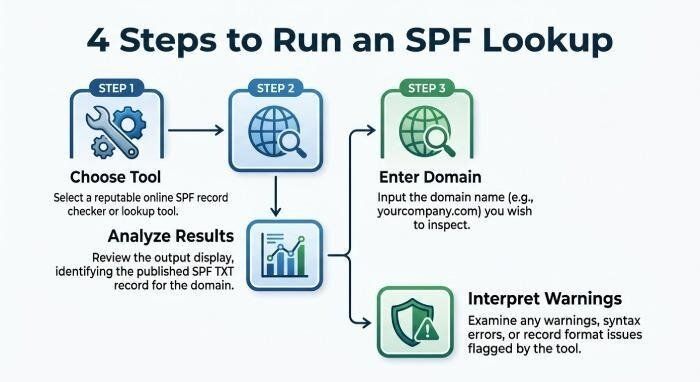
Step 1: Choose the Right SPF Diagnostic Tool
Start by choosing a trusted SPF Lookup or SPF Checker tool. Top options like MXToolbox, EasyDMARC, and SuperTool, as well as those highly rated on platforms like G2 Crowd, SourceForge, and Expert Insights, offer user-friendly designs, comprehensive diagnostics, and extra resources for SPF reporting and analyzing email traffic.
Step 2: Enter Your Domain Name
Enter your selected domain name into the SPF Lookup tool. This tool will perform a real-time DNS query to fetch the corresponding SPF record (TXT record) and analyze its SPF tags and format.
Step 3: Analyze SPF Record Check Results
The SPF diagnostic utility provides a detailed analysis of SPF records, which includes:
- The original SPF record string (like the contents of a TXT record)
- An overview of SPF validation (the status of the SPF record)
- Breakdown of all elements (mechanisms, allowed IP addresses, subnets, and include mechanisms)
- Results from the expanded SPF lookup tree, featuring all nested include references
Additionally, tools like SPF Record Checker or SPF Record Validator can identify syntax issues in SPF records, point out inactive or incorrectly set up subdomains, and indicate when SPF limits, such as the maximum of 10 DNS lookups, have been surpassed.
Step 4: Interpret and Act on SPF Validation Warnings
Identify potential issues in the diagnosis, including:
- Syntax mistakes (incorrect mechanisms, typographical errors in SPF tags, non-compliance with RFC 7208)
- Excessive DNS lookups (surpassing the 10-lookup limit)
- Usage of the outdated PTR mechanism
- Absence or contradictions in include mechanisms
- Missing authorized senders (neglecting third-party service IP addresses)
- SPF record status indicating “Softfail” or “Permfail”
Utilize the comprehensive diagnostics to prioritize SPF upkeep, ensuring effective email delivery and reinforcing security measures.
Common SPF Errors and How to Fix Them Fast
SPF Syntax Mistakes and Misconfigurations
Incorrect syntax in SPF records, including missing prefixes, conflicting tags, or incorrect qualifiers, often leads to SPF failures. Use an SPF Checker to verify syntax immediately and ensure it adheres to RFC 7208 standards.
Exceeding DNS Lookup Limits
SPF validators monitor the depth of the "SPF lookup tree." Each include, MX, and A record within the SPF record can trigger extra DNS lookups. If the total exceeds the 10-lookup limit, SPF validation can fail. Regularly review your SPF records, minimize unnecessary include statements, and streamline the list of authorized senders to enhance lookup efficiency.
Missing or Incorrect Authorized Senders
If your SPF record doesn't specifically include an IP address, subnet, or mail server used for sending outgoing emails, those emails could potentially fail SPF validation. This may lead mailbox providers to either reject them or route them to the spam folder. By regularly managing your SPF record, you can ensure that all authorized senders, such as partners or third-party services like Mailchimp, Google, or Microsoft, receive the necessary permissions.
Legacy or Deprecated Mechanisms
Modern SPF best practices discourage the use of PTR mechanisms because they depend on reverse DNS, which may be slow or unreliable. It's advisable to replace PTR mechanisms with specific IP addresses or utilize include tags that point to the appropriate TXT records.
Overly Permissive Policies
Employing permissive settings like `+all` may result in SPF failures, putting you at risk for reputation damage, email spoofing, and fraudulent email attacks. It's advisable to utilize `-all` (fail) or `~all` (softfail) to enforce strict controls and ensure SPF adherence.
SPF Lookup Best Practices for Ongoing Email Authentication Health
Routine SPF Record Check and Monitoring
Establish a routine for DNS lookups and SPF record verification, particularly following the integration of new outbound email services or major infrastructural updates. Keep an eye on SPF status and utilize top-tier tools such as EasyDMARC’s Delivery Center or the MXToolbox Network Tools to perform SPF validation.
Proactive SPF Record Management
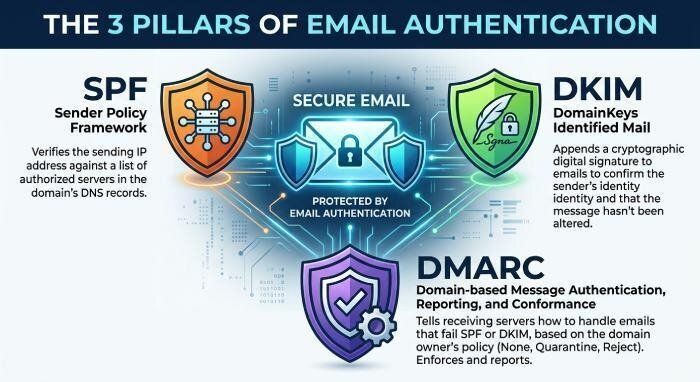
Maintain concise TXT records and avoid excessive nested include statements. Ensure that all authorized senders, along with their corresponding IP addresses or subnets, are clearly documented to facilitate transparency and simplify SPF risk evaluations. Utilize the reporting capabilities of sophisticated tools to monitor the results of authentication protocols and address any delivery issues. Combine DMARC and DKIM with SPF to create a comprehensive email authentication framework, following guidance from Expert Insights and RFC 7208.
Configuring SPF for Multiple Products and Services
When utilizing various outbound sending platforms like Google Workspace, Zoho Mail, or Microsoft Exchange, make sure to reference each third-party service with the correct include tags and follow the SPF syntax outlined in their documentation.
Automated SPF Monitoring and Alerting
Tools such as EasyDMARC, featuring its Email Health and Diagnostics components, offer automated oversight for alterations in SPF record statuses, blacklist entries, and delivery issues related to threats. Leverage this proactive capability to quickly identify SPF failures, respond promptly to these issues, and maintain ongoing protection against fraud.
Comprehensive Authentication and Reporting
Utilize SPF testing tools alongside DMARC forensic and aggregate reports to continuously monitor email traffic and authentication status. This comprehensive strategy for implementing, managing, and troubleshooting SPF records establishes a solid foundation for strong email security and fosters trust with both mailbox providers and users.
Incorporating an SPF Lookup tool into your overall SPF Best Practices plan allows your organization to attain outstanding SPF compliance, avoid expensive email authentication issues, and uphold top-tier domain reputation and fraud prevention measures.


