
business resources
Stellar Migrator for Exchange Review: Can It Really Deliver a Zero-Downtime Exchange to Microsoft 365 Migration?
07 Aug 2026

Moving mailboxes off an on-premises Exchange Server and onto Microsoft 365 is one of those projects every IT team eventually has to run, and almost none of them look forward to. The theory is simple: point the source at the destination, sync the data, and cut everyone over. In practice, DNS records lag, permissions don't map cleanly, large mailboxes stall mid-transfer, and a project that was supposed to take a weekend drags into a multi-week ticket queue.
Stellar Migrator for Exchange is one of a growing crop of purpose-built tools trying to close that gap — specifically the gap between “technically possible” and “actually zero downtime.” We spent time with the software, read through its documentation and workflow, and compared notes against other independent testers to see whether it holds up. Here’s what we found.
Why downtime is the metric that matters
It’s worth being precise about why “zero downtime” is the bar. An IBM Global Services study highlights that the average revenue cost of an unplanned application outage is over $400,000 per hour for large enterprises in any sector. Gartner, on the other hand, works it out to roughly $5,600 per minute, or around $336,000 per hour.
IT Intelligence Consulting’s 2024 downtime survey found that more than nine in ten mid-size and large enterprises estimate their own downtime costs above $300,000 an hour, with over 40% putting a serious outage between $1 million and $5 million an hour.
Email migrations are a common trigger for exactly this kind of outage, because they touch authentication, DNS, and data sync simultaneously. Besides delaying a project, a stalled batch or a botched MX cutover stops sales, support, and finance teams from communicating at all. That is what Stellar aims to solve.
What Stellar Migrator for Exchange actually Is
Stellar has been building data recovery and mailbox management software since 1993. Stellar Migrator for Exchange is dedicated answer to Exchange-to-Microsoft 365 migration.
Stellar Migrator for Exchange currently focuses on migrating essential mailbox data, including emails, calendars, contacts, and public folders. Support for additional Microsoft 365 workloads, including SharePoint and Teams, is also in the pipeline, with our R&D team actively working on these capabilities and a release planned soon.
As the software runs locally, migration performance can be optimized based on the available hardware and system configuration. This provides organizations with greater control over their migration environment, allowing them to scale resources according to the size and requirements of their migration project.
Who should use it
Exchange Migration tool is well suited for IT teams managing mailbox migrations ranging from small business projects to mid-market and larger environments. It is also a strong choice for Managed Service Providers (MSPs) handling migration projects for multiple clients.
The solution is particularly useful for Microsoft 365 tenant-to-tenant migrations, which are commonly required during mergers, acquisitions, organizational restructuring, or tenant consolidation. With features designed to simplify mailbox mapping, batch migration, scheduling, and incremental migration, IT teams and MSPs can streamline the migration process without relying heavily on complex PowerShell scripts or lengthy manual processes.
For large-scale enterprise migrations involving thousands or even tens of thousands of mailboxes, migration performance can be optimized according to the available hardware, network bandwidth, and system configuration. This gives IT teams flexibility to provision resources based on the scale of the project and efficiently manage migration workloads.
Setting up: What the workflow looks like
The setup process is designed to be something a generalist IT admin can complete without deep Exchange certification, and in practice it holds to that promise. After installing and licensing the software, you connect it to your source environment and your destination Microsoft 365 tenant using admin credentials — for tenant-to-tenant jobs, the software can even auto-generate the required Entra ID app registration itself, rather than making you configure API permissions by hand.
Here's the full sequence, step by step, for an Exchange Server to Microsoft 365 job:
1. Download the software. After registering for the free trial, you get an email with a download link for the desktop installer and access details for Stellar's Licensing Portal.
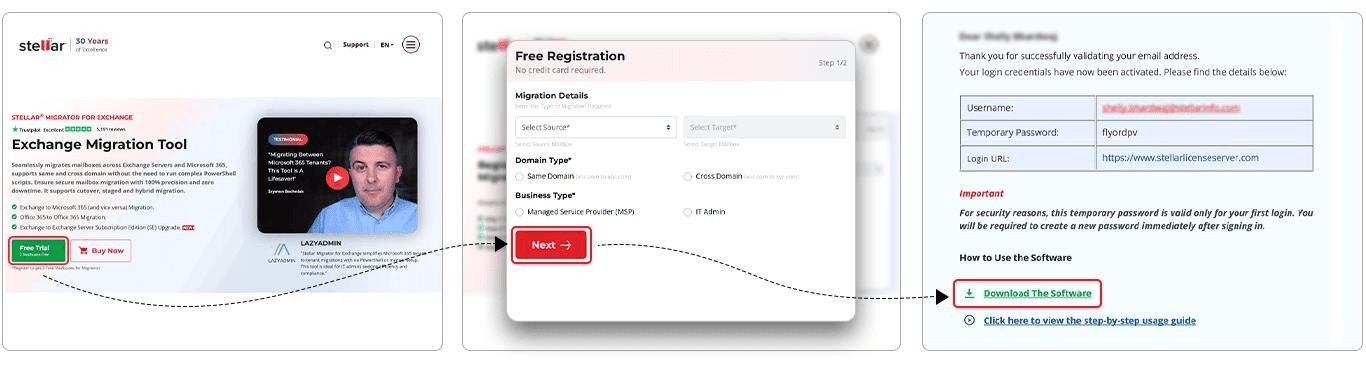
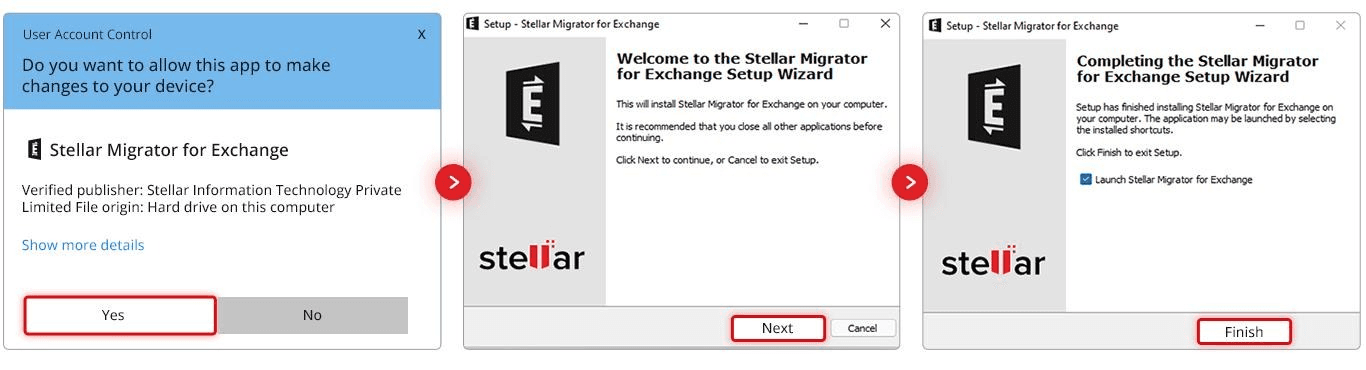
2. Install it. Run the installer and follow the wizard. No extra configuration is needed afterward — you're ready to create your first job using the two free mailbox credits.
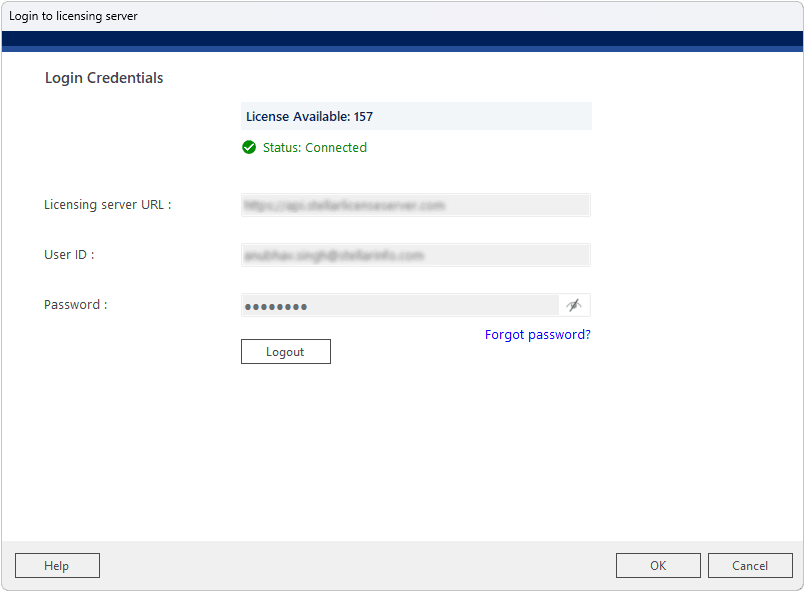
3. Log in to the Licensing Server. The tool prompts for your registered credentials against a pre-filled licensing URL. A green “Connected” status confirms authentication before you continue.
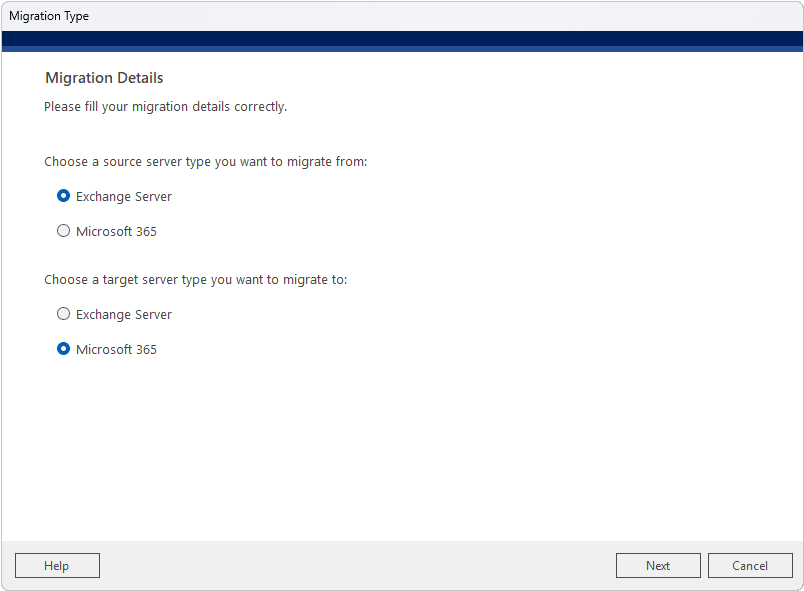
4. Choose the migration type. Pick the source and target platform for this job — in this walkthrough, Exchange Server as source and Microsoft 365 as target.
5. Create the migration job. Name the job and choose which mailbox types to move (primary/shared, archive, public folders). You can import a pre-mapped CSV instead of relying on auto-mapping.
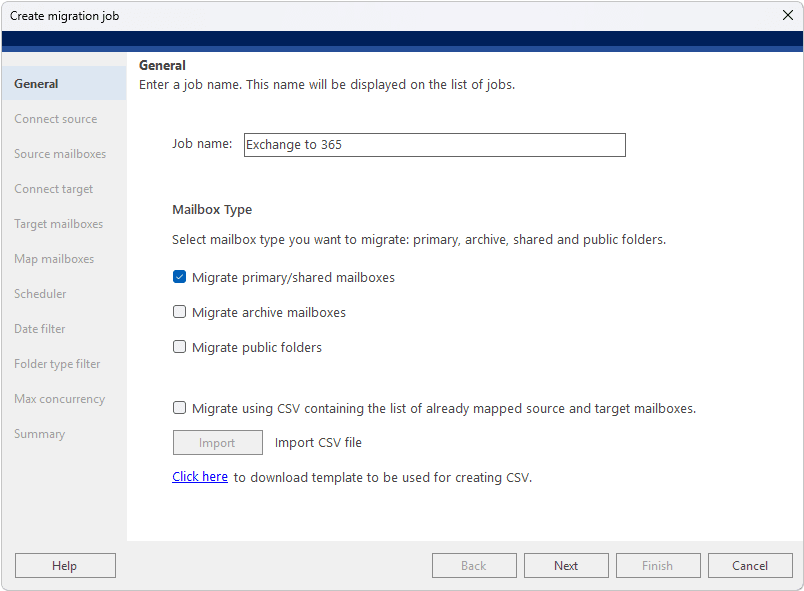
6. Connect the source. Point the tool at the Exchange environment. Autodiscover mode only needs an email and password; manual mode needs the server's IP or FQDN. Clicking Validate confirms the connection.
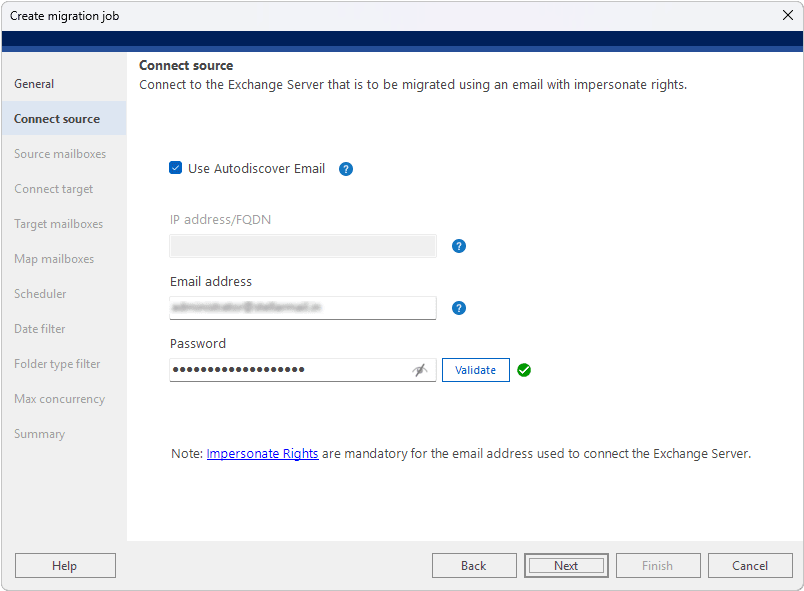
7. Review source mailboxes. Detected mailboxes appear in a list. For larger environments (100+ mailboxes), you can bulk-load them from a CSV instead.
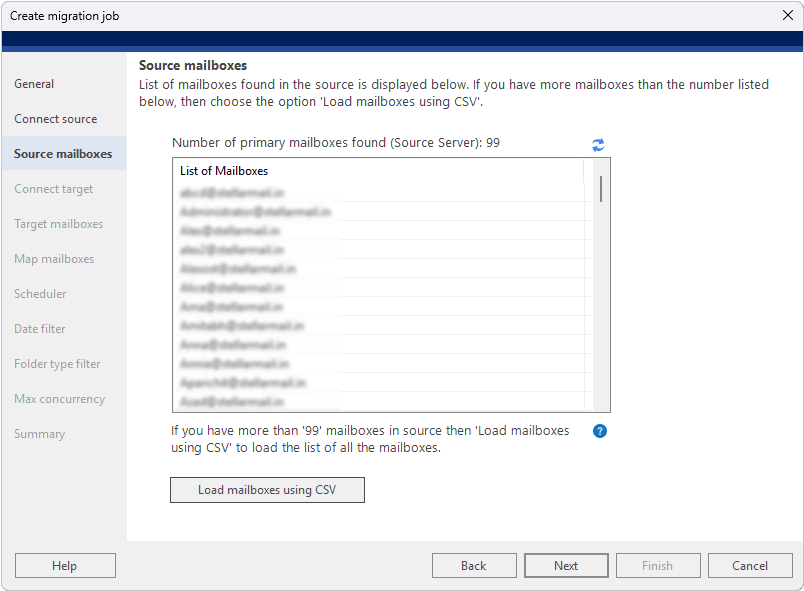
8. Connect the target. Choose Auto or Manual registration for the Microsoft 365 tenant. Auto registration signs in as a Global Admin and lets the tool register its own Azure AD app.
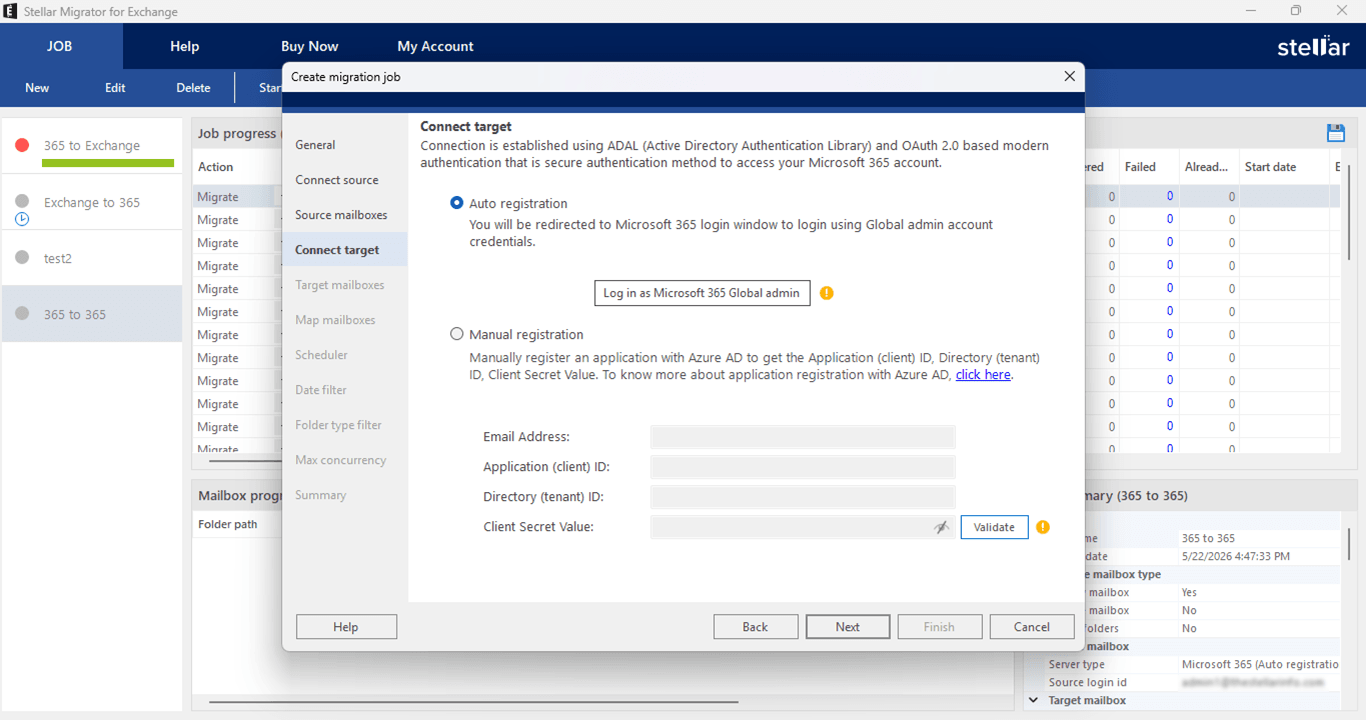
9. Watch the auto app registration. A live checklist confirms each setup step — Azure AD app registration, authentication, Exchange Web Services and Graph API connectivity — with green checkmarks.
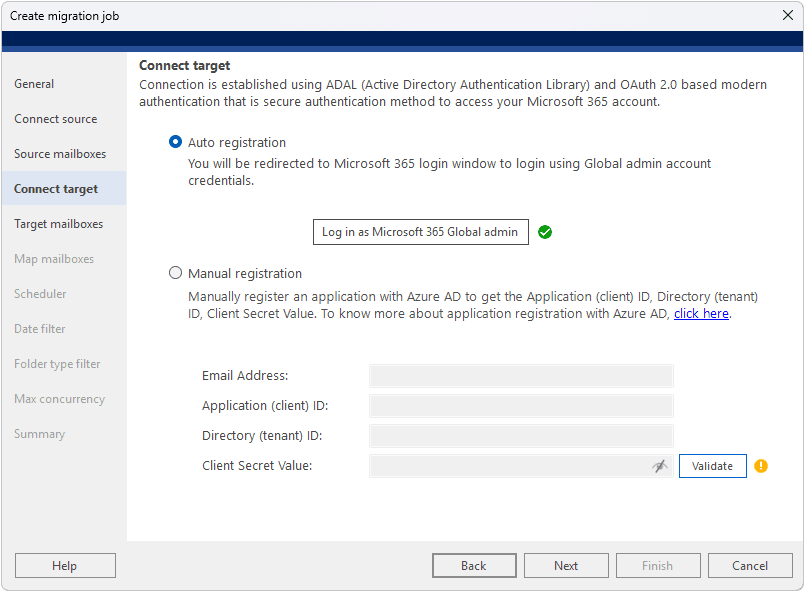
10. Review target mailboxes. Same as step 7, but for the destination tenant, with the same CSV bulk-load option if needed.
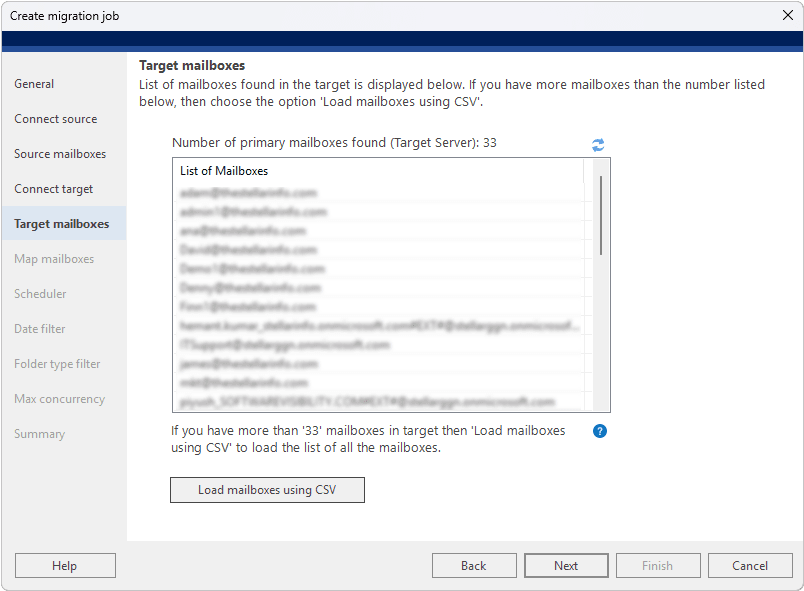
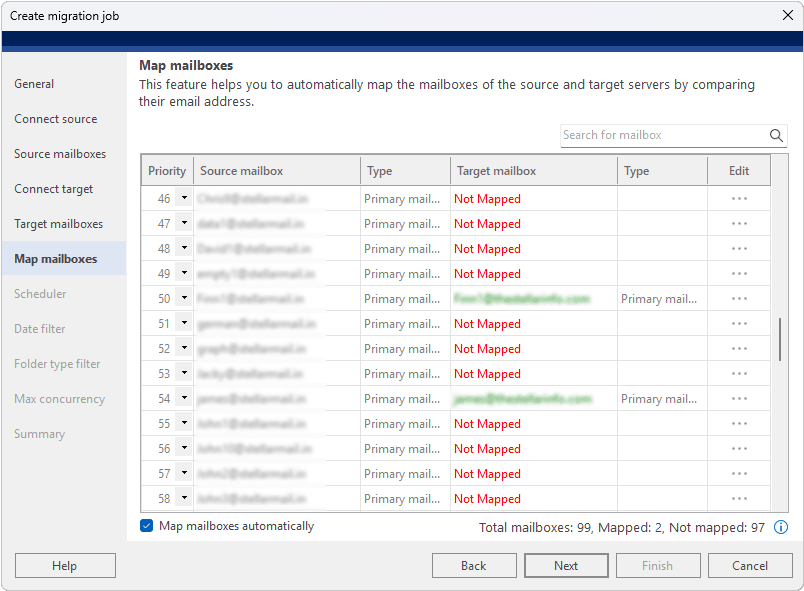
11. Map mailboxes. The tool auto-matches source and target mailboxes by email address. Matched pairs show green; unmatched ones show red and can be fixed manually.
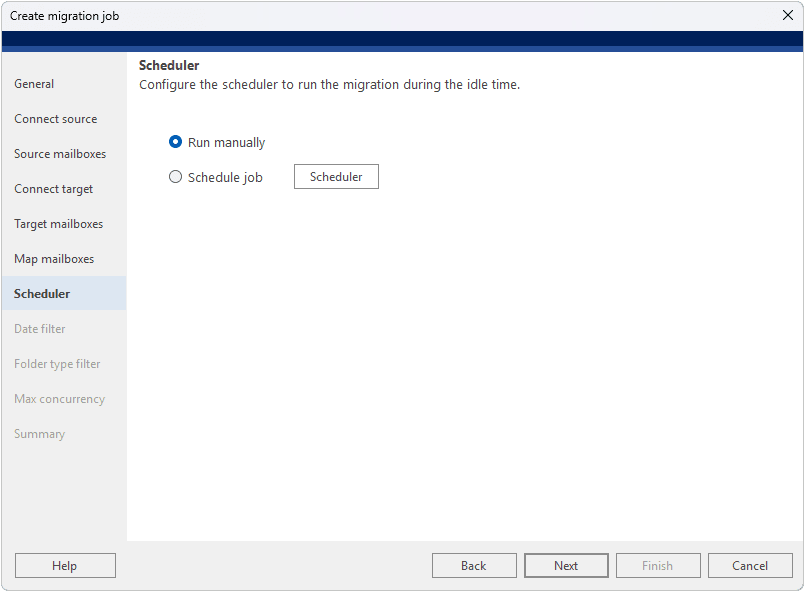
12. Set the schedule. Run the job immediately or schedule it (once, daily, weekly, monthly) for a specific window — handy for running the bulk sync outside business hours.
13. Apply a date filter. Optionally limit which mail items migrate by date — useful for moving only recent data first.
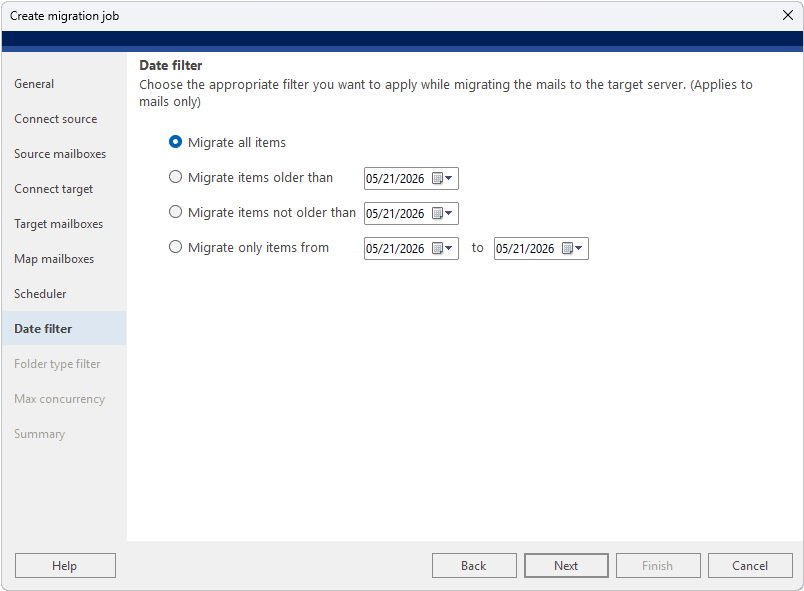
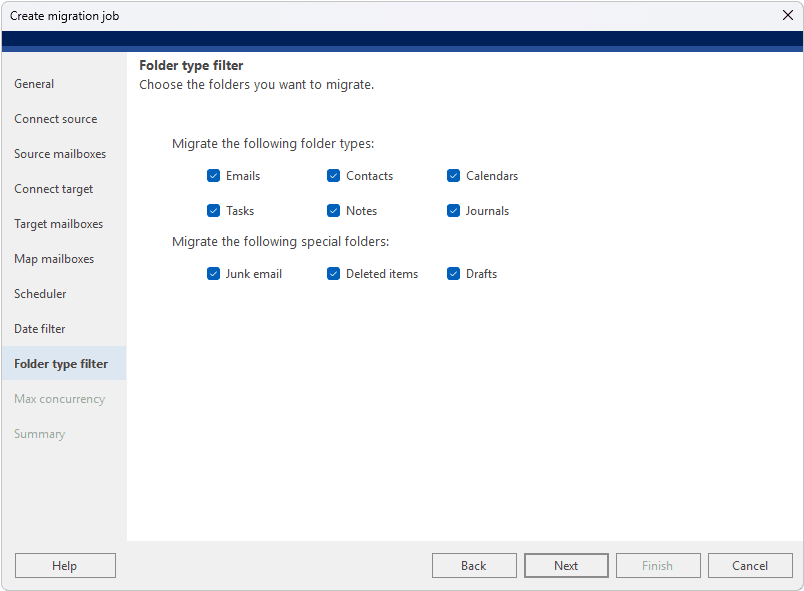
14. Choose folder types. Select which folders to include (email, contacts, calendars, tasks, notes, journals). Everything is included by default.
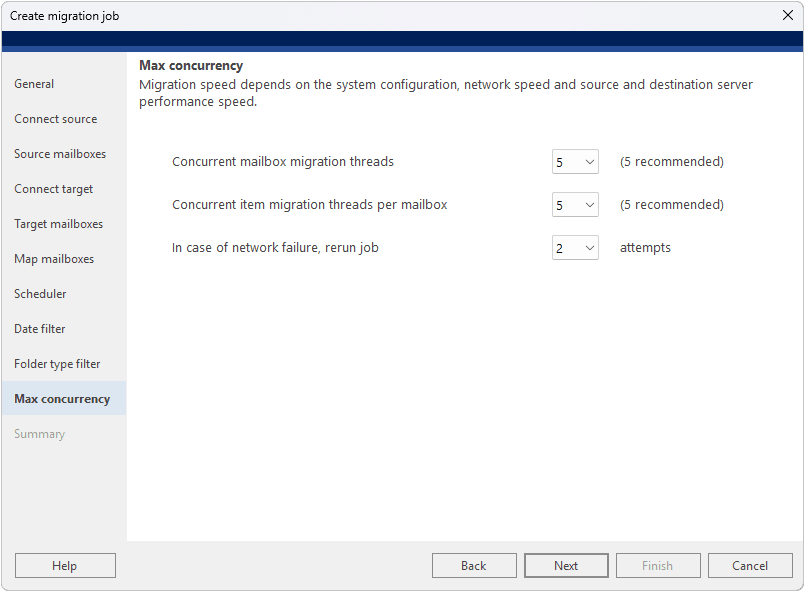
15. Set concurrency. Configure how many mailboxes and items sync in parallel, and how many times a failed item retries automatically.
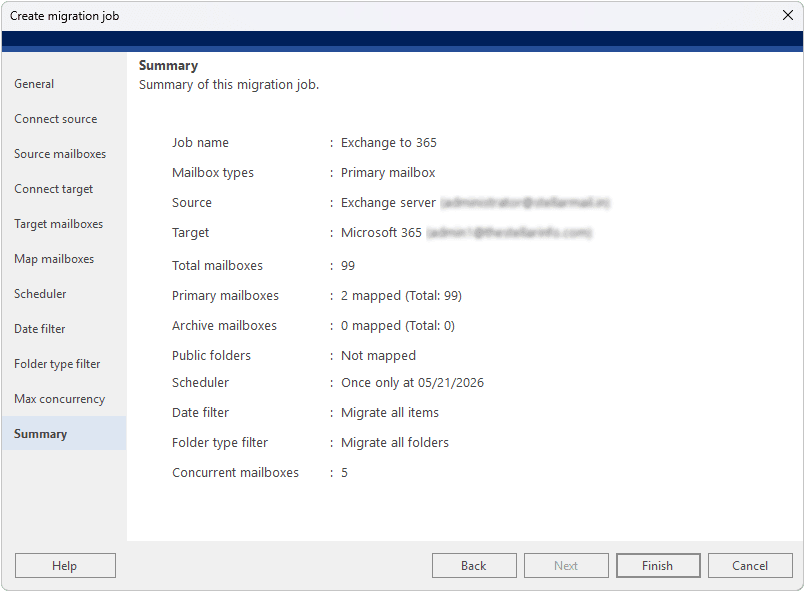
16. Review the summary. A final screen recaps every setting before you commit. Anything can be edited by jumping back to that section.
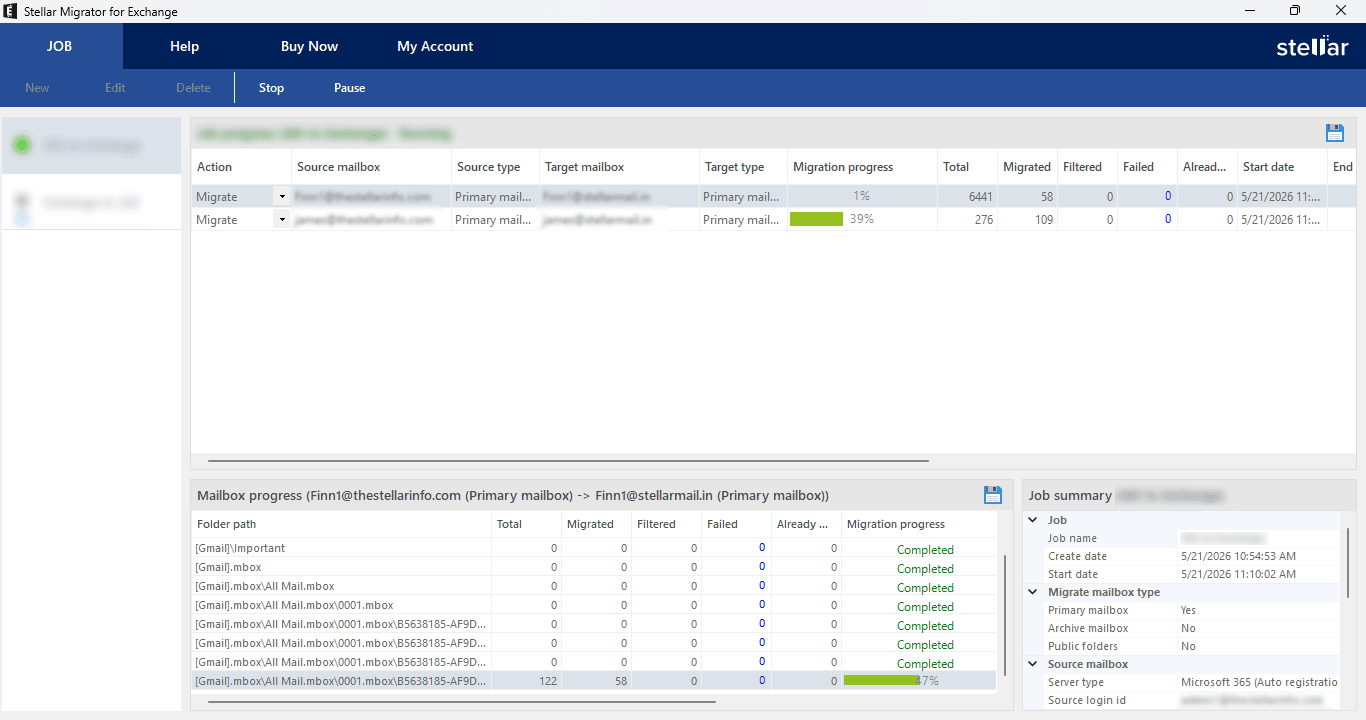
17. Start the migration. Kick off the job and watch a live dashboard: per-mailbox progress, items migrated/filtered/failed, and start times, with pause/stop controls always available.
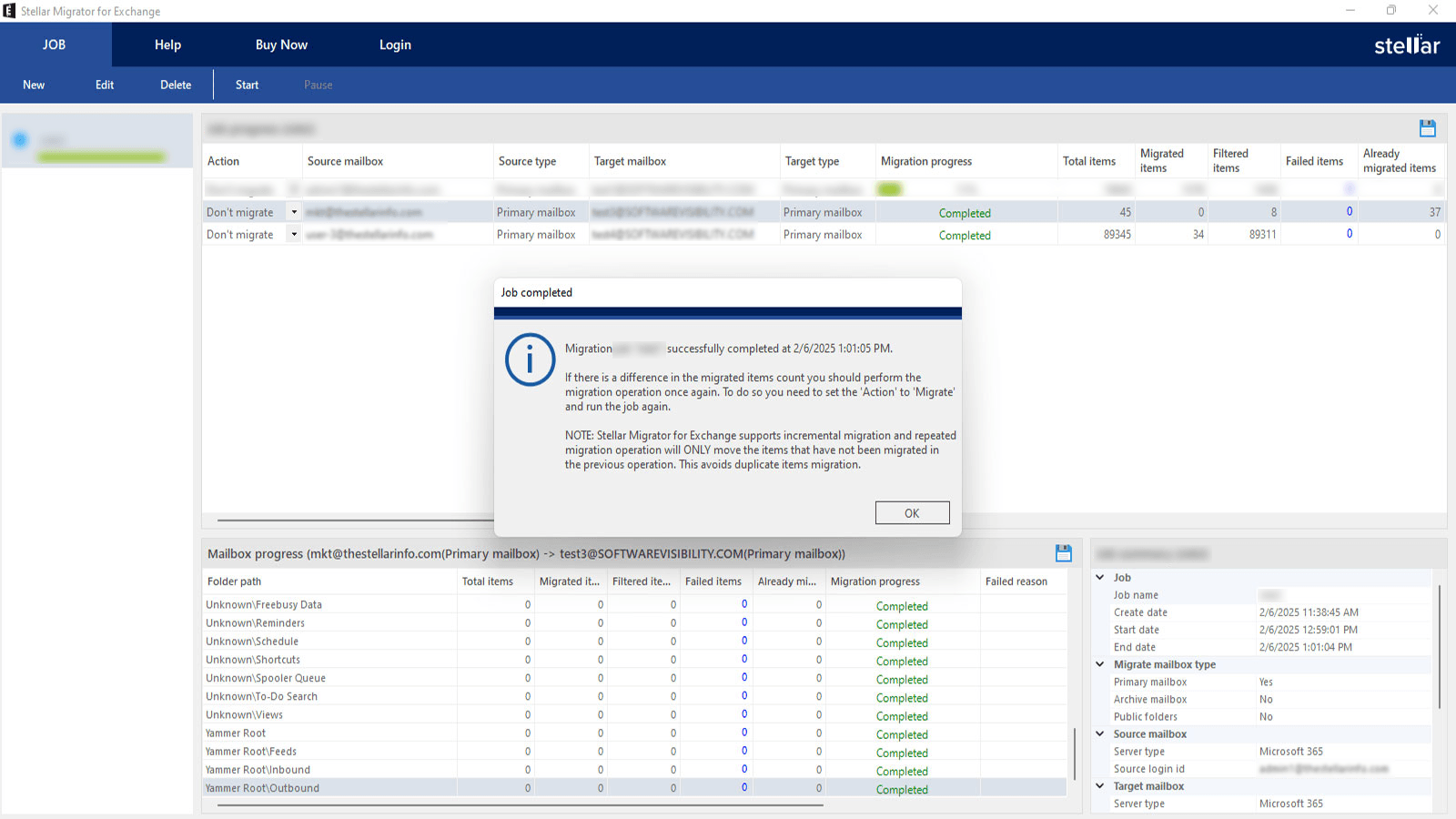
18. Migration complete. Finished mailboxes flip from “Migrate” to “Don't Migrate” in the job list. Anything that failed stays flagged so you can re-run just that item.
Most reviewers who’ve tested the tool report being able to configure and kick off a first migration job within 15–30 minutes of installation, which is a reasonable claim to make about a workflow this guided.
The Features That Actually Matter for Zero Downtime
A lot of migration tools claim “minimal downtime.” What separates a genuine zero-downtime workflow from marketing language is a specific set of capabilities, and this is where Stellar Migrator for Exchange earns its positioning:
- Delta (incremental) migration. Only new or changed items sync after the initial pass, which is what keeps the final cutover window down to minutes instead of hours.
- Parallel mailbox migration. The tool can move up to 10 mailboxes simultaneously, which meaningfully shortens total project time for larger batches without requiring extra infrastructure.
- Direct cross-forest and cross-domain migration. Connections are made using IP addresses and server credentials, sidestepping the manual AD trust-relationship setup that typically slows down these projects.
- Pre-migration validation. Surfacing permission and connectivity problems before a batch runs, rather than after it fails.
- Selective re-run for failed items. If a subset of a batch fails, you retry just those items instead of restarting the whole job — a small feature that saves real time on large migrations.
- Audit logs and reporting. Useful not just for troubleshooting, but for demonstrating GDPR, HIPAA, or SOX compliance after the fact.
Strengths and Limitations
No migration tool is the right fit for every environment, and it’s worth being upfront about both sides.
Where it’s strong: the local-execution architecture keeps sensitive mailbox data off third-party servers, which matters for regulated industries. The interface genuinely removes the PowerShell burden for cross-forest and tenant-to-tenant moves, which are usually the most error-prone scenarios to configure manually. And the combination of delta sync, batching, and selective retry addresses the actual mechanics of downtime rather than just promising to avoid it.
Stellar Migrator for Exchange currently focuses on migrating essential mailbox data, including emails, calendars, contacts, and public folders. Support for additional Microsoft 365 workloads, including SharePoint and Teams, is also in the pipeline, with our R&D team actively working on these capabilities and a release planned soon.
As the software runs locally, migration performance can be optimized based on the available hardware and system configuration. This provides organizations with greater control over their migration environment, allowing them to scale resources according to the size and requirements of their migration project.
Pricing
Stellar offers a free trial covering two mailboxes, which is enough to validate the workflow before committing. Paid licensing is usage-based rather than a flat enterprise subscription, working out to roughly $3–$10 per mailbox depending on volume and migration type, with custom quotes available for large-scale enterprise deployments. That per-mailbox model tends to make total project cost more predictable than open-ended consulting hours, particularly for organizations that know their mailbox count going in.
Who Should Use It
Stellar Migrator for Exchange is best suited to IT teams handling migrations in the tens-to-low-thousands of mailboxes — small businesses, mid-market companies, and managed service providers running projects on behalf of clients. It’s a particularly strong fit for tenant-to-tenant migrations triggered by mergers or acquisitions, where the alternative is usually a consultant, a stack of PowerShell scripts, and a much longer timeline. Organizations planning enterprise-scale migrations well into the tens of thousands of seats may still want to evaluate cloud-native SaaS alternatives alongside it.
The Verdict
Zero-downtime Exchange to Microsoft 365 migration is achievable without hiring a specialist consultant, and Stellar Migrator for Exchange makes a credible case for being the tool that gets you there. Its combination of delta sync, parallel migration, built-in validation, and script-free cross-forest support directly targets the mechanics that cause most migration downtime, rather than just papering over them. For IT teams who want predictable timelines and don’t want to become PowerShell experts to get a merger’s email systems talking to each other, it’s a strong, cost-effective option worth putting at the top of your evaluation list.


