
business resources
The Best Way for Businesses to Extract Text from Image Files in Bulk
08 Sept 2026

Today, businesses have to deal with more image documents than ever before. Invoices arrive as email attachments. Receipts are snapped on mobile phones. Contracts are scanned and saved as PDFs. Forms are captured during fieldwork.
Trapped inside each is “text” that needs to be either edited, searched, analyzed, or stored. When the volume is small, typing it out by hand makes sense. But when that volume multiplies by hundreds or thousands, manual extraction becomes a bottleneck.
The question isn't whether the text should be extracted but how to do it efficiently at scale.
The best approach is one that is fast and accurate enough. It shouldn’t require any technical or complex infrastructure. And, most importantly, it must handle bulk files without breaking the workflow.
Why Manual Text Extraction Isn’t Practical at Scale
Before moving on to the solution, it's worth knowing why the manual technique falls short. In theory, this method is straightforward. Open an image, read the text, and type it into a document.
But in practice, a single page can take several minutes. For multiple pages, these minutes turn into hours. And even a careful employee can make occasional errors.
Now, multiply that across a month’s or a year’s worth of scanned records; the risks become impossible to ignore.
The Best Way: An Online OCR Tool Built for Bulk Image Files
The most practical option for businesses is to use an “online OCR-based image-to-text converter."
However, it’s important to note that not every tool is suitable for business use. You must evaluate a few options before picking one. Businesses must look for these core capabilities in an OCR converter:
- Batch processing. The tool must be able to convert multiple images at once. Uploading one by one is not viable for image files in bulk.
- Speed and accuracy. It should be quick enough to boost the productivity of your workflow. And accurate enough to spare you from the tedious back-and-forth manual corrections.
- Multi-format Upload. The converter must allow “image upload” in different formats. This is important because businesses often receive images in various formats, including JPG, PNG, GIF, PDF, JPEG, WEBP, and more.
- Language support. It should support multiple languages. Businesses often have to deal with information in more than one language. This feature can save time by allowing businesses to extract text from documents written in different languages without manually transcribing them.
- Data Security. The tool must provide strong encryption and data security to help protect sensitive business information.
Online tools also eliminate the need to install heavy software. Instead, users can directly access and run advanced OCR tools to perform image-to-text conversions.
A Practical Workflow for Businesses
Once you’ve chosen a tool, you need to follow a step by step workflow.
In the practical demonstration below, we will use an OCR tool to extract text from image that meets the standards we have discussed above.
- First of all, collect every file that needs to be converted. Whether they are photos of receipts, scanned invoices, or screenshots of forms, gather them in one place.
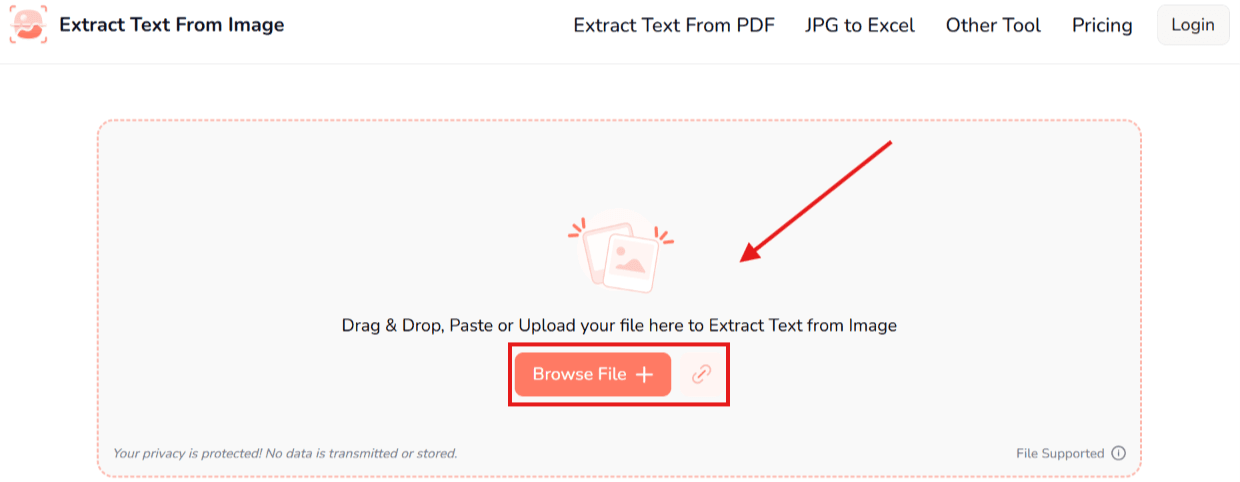
- After that, open the online tool and upload your batch. You may upload the set of images through drag and drop, copy and paste, or even upload directly from local storage. Some converters also accept image URLs for text extraction.
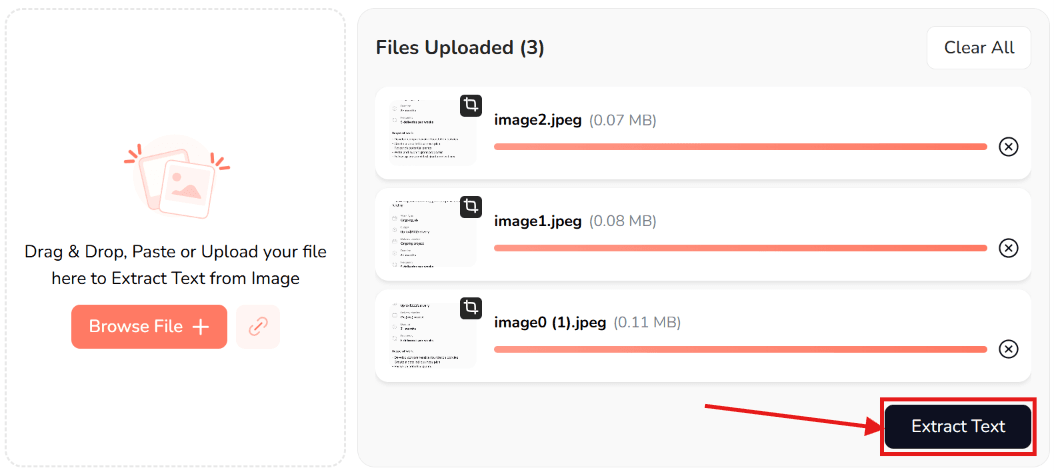
- Once the images have been successfully uploaded, simply click on the “Extract Text” button to convert the image files into text. (Modern tools may take only a few seconds, depending on the number and size of the files.)
- As soon as the images are converted, you can download the text for all the images together with the “Download ZIP” button. Or you can expand, copy, or download (as a .TXT file) the text for each image one by one.
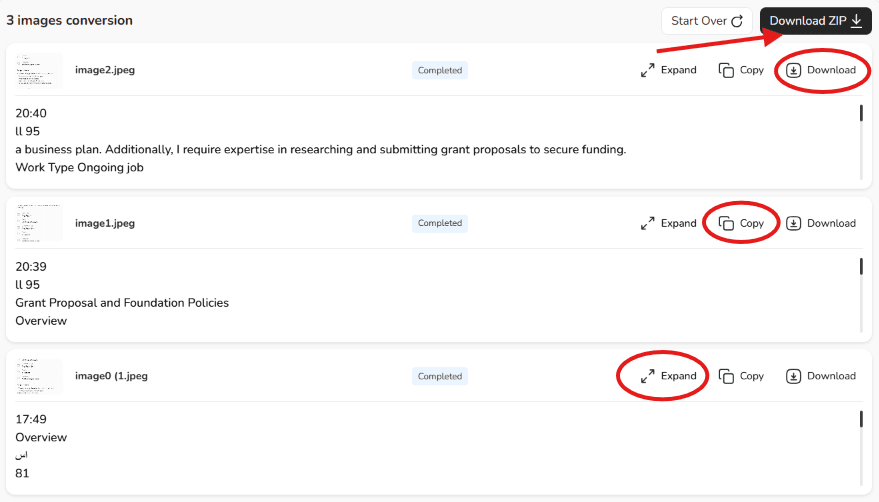
- Before exporting/downloading, make sure to review the text and check whether the text was extracted accurately. For immediate use, copy the text to the clipboard. And, for archiving or further editing, it’s better to download the extracted text as a file.
Important Considerations
The following points can help you avoid the most common pitfalls businesses face when extracting text from image files in bulk:
- Preview your batch before uploading it. There might be a crooked scan, a thumb covering a portion of the text, or a stain/shadow on a receipt.
- Upload the clearest version of a picture available. OCR works best when the input is of high quality.
- Before uploading your batch into a tool, identify the maximum number of files and the maximum size of files it allows in one go. This saves you from getting in trouble later; you can optimize the file number and size beforehand.
- If the tool has difficulty recognizing multiple languages in the same batch, process documents in separate language-based batches.
- Always review the tool’s output for accuracy before using or saving it. You must cross-verify important information like dates, names, numbers, etc.
Wrapping Up
Extracting text from image files in bulk is not a technical challenge anymore. It doesn’t require very expensive software or dedicated IT support. The best way businesses can handle the task is through a reliable online OCR converter.
The right tool is one that is efficient and accurate. It must process multiple files at once, support various languages, have clear and transparent pricing, and most importantly, respect data privacy.
Whatever the tool, the extracted text should always be given a second look for accuracy.


