
business resources
The Hidden Security Power of a VDR
09 Jun 2026

The cost of a data breach reached $4.4 million in 2025, which was a 9% decrease from 2024. The figure dropped because organizations can now detect and contain incidents more quickly. However, overall exposure to security incidents remains persistent.
According to the World Economic Forum, phishing, vishing, smishing, invoice fraud, and insider-led breaches remain among the most common ways of compromising information. And as data protection technologies advance, attacks evolve too.
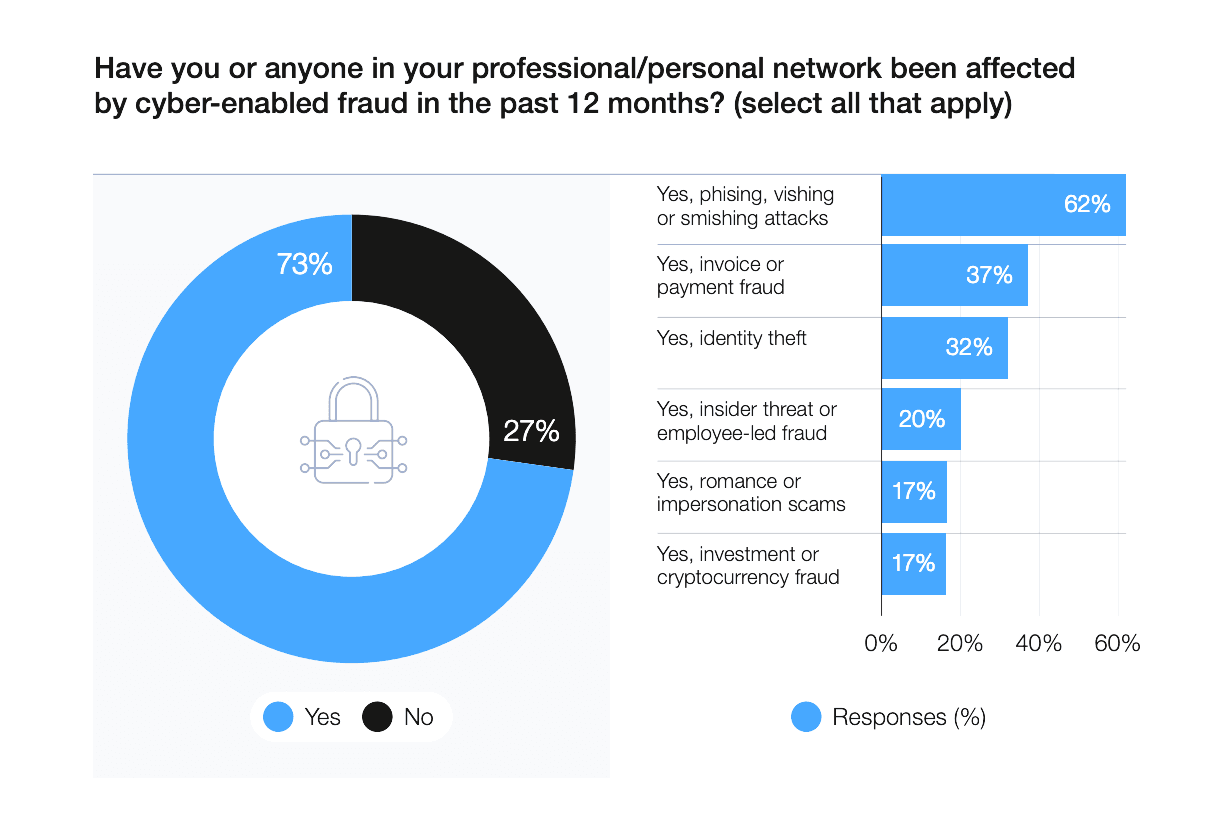
As data protection improves, attackers adjust their methods to exploit human behavior, timing, and access points. The result is that every exchange of sensitive information carries exposure, regardless of the systems you use. A virtual data room addresses this issue. It provides a controlled environment for sensitive disclosures, with built-in structure and oversight.
What is a VDR?
This is a secure online environment where users store, manage, and share confidential business information under controlled conditions. It combines strict data room access controls and activity tracking with an organized document system that keeps complex information manageable as multiple parties review it.
Common VDR use cases include:
- Mergers and acquisitions
- Private equity transactions
- Fundraising
- Due diligence
- Real estate transactions
- Healthcare data sharing
- Financial audits
- Regulatory compliance reporting
The platform ensures clarity, control, and accountability throughout these settings.
Learn more about the solution on the data-room.ca page
Virtual data room security features: Beyond basic protection
Unlike generic file-sharing tools, data room security goes beyond encryption and passwords. It is built into user verification, access rules, activity tracking, and data control throughout the transaction. This creates a tiered system that supports control, compliance, and discipline across the deal process.
| 1. Access control and identity | |
| Functionality | Description |
| Granular permission settings | Defines and manages user or group-level access, with the ability to modify or revoke at any time |
| Corporate account | Centralizes configuration of security rules, user access, and project settings |
| Single sign-on | Provides secure access across multiple projects using a single authenticated login |
| Email verification | Validates user identity through confirmed email access before granting entry |
| Domain and IP restrictions | Limits access to approved email domains and IP addresses only |
| User security impersonation | Allows administrators to view the platform as any user to verify access permissions |
| Two-factor verification | Secures access using a one-time authentication code delivered via app or SMS |
| Custom password policies | Enforces password complexity and rotation requirements |
| Custom session timeout | Ends sessions automatically after a defined period of inactivity |
| 2. Information protection and data control | |
| Multi-layer encryption | Protects data in transit and at rest using advanced encryption standards |
| Fence view | Restricts document visibility to prevent unauthorized viewing and capture |
| Dynamic watermarking | Embeds user-specific identifiers, IP address, and timestamp into documents |
| Remote shred | Revokes access to documents even after they have been downloaded |
| No footprints | Prevents local storage of files on user devices |
| Intelligent redaction | Supports removal of sensitive content before external sharing |
| 3. Auditability and monitoring | |
| Virtual data room audit trail | Records all user activity in full detail, including who watched what and when |
| Real-time activity monitoring | Provides live visibility into user actions within the data room, allowing immediate oversight of ongoing activity |
| Export usage and audit logs | Exports activity logs to external security systems |
| 4. Infrastructure and resilience | |
| Global data residency | Allows selection of data storage locations to meet compliance requirements |
| Physical protection | Secures data centers with physical access controls, including biometric authentication and round-the-clock surveillance |
| Fully closed secure perimeter | Ensures all data and processing remain within a secure environment |
| Real-time data backup | Continuously synchronizes data across geographically distributed locations |
| Disaster recovery | Enables data availability during system failures and emergencies |
| 5. Compliance | |
| Regulatory compliance | Ensures alignment with data protection and security standards, including ISO, SOC, GDPR, and HIPAA |
Each component of the system reinforces the others to create a unified security environment. As a result, teams can manage sensitive information with greater control.
Breaking down misconceptions about VDR security
Some users may mistakenly view data rooms as either simple file storage or too complex to manage. However, none of these assumptions reflect how VDRs are designed and used in practice.
- “It’s just a file storage tool.”
A VDR goes beyond storage. It controls access, tracks activity, and records every document interaction to keep information secure and transparent.
- “Only needed for large deals.”
A VDR is used whenever sensitive information is shared. It applies to fundraising, audits, legal reviews, and partnerships, regardless of deal size.
- “Too complex to manage.”
Modern VDRs are simple to operate. Dashboards, auto-indexing, and predefined permissions make data room management straightforward with minimal technical effort.
- “Once access is granted, control is limited.”
Access remains fully adjustable. Permissions, time limits, and dynamic watermarking in data room allow control even after documents are downloaded.
- “Security features slow down the deal process.”
A structured VDR improves speed. Clear access and an organized document hierarchy reduce confusion and streamline review.
Some platforms can really resemble basic file storage systems or fall short in terms of advanced functionality. Therefore, it is important to ensure the provider meets your needs.
How to evaluate a secure VDR
The right way to assess a provider is through focused questions that reveal how the platform behaves under real transaction pressure.
How granular are permissions?
- Can access be set at the user, group, folder, and document levels?
- Can permissions be changed or revoked instantly?
- Can different users see different versions of the same structure?
What audit logs are provided?
- Are all actions (views, downloads, edits, uploads, access attempts) logged?
- Can logs be filtered by user, file, and time?
- How long is the activity history stored?
What encryption is used?
- Is data encrypted in transit and at rest?
- What encryption standards are applied?
- Are encryption keys managed internally or by a third party?
What authentication methods are supported?
- Is multi-factor authentication available?
- Can access be restricted by email domain or single-use links?
- Are identity checks required before entry?
How is access controlled over time?
- Can access expire automatically?
- Can permissions be changed after access is granted?
- Are IP restrictions or session limits available?
What happens after the file download?
- Can documents be watermarked automatically?
- Can access to downloaded files be revoked?
- Are download restrictions configurable per user or group?
Expert advice
Ideals ranks first among virtual data room providers on Capterra, with 94% of users recommending the product. This feedback demonstrates strong trust in its security, functionality, and ease of use.
Final thoughts
Strong VDRs lead to clear communication, smooth due diligence, and reliable evaluations. It elevates the perception of preparedness and professionalism throughout the transaction process.
Build security that buyers can verify. Turn your data room into a signal of readiness.


