


Trading Strategies & Tech
Trading Signals for MetaTrader – Overview Part 2
21 May 2013

In Part 1, we took a look at the benefits of Metaquotes’ Trading Signals for MetaTrader. Today, we’re going to show you how to subscribe to a signal using the service, so you can start mirroring the trades of successful traders. We’re also going to show you how you can set up as a provider, so you can start earning an extra income from your forex trading activities.
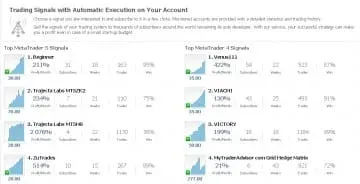 Subscribing to a Signal
Once you have selected a signal to follow from the MQL market, there are only three things you need to do before you can subscribe to that signal. First you need to get an MQL account if you don’t already have one. If you are using MT4, you need an MQL4.com account, and if you are using MT5 you need to an MQL5.com account. Then, you need to specify your broker, and provide your account number with that broker. You can do all of this without having to provide any confidential information, as you can obtain an MQL account using a nickname, and you don’t need to give an Investor or Master password when you provide the account number.
Synchronising the Trading Signals
When setting up to follow a Signals Provider, it is vital that a Subscriber doesn’t have Any open positions or orders placed, or the synchronisation will not be performed.
It’s also important to sync up when the market conditions are right, or you could end up entering the market at a price that is worse than the one that the Signals Provider did. Therefore, it makes sense to synchronise when the total floating profit of the Signals Source is zero or negative. You can synchronise if the trader is in profit on their open trades, but you will be warned about this by the software and advised to wait for better conditions, or accept the risk and synchronise immediately.
Once you have the signals synchronised, you should be ready to go. Remember that you can always cancel a subscription at any time, and even though you will not get your subscription fee back, this may be preferable to getting stuck with a Signals Provider that isn’t performing as well as you hoped.
Providing a Signal
The process for signing up to become a Signals Provider is a fair bit more complex, as you need to provide much more personal data and pass a month’s probationary period before you are accepted. To provide protection for Subscribers, Signals Providers have to provide their full contact details and confirmation of identity (such as a scanned passport) in case there are any disagreements between Subscribers and Providers. This information is secure, and will not be disclosed to third parties.
In addition to providing personal details, you also need to specify whether you are using MT4 or MT5, the name of your broker, the number of your account with that broker, an investor password, and a subscription price. If you are not charging people to subscribe to your signal, there is no need to pass a one-month probation period, but if you are, you need to prove your trading ability over the course of that month. Traders who make a loss of anything more than 60% will not be accepted as a paid Signals Provider. Once you have completed the process, the signal can be transferred from the Provider and accepted by Subscribers.
How it works
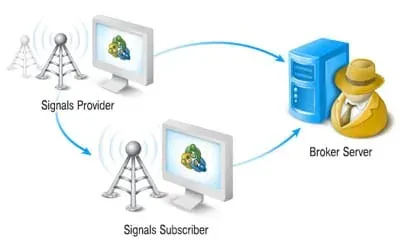
The trading activity of the Signals Provider, which can be a trader or an Expert Advisor, is sent to their broker’s trading server to be acted upon. MetaTrader’s Signal Server is connected to the Provider’s broker using the Investor password, and receives data about all their trading activity in real time. The Subscriber’s terminal is connected constantly to the MetaTrader Signal Server, and receives all the data about the Provider’s trading operations instantaneously. These trades are then performed via the Subscriber’s own broker. Therefore, there is no need for the broker to be the same for the Subscriber and the Signals Provider, as the only direct communication is between the Signals Provider and the Subscriber.


