
business resources
Video Analytics: What Businesses Should Actually Measure in 2026
26 Oct 2026

A 20-second product teaser can post a 95% completion rate and generate zero pipeline. A 30-minute webinar where most viewers leave at the 12-minute mark, right after the pricing walkthrough, can close six figures in the same quarter.
Both numbers are real. Only one of them tells you anything about whether the video worked.
Video analytics metrics fall into five layers: reach, attention, action, business value, and delivery quality, and each layer answers a different business question.
Most teams over-index on layer two. They look at watch time and completion rate climb, call the video program healthy, and never build the pipe that connects a view to a dollar.
This article breaks down what to track in each layer, how to read the retention curve that most dashboards bury three clicks deep, and why the reported numbers might not mean what the dashboard implies unless something upstream is protecting who gets to watch in the first place.
Key Takeaways
A single metric never proves video ROI. Reach, attention, action, business value, and delivery quality each answer a different question, and a dashboard built from one layer is reading half the story.
Completion rate has no universal "good" number. A 20-second clip and a 30-minute webinar cannot be judged against the same benchmark, no matter how many blog posts insist otherwise.
Watch time and completion rate measure attention, not revenue. Pipeline, qualified leads, and CTA-to-conversion rate are the only metrics that connect video to business outcomes.
Retention curves show three distinct patterns: early drop-off, mid-video abandonment, and rewatch spikes. Each one points to a different edit, not the same generic fix.
Reported conversions are only as trustworthy as the access controls and event tracking sitting behind the video. Unrestricted viewing quietly corrupts the viewer-level data a team feeds into a CRM.
A working weekly dashboard needs 8 to 10 metrics, not every event the analytics platform is capable of logging.
The Five Layers of Video Analytics, and the One Question Each One Answers
Every metric worth tracking sits in one of five layers, each mapped to a decision, not just a number.
Layer | Business Question | Core Metrics | Decision It Drives |
| Reach | Did the right people get the chance to see it? | Unique viewers, impressions, play rate | Fix distribution or placement |
| Attention | Did viewers stay for the part that mattered? | Watch time, average percentage viewed, retention curve | Edit the opening, pacing, or structure |
| Action | Did viewers do anything after watching? | CTA click-through rate, form starts, conversion rate | Move or rewrite the call to action |
| Business value | Did the video contribute to revenue? | Qualified leads, pipeline influenced, ROI | Keep, scale, or retire the video |
| Delivery quality | Could viewers actually watch it without friction? | Startup time, rebuffering rate, playback failures | Fix hosting, encoding, or page weight |
A video analytics platform, at minimum, is software that captures and structures these five layers so a marketing or product team can trace a single viewing session from first frame to conversion event.
Full-stack analytics is the term for a platform that does this natively, without requiring a separate tool for every layer. Gumlet is an all-in-one video hosting platform that hosts, protects, and measures video from a single dashboard, and its rebuilt analytics suite, released in June 2026, is one example: real-time engagement tracking, drop-off heatmaps, and viewer-level insight sit in the same dashboard a team already uses to manage hosting and delivery, rather than a hosting tool, a heatmap tool, and a CRM integration stitched together separately with the viewer IDs never quite matching up.
High reach with a weak play rate points at a thumbnail or placement problem, not a content problem. Strong play rate paired with an early retention collapse means the opening is writing a check the rest of the video does not cash. Healthy engagement with flat conversions usually means the problem sits in the offer or the CTA, not in the edit.
Connecting a specific watch-depth number to a CRM record, and turning that connection into a repeatable weekly process, is its own separate problem with its own separate checklist. This article stays one layer earlier: reading what the retention curve is actually showing, and confirming the viewer data feeding that curve can be trusted before any of it reaches a CRM.
Reach Metrics: Are the Right People Starting the Video
Reach metrics answer one question: did the video reach an audience large enough, and relevant enough, for what it was built to do. Two numbers get compared here more than any other, and mixing them up produces a report that looks fine and means nothing.
Unique Viewers vs. Total Views: When Each One Matters
Total views count every play, including repeats from the same person. Unique viewers count distinct individuals, and it is the number that actually estimates audience size.
For a gated demo video sent to a single buying committee, ‘unique viewers’ tells you whether the whole committee watched or just the champion. For a public awareness video, total views tells you how much repeat consumption happened, and a viewer rewatching a product explainer three times is behaving differently than someone counted once and never again.
Raw view counts are misleading for three reasons: autoplay inflates starts nobody chose, a three-second accidental play counts the same as a full watch in most dashboards, and two videos with identical view counts can still produce completely different watch time and conversion numbers. A video hosting platform that separates unique viewers from total views natively, the way Gumlet's analytics dashboard does, saves a team from having to reconstruct that distinction later from raw event logs.
Video Play Rate and What a Weak Number Means
Video play rate is the percentage of people exposed to a video who actually start it, calculated as:
Plays / Impressions or Page Loads x 100
A weak play rate points at a poster frame that does not signal value, a page position below the fold, copy around the player that does not earn the click, or an audience that genuinely does not need a video on that page.
A high play rate paired with weak retention is a different problem: the thumbnail or headline promised something the opening did not deliver, and no mid-video fix repairs a broken promise made before the click.
Attention Metrics: Did Viewers Stay for the Part That Matters
Attention metrics pick up where reach leaves off. A video can reach exactly the right audience and still fail here if nobody sticks around long enough to receive the message it was built to deliver.
Watch Time vs. Average Percentage Viewed
Watch time is the total minutes viewers spent watching, summed across every play. It is a useful scale metric, since two videos with the same play count can generate very different total attention, but it favors longer content by default and says nothing about proportion.
Average percentage viewed divides average view duration by total video length, which is what makes it possible to compare a 45-second explainer against a 3-minute case study on equal footing.
A video at 40% average percentage viewed and one at 80% are not automatically ranked good and bad; it depends on where the important content sits inside each one.
Completion Rate Has No Universal Benchmark
There is no single "good" completion rate, because a 20-second teaser, a 90-second demo, and a 40-minute onboarding lesson are not the same measurement problem.
Benchmark a video against comparable content in your own library, at your own length and placement, never against a flat industry percentage lifted from a blog post that never asked what the video was for.
A 95% completion rate on a 20-second video with no CTA and no informational payload is not a success. It means the video was short enough that finishing it required no commitment.
The inverse holds too. A 30-minute webinar where viewers consistently exit right after the section that answers their question can be the best-performing asset in the library despite a 20% completion rate.
Decision rule: If a completion rate looks weak, check what happens at the drop-off point before concluding the video underperformed. A video that delivers its core value early and loses viewers after that point is doing its job, not failing at it.
How to Read a Video Retention Curve
The retention curve is the single most actionable chart in most video dashboards, usually buried behind two extra clicks past the summary view. Reading it correctly means separating three patterns, each calling for a different fix:
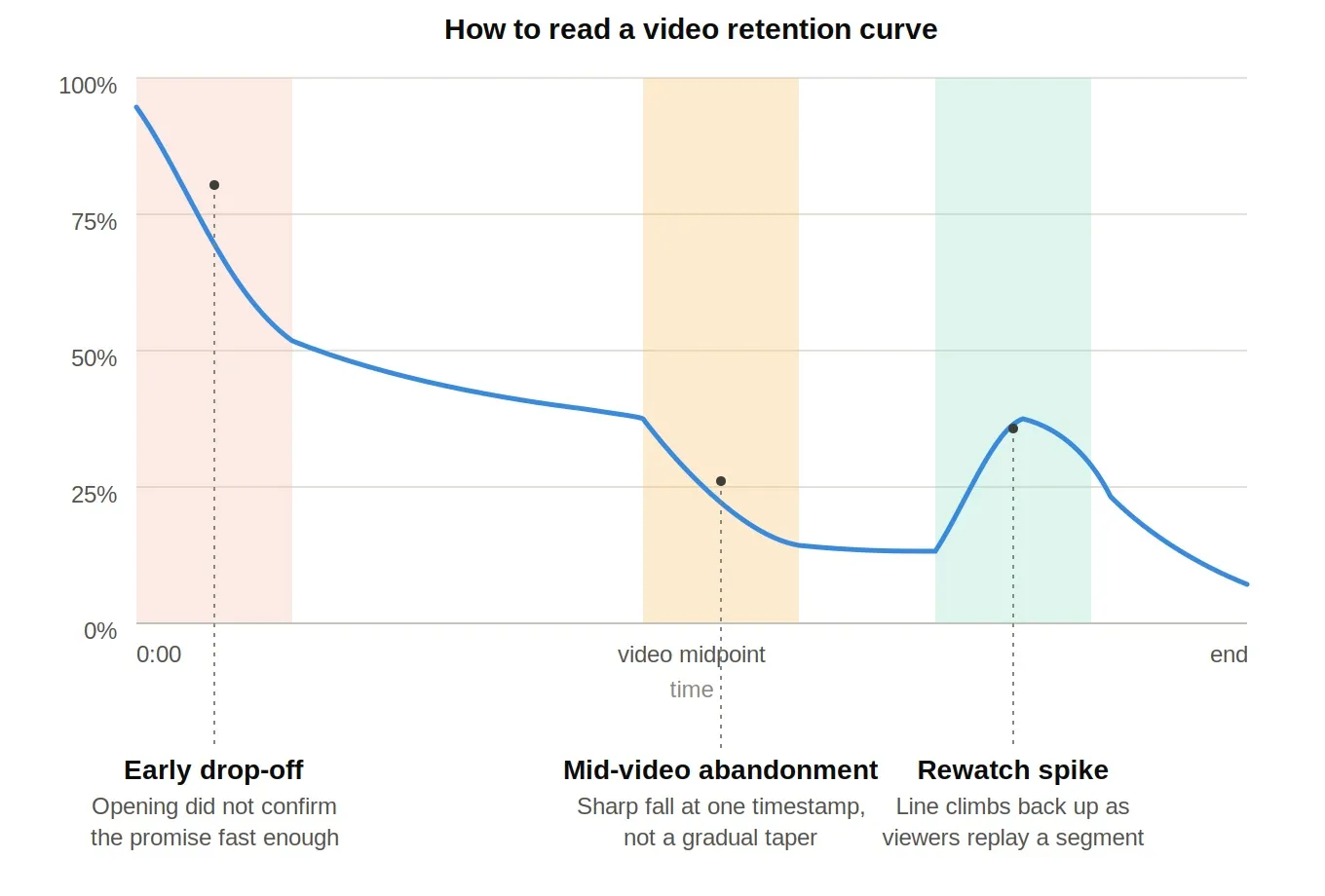
Early drop-off: A steep decline in the first 10 to 15 seconds means the poster frame, headline, or opening sentence set an expectation the content did not immediately confirm. Fix: Test a clearer promise, or move the payoff earlier.
Mid-video abandonment. A sharp fall at a specific timestamp, not a gradual taper, usually marks a repeated explanation, unexplained jargon, or a pacing dip. Fix: Cut the repetition or add a concrete example right at that point.
Rewatch spikes: A section where the retention line climbs back up means viewers are replaying it, either because the content is genuinely valuable and worth pulling forward, or because it is confusing enough that people are rewinding to parse it. Fix: Check which one it is before deciding whether to promote the segment or clarify it.
Reading these three patterns depends on the dashboard actually surfacing a second-by-second curve rather than a single average. Gumlet's video heatmap plots engagement across the full timeline and flags the drop-off points directly on the graph, which is what makes the early-drop-off-versus-mid-video-abandonment distinction visible in the first place instead of buried in an aggregate percentage-viewed number.
A gradual, steady decline across a video is normal interest loss and rarely needs a structural fix. A sharp, localized cliff is the one worth acting on, because it points to a specific second, not a general quality problem.
The steepest drop in most videos happens earlier than most teams expect it to. A gap remains in independent research specifically on embedded business and demo video, but the same underlying pattern, a sharp early cliff followed by a much flatter decline, shows up consistently across long-form video platforms with published retention data, which is why the first 10 to 15 seconds get disproportionate attention in every retention-curve framework, including this one.
Engagement Metrics for Business Video
Views and watch time can hide a weak video. A 5-minute product walkthrough can rack up a healthy view count while most viewers leave at 45 seconds, right after the intro and before the product appears on screen.
The view count says the video is working. The engagement heatmap says the content that matters never got watched by most of the audience that started.
Heatmaps and drop-off data surface this gap, since they show which seconds hold attention and which ones lose it, aggregated across every viewer rather than reconstructed from a single watch-time average. That kind of granular engagement tracking is what separates a dashboard a team can act on from one that just confirms a video got watched.
Filtering that data by geography, device, or time period, a standard feature on platforms like Gumlet, turns a single flat heatmap into a segmented one: a drop-off that only shows up on mobile is a different fix than a drop-off that shows up everywhere.
Rewatch rate, the share of viewers who replay a section, cuts both ways. It can signal high interest, a useful reference section, or a technical retry after a failed load, and a heatmap alone cannot always tell which.
A rewatched product demonstration in a sales video reads very differently than a rewatched explanation in a training video, where it usually flags unclear instruction.
Action Metrics: Did Viewers Do Anything
Reach and attention describe behavior inside the player. Action metrics describe what happens the moment a viewer is asked to do something, and this is where a video with strong watch numbers can still fail to earn its budget.
CTA Click-Through Rate vs. Post-Click Conversion Rate
CTA click-through rate is the share of viewers who click a next-step prompt, calculated as:
CTA Clicks / Eligible Plays or Viewers x 100
Choose the denominator deliberately: viewers if the question is how many distinct people acted, plays if repeat sessions matter.
Post-click conversion rate picks up where CTA clicks leave off: of the people who clicked, how many completed the actual conversion event, whether that's a form fill, a demo booking, or a purchase.
Clicks without downstream conversion are not successful on their own. A high CTA click-through rate paired with a weak post-click conversion rate usually means the landing page is the problem.
The Video-to-Lead Attribution Process
Connecting a video view to a CRM record is a five-step process, and skipping any one step is where most attribution setups quietly break:
Define the conversion event: Decide upfront whether success is a form fill, a demo request, a trial signup, or something else.
Attach trackable elements: Add CTAs or in-player forms that generate a discrete, loggable event rather than a passive impression.
Capture the interaction events: Log player events, play, percentage-watched thresholds, CTA clicks, tied to a viewer or session identifier.
Pass the data to analytics or CRM systems: Route the video ID and viewer event data into the platform the team actually works in.
Compare viewer behavior against completed conversions: Cross-reference who watched what against who actually converted.
Skip step three, and the rest of the pipeline has nothing to route. This is the step most teams underbuild, because it requires the video player itself to expose events cleanly.
Business Value Metrics: Connecting Video to Revenue
Reach and attention metrics describe behavior. Business value metrics describe outcomes, and they are the only layer that answers the question a CFO actually asks.
Video ROI is calculated as:
(Attributed Return - Video Cost) / Video Cost x 100
Say a product demo video costs $4,000 to produce and host for a quarter, generates 40 qualified leads at a 15% close rate, and the average deal size is $6,000. That's 6 closed deals worth $36,000 in attributed revenue, for an ROI of (36,000 − 4,000) / 4,000 × 100, or 800%.
The video cost is easy to track. The attributed return only exists if the video ID and engagement events actually made it into the CRM, which is what the five-step attribution process above is for.
Not every video needs to clear this exact bar. A brand awareness video might be judged on reach and branded search lift instead. A product demo is the clearest candidate for a direct ROI calculation, because its conversion event is usually explicit.
Forcing every video through the same revenue formula produces distorted numbers; matching the metric to the video's job produces useful ones.
What a video hosting platform's video analytics needs to expose, at minimum, for this calculation to be possible: viewer-level watch data, CTA and form interaction events, and an integration path into whatever system holds the revenue data.
A dashboard that stops at play count and watch time cannot feed this formula no matter how good the visualizations look.
Why Reported Video Conversions Are Not Always Complete
Every metric covered so far assumes the pool of people watching the video is the pool the access model intended. That assumption breaks more often than most measurement writeups acknowledge: fewer than half of marketers connect their video platform to a CRM or email tool at all, according to a 2026 HubSpot industry survey, which means the majority of teams are already working from partial attribution before access-control leakage is even factored in.
When it breaks, the numbers feeding a CRM or an ad retargeting stack quietly stop meaning what the dashboard implies.
Unique viewers, watch time by account, and CTA attribution all get calculated from whoever's video player fired the tracked events. If a paid demo video or a gated course lesson can be screen-recorded, re-hosted, or shared past a login wall, some fraction of every "unique viewer" and "watch time by account" figure belongs to people the access model was supposed to exclude, and the attribution pipeline cannot tell an intended viewer from a leaked-link viewer, because both fire identical player events.
Call this the attribution integrity gap: the distance between who a video's access controls were designed to admit and who the analytics platform actually counted. No dashboard flags this on its own. It shows up later, as inflated engagement numbers that never convert, or as a lead-scoring model that quietly gets worse at predicting who actually buys.
This matters as much to whoever owns the instrumentation as it does to whoever owns the pipeline number. Access control has more leverage here than most teams assume: FastPix’s 2025 analysis of course-platform leak patterns found that signed URLs, session limits, and basic access checks stop roughly 80% of casual redistribution before it starts, which means most of the attribution integrity gap is preventable rather than something a dashboard has to work around after the fact.
Viewer-level attribution only exists because specific player events, play, pause, seek, percentage-watched thresholds, fire consistently and get tied to a viewer or session identifier.
Two things break that silently:
If analytics collection is disabled at the workspace level, those events stop firing and every downstream report goes quiet without an error message.
If a video gets embedded through a route that bypasses the hosted player's own event layer, a raw file link dropped into an email instead of the player embed, the events required to track that play never fire, and the resulting gap looks identical to a viewer who genuinely lost interest. CoursePiracy’s 2026 research of over 10,000 pirated course listings found confirmed unauthorized links for 57% of the courses checked, with an average of seven redistributed links per leaked course, which is the scale of untracked viewing that never shows up in a completion-rate chart.
Cookie restrictions and regional privacy requirements add a third, independent limit on top of both, so reported conversions should never be read as complete customer-level attribution even when every access control is working correctly.
Decision rule: Before trusting a drop in reported engagement, confirm the video was actually served through the instrumented player and not through a bypassed link, because the two failure modes produce the same chart.
Platforms built around video protection first, analytics second, tend to handle this best. Layered access controls, password protection, domain restriction, signed URLs, watermarking, DRM, exist for protection on their face, but carry a second benefit: they let a team distinguish "watched by someone inside the intended audience" from "watched by someone who got a link forwarded three times."
Gumlet layers password and geo-blocking on every plan up through domain restriction, dynamic watermarking, and a one-click Widevine and FairPlay DRM add-on. VdoCipher takes a similar approach from the DRM-first side, built around Widevine and FairPlay encryption with customizable per-viewer watermarking, which shows up as more trustworthy attribution downstream, not just fewer piracy incidents.
Video Metrics by Funnel Stage and Use Case
Applying a conversion-stage metric to an awareness-stage video produces a report that looks like failure when it isn't, and a demo video and a course lesson, both long-form and instructional, still need completely different scorecards.
Awareness video leans on impressions and reach; consideration video leans on retention; conversion video leans on CTA and conversion rate; retention video leans on watch time by account. The table below breaks this down by the specific job the video is doing.
Use Case | Primary Goal | Metrics to Prioritize | Example Decision |
| Product demo | Qualify buying intent | Retention to the feature reveal, replayed segments, CTA clicks, demo-to-trial conversion | Move the strongest feature earlier if retention drops before it appears |
| Webinar / long-form | Deliver depth, support a later conversion | Unique attendees, minutes watched, chapter-level retention, post-view conversion | Trim or re-cut sections with heavy mid-video abandonment |
| Course lesson / cohort content | Support learner progression | Completion relative to course pacing, rewatch of specific concepts, assessment or module-advance rate | Flag a rewatched concept for a clearer explanation in the next cohort |
| Onboarding / feature release | Drive product adoption | Watch time by account, completion of the sequence, feature-adoption rate post-view | Shorten a sequence if drop-off clusters before the final step |
The course-lesson row gets measured wrong more often than any other category here. Completion rate should be benchmarked against course progression, not marketing conversion: a learner who finishes 70% of a lesson and advances to the next module is a success story, even though a marketing team reading that 70% out of context would flag it as weak.
Rewatch, in this context, is a comprehension signal rather than a demo-interest signal, a concept rewatched across many learners is worth revisiting in the next cohort's lesson, not a sign the content is landing well.
Gated course content is also where domain restriction and watermarking earn their keep operationally, since a leaked lesson link pollutes the completion and rewatch data for every learner still counted in that cohort.
What to Do When the Numbers Don't Add Up
Two combinations of metrics come up constantly, and each has a specific diagnosis.
1. High Play Rate, Low Retention
The thumbnail or headline is earning the click, but the opening isn't delivering on the promise fast enough. This holds when the drop happens in the first 10 to 15 seconds specifically, not gradually.
It does not apply if the audience skews toward accidental autoplay traffic that was never going to be retained regardless of the opening.
Action: Shorten the intro, move the payoff earlier, and cut any branding sequence that delays the content.
High Engagement, Low Conversion
Viewers are watching and staying through the useful parts, and still not converting afterward. This holds when the CTA is present and visible. It does not apply if there's no CTA in the video at all, in which case the diagnosis is missing, not weak.
Action: Check CTA timing against the retention curve, test aligning it with peak attention instead of defaulting to the end, and audit the landing page for friction the video can't fix.
Building a Weekly Video Analytics Dashboard
Two audiences need two different dashboards, and collapsing them into one report either drowns the executive view in operational detail or strips the operational view of anything actionable.
The operational dashboard, checked weekly, needs 8 to 10 metrics:
Primary outcome
Play rate
Unique viewers
Average percentage viewed
Retention to the key moment
CTA click-through rate
Startup time
Rebuffering or failed-start rate
A segment breakdown by source, device, or campaign
The executive scorecard holds to four:
Engaged viewers
Qualified conversions
Pipeline or revenue influenced
Cost or efficiency per outcome
Detailed retention curves belong in the operational view, not in front of someone deciding next quarter's budget.
Review cadence should match the decision, not a fixed weekly habit: campaign-level numbers deserve a check a few times a week during active promotion, library-wide metrics deserve a monthly pass to catch drift, and budget or production-priority decisions should pull from a quarterly review.
What a video hosting platform's dashboard surfaces natively, versus what a team has to stitch together through a separate CRM integration, is often the difference between a dashboard someone checks weekly and one opened once a quarter because pulling the numbers takes an afternoon.
Which Platform Gets This Right
Every metric and diagnostic in this article assumes the underlying platform can deliver clean, viewer-level data across all five layers in one place. Not every video host clears that bar. Purpose-built social and ad platforms cap out at reach and attention; they were never built to pass a video ID into a CRM.
DRM-first platforms like VdoCipher solve the access-control half of the attribution integrity gap convincingly, but that strength sits primarily in protection rather than in a full business-value reporting layer that connects watch data through to pipeline.
A platform earns "holistic" status here by doing three things at once: exposing granular engagement data down to the drop-off second, gating the right layer of protection to the content that actually needs it, and making both available from the same dashboard a team already uses to manage hosting.
Gumlet is one of the platforms built around that combination, layering password protection and geo-blocking on every plan, domain restriction and pixel tracking from its Creator tier and up, and dynamic watermarking on its Business tier and up, alongside a one-click Widevine and FairPlay DRM add-on available on any paid plan, all reporting into the same real-time analytics dashboard rebuilt in June 2026.
For a team trying to run this five-layer measurement system without assembling it from three separate vendors, that combination is worth evaluating directly.
Frequently Asked Questions
1. What are the most important video analytics metrics to track?
The metrics that matter depend on the video's job, but a solid baseline covers all five layers: unique viewers and play rate for reach, retention for attention, CTA click-through rate for action, pipeline for business value, and rebuffering rate for delivery quality.
Tracking only attention-layer metrics, the most common mistake, tells you a video was watched, never whether it worked.
2. What is a good video completion rate?
There is no universal good completion rate, because a 20-second clip and a 40-minute lesson are not comparable measurement problems.
Benchmark completion against similar videos in your own library at a similar length and placement, and check what happens at the drop-off point. A video that loses viewers right after delivering its core message is often performing fine, not failing.
3. How do I connect video views to leads in my CRM?
Define the conversion event before the video goes live, attach trackable CTAs, and log player events tied to a viewer identifier.
Pass that data into the CRM, then compare viewer behavior against actual conversions rather than assuming correlation. If the interaction-capture step isn't built correctly, nothing downstream has data to work with.
4. Should I track unique viewers or total views?
Track unique viewers when audience size and reach are the question, since total views count repeat plays as separate events. Track total views when repeat consumption itself matters, such as a product explainer someone rewatches before buying.
Most video hosting platforms, Gumlet included, report both numbers side by side rather than forcing a choice between them, so the decision is about which one drives the report, not which one the dashboard can show.
5. How do I know if my video conversion data is accurate?
Confirm the video was served through the platform's instrumented player, not a bypassed raw file link, since a bypassed link skips tracking and produces a drop that looks like disinterest.
Check that analytics collection is enabled at the workspace level, and if a paid video has no domain restriction, treat viewer counts as a ceiling, not a confirmed number.
6. How often should I check my video analytics?
Match the cadence to the decision. Campaign-level numbers deserve a check a few times a week while a promotion is active, library-wide metrics deserve a monthly pass, and budget decisions should pull from a quarterly review. Checking every number daily produces noise, not decisions.
The Bottom Line
A metric earns its place on a dashboard only if it changes a decision. The five-layer structure exists to stop teams from measuring the layer that's easiest to see, attention, instead of the layer that actually matters, business value.
A completion-rate chart that looks impressive and a pipeline number that doesn't move are not in tension with each other; they're two different questions, and only one is the one the CFO is actually asking.
As more video decisions get automated into CRM lead scoring and ad retargeting, the reliability of the underlying viewer data matters as much as the metrics built on it.
A retention curve is only useful if the plays behind it came from the audience the video was built for, which is where instrumentation and access controls stop being a security afterthought and start being a measurement precondition.


