
resources
Cost of AI Platforms for Startups: 9 Budget-Friendly Tools & Pricing Models
16 Oct 2026

Sticker prices like “$20 a seat” or “pennies per million tokens” look harmless—until the invoice lands. Forbes puts the average SaaS outlay at nearly $3,500 per employee each year, and seat floors, prerequisite suites, plus surprise overage fees keep driving that figure higher. This guide breaks down the cost of AI platforms for startups using a five-person team as the yard-stick. You’ll find nine category winners, the real-world math behind every tool, and a checklist that keeps your monthly stack below $500.
Quick answer: what should a startup expect to spend?
- Two-founder test bed. Lean on free tiers plus one paid specialist and you’re often under $100/month.
- Five-person seed team. Add coding, knowledge, or automation seats and the cost of AI platforms for startups settles around $150–$500/month.
- Post-Series A. Security, SSO, and higher-volume APIs typically push spend higher.
All prices are U.S. dollars, pre-tax, verified on October 14, 2026. “Advertised” shows the vendor’s entry headline (annual-equivalent where noted); “Minimum bill” reflects a five-seat, month-to-month scenario.
How we sized every price tag
Our yard-stick is a five-person U.S. software startup that pays month to month. The setup removes annual-payment discounts and lets us compare every platform directly.
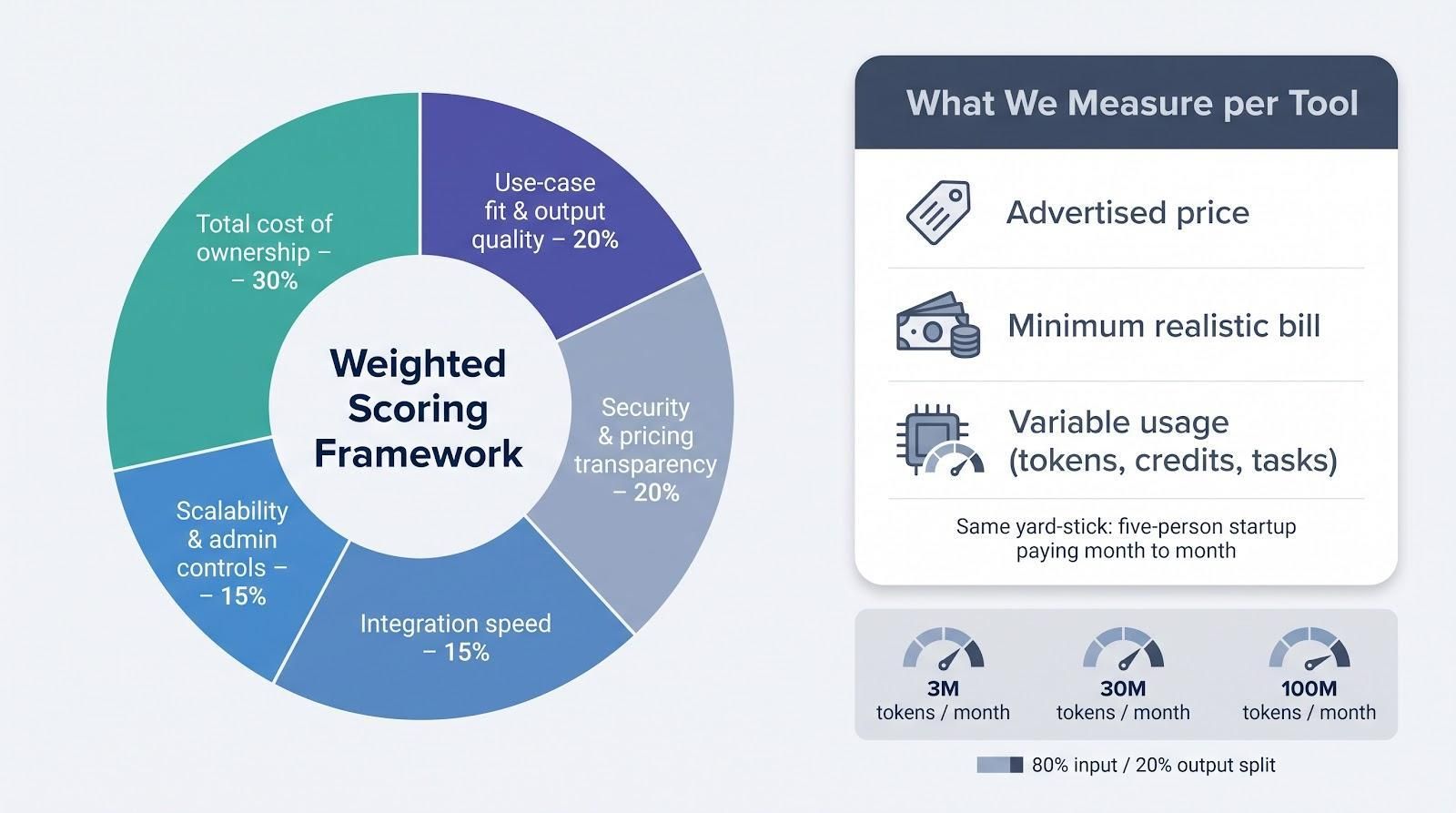
For each tool we record three figures:
- Advertised price: the headline cost on the vendor site.
- Minimum realistic bill: the total after seat floors, required suites, or add-ons.
- Variable usage: tokens, credits, or tasks consumed by the team.
To judge overall value we apply these weights:
- Total cost of ownership: 30 %
- Use-case fit and output quality: 20 %
- Integration speed: 15 %
- Scalability and admin controls: 15 %
- Security and pricing transparency: 20 %
API models are benchmarked with an 80 % input and 20 % output split at 3 M, 30 M, and 100 M tokens per month. Taxes, temporary promotions, and startup credits are excluded so the cost of AI platforms for startups mirrors steady-state spend.
Because every team staffs quality assurance differently, we simply flag review-heavy tasks such as decks, code, or creative work and leave hourly rates outside the baseline.
With the methodology in place, the next section looks at the six pricing levers that shape an AI bill.
1. Per-seat subscriptions
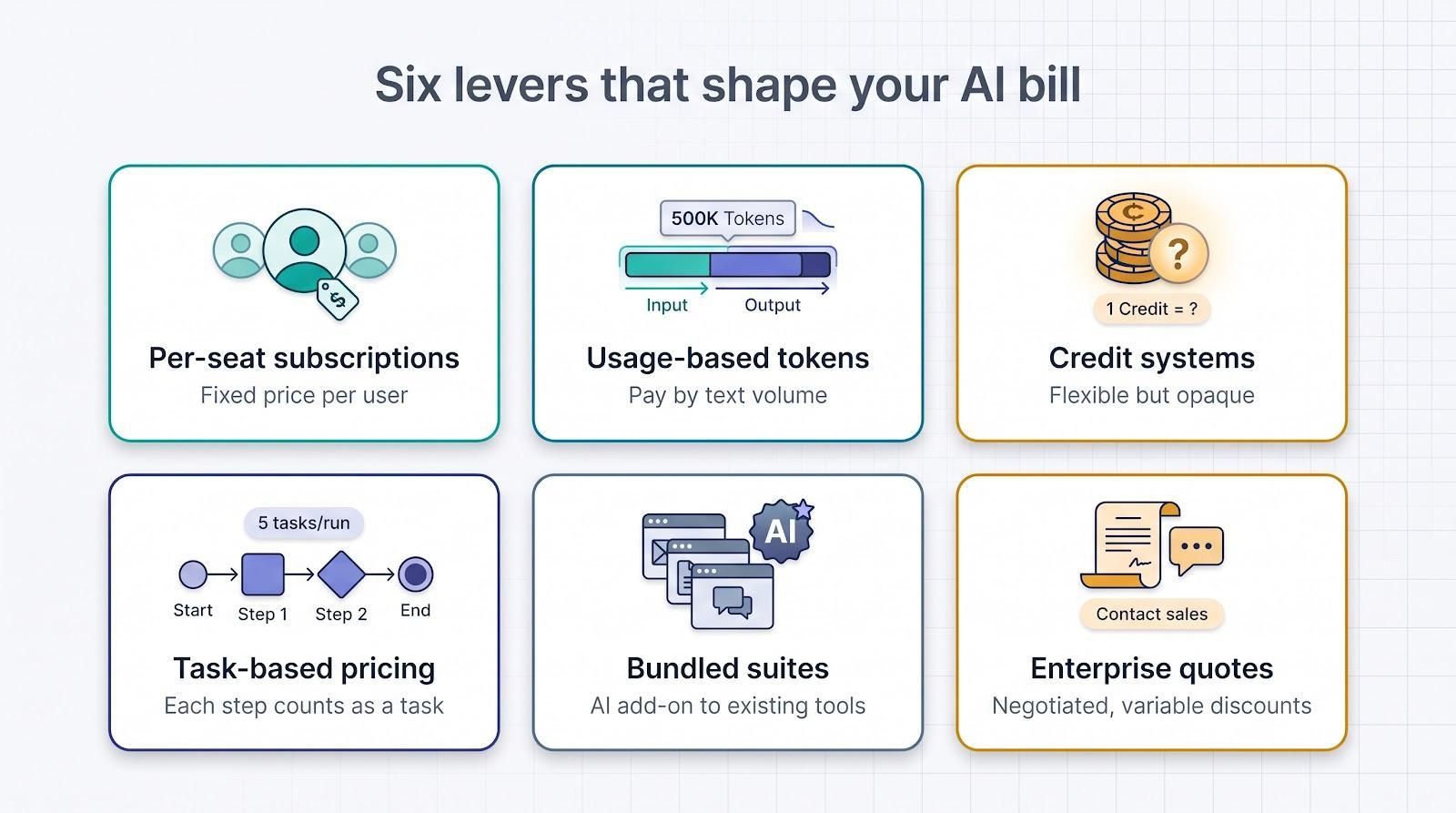
A per-seat plan charges a fixed dollar amount for every human user, no matter how often that person opens the tool. ChatGPT Business Standard illustrates the model at $25 per user on monthly billing with a two-seat floor.
Unused licenses drain budgets. If only two people open the app each day while all five employees hold seats, 60 % of the spend delivers no value. Audit sign-ins after the first month, then adjust license counts. Adding seats is simpler than recovering wasted fees.
Monthly contracts protect runway even when annual discounts appear generous. Claude Team lists $30 per user monthly and requires five seats, so a three-person startup would pay for growth it has not earned.
Per-seat plans work best when usage mirrors head-count—ideal for daily productivity apps—while variable-use models suit workloads that spike.
2. Usage-based token pricing
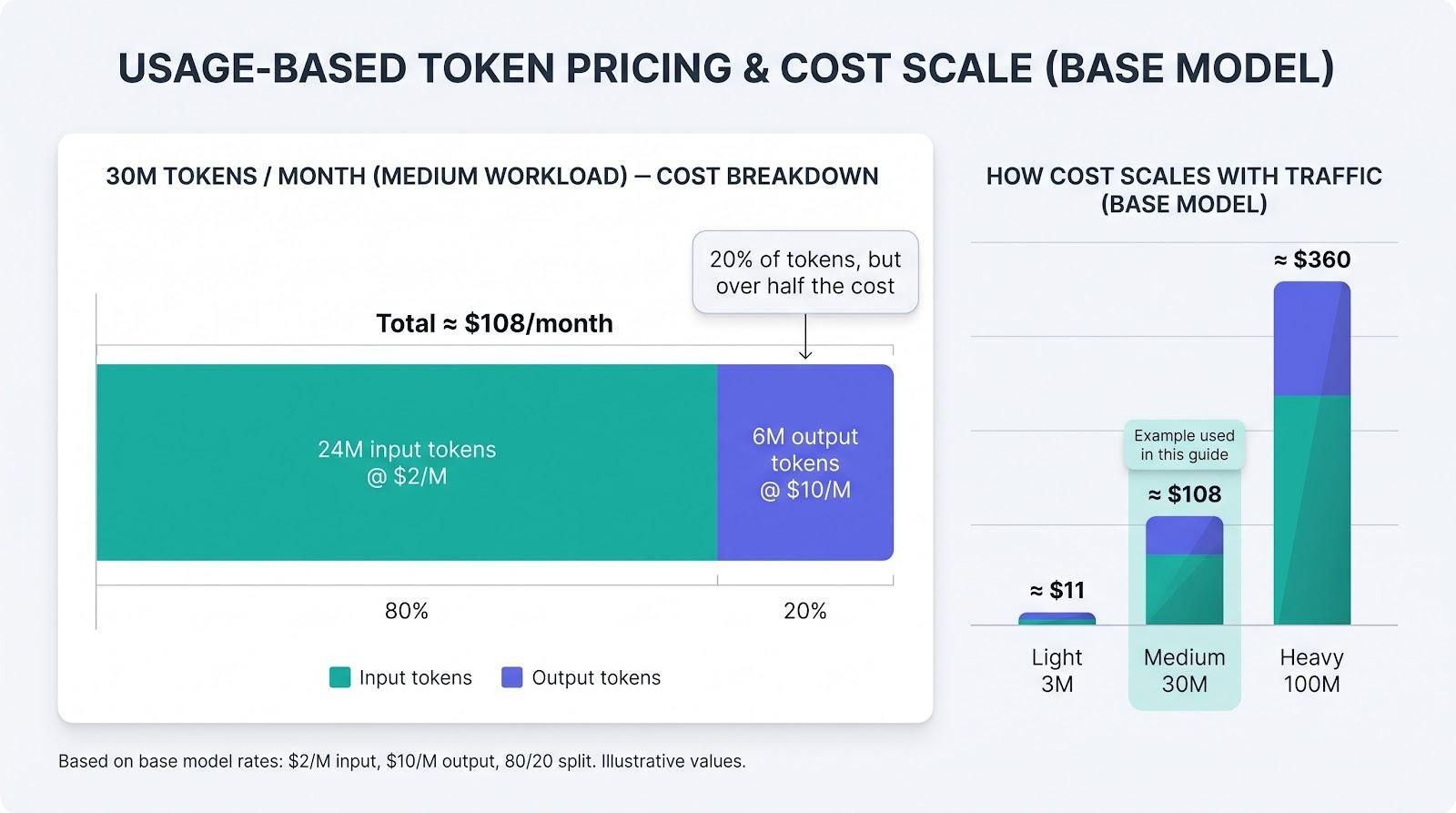
Some vendors bill by text volume instead of head-count. OpenAI, Anthropic, and Google Gemini convert every prompt to input tokens and every response to output tokens. Output usually costs several times more than input. Current GPT-6.1 Sol and Claude Sonnet 5 rates show $2 per million input tokens vs. $10 per million output.
Why startups like tokens
You pay only for work performed. A quiet month may cost just a few dollars, so spend scales with customer traffic, not payroll.
Why tokens bite back
Usage is hard to predict. A viral feature or runaway code loop can burn budget overnight. Set daily or weekly spend caps in the dashboard on day one to avoid four-figure shocks.
Cost snapshot
A medium workload of 30 million tokens at the 80 % input / 20 % output split used throughout this guide costs about $108 per month on GPT-6.1 Sol; Claude Sonnet 5 falls in the same range. Premium models such as GPT-6 Astra or Claude Opus can multiply that figure two- to five-fold, so match model choice to ROI, not hype.
Separating wallets
ChatGPT Business seats do not cover API usage, so budget a second line item if your product calls the model directly.
Next up: credit systems that bundle tokens, images, and agent actions into a single allowance.
3. Credit systems
Many vendors bundle usage into credits: a flexible chip that might buy one text prompt, an image render, or five minutes of agent runtime. The catch is that every product sets its own exchange rate.
Concrete examples
- GitHub Copilot Business includes 1 900 AI credits per seat; overage is $0.01 per credit.
- Canva Pro ships 200 Premium and 20 Ultra uses each month, with optional AI Pass top-ups.
- Notion Business + AI starts deducting credits when a Worker runs, at roughly $0.002 per run.
Why founders like credits
You buy one bundle and build until the meter hits zero: simple for finance to track.
Why credits hide risk
Because each tool prices actions differently, “1 000 credits” in Copilot equals $10, while the same count in Notion covers thousands of Worker runs. Heavy tasks such as full-repo refactors or multi-image social posts can drain a monthly pool in hours.
Guardrails
- Forecast demand first. List how many finished outputs each role needs, then check if the included pool covers that volume.
- Check overage math. Extra packs often cost more than the base subscription.
- Watch the dashboard. Real-time alerts prevent the credit wall from appearing the night before launch.
Credits simplify invoices yet complicate cross-tool comparisons, which is another reason the cost of AI platforms for startups depends on workflow details, not sticker prices.
4. Task-based automation pricing
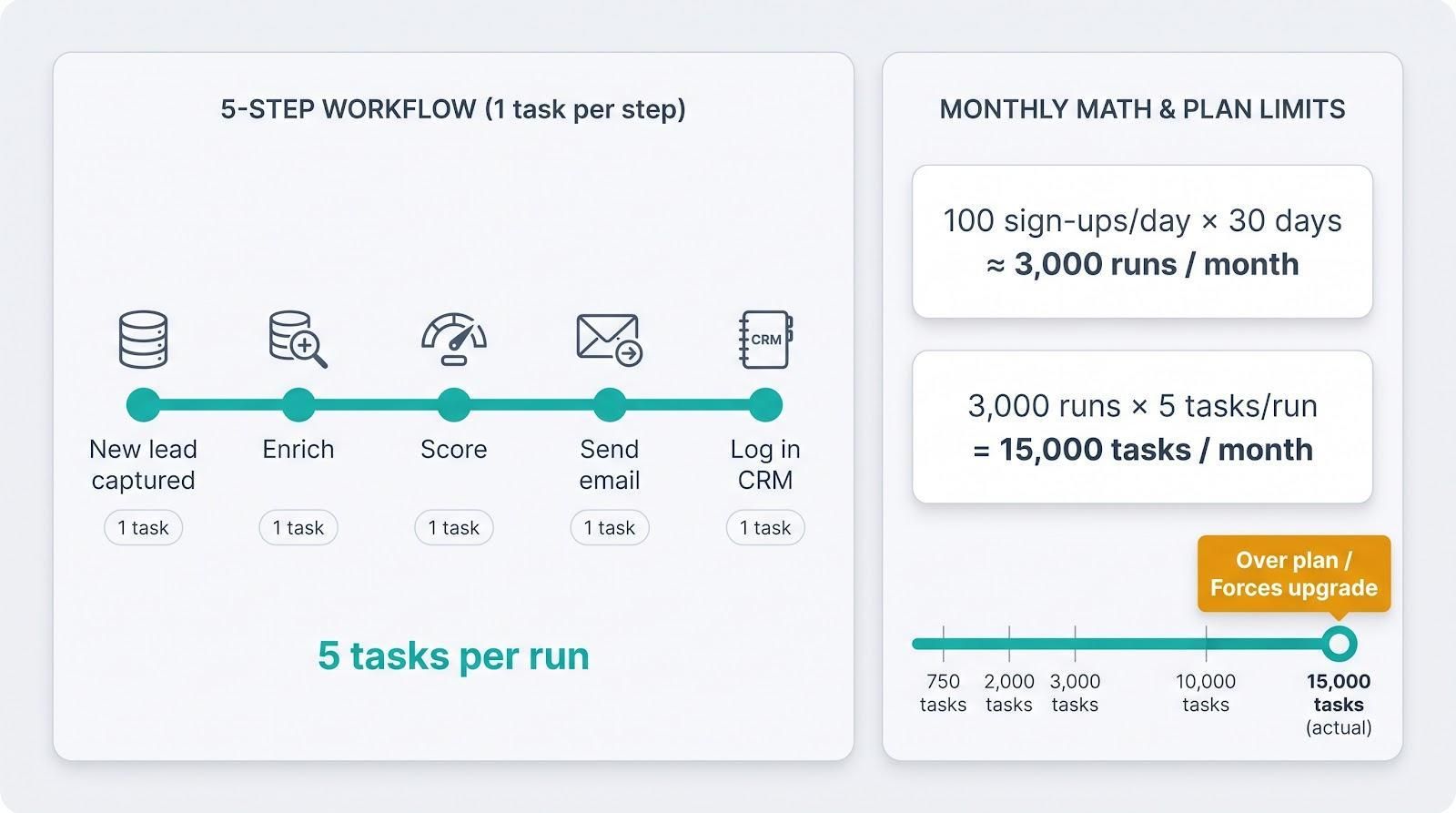
No-code platforms such as Zapier and Make bill by task, meaning each successful action inside a workflow. “New Airtable row” counts as one task; “post to Slack” is another.
Why that matters
A simple five-step Zap that enriches, scores, emails, and logs every new lead burns five tasks per run. At 100 sign-ups a day, that is about 15 000 tasks a month.
Sticker vs. reality
Zapier’s entry plan lists $19.99 per month (annual) for 750 tasks. Move the slider to 3 000 tasks and the cost rises to about $74. Higher-tier plans or pay-per-task overages push the bill even further, especially when workflows call premium apps or AI steps.
Guardrails
- Map the math first. Multiply runs by steps to estimate monthly tasks before clicking “Turn on.”
- Batch low-stakes alerts. Daily digests can cut notification tasks by up to 90 %.
- Audit every quarter. Remove one-off automations that save seconds instead of hours.
Task pricing looks transparent on paper but turns costly in bulk. That reality is another reason the cost of AI platforms for startups hinges on usage patterns, not headline plans.
5. Bundled suite pricing
Some AI tools ride shotgun with software you already pay for. Google Workspace now sells Gemini as a Workspace add-on, while Microsoft 365 bolts Copilot onto Word, Excel, and Teams.
When bundles win
If the team lives in Gmail and Drive, the extra $14 per Workspace Standard seat feels minimal. You gain chat assistance, doc rewriting, and light API calls without changing any workflow.
When bundles backfire
Purchasing a second productivity suite just for the AI doubles your office bill and forces employees to choose which assistant to open. Pick one primary stack and lean in.
Fine print to flag
- Promo cliffs: Microsoft’s $18 Copilot Business intro ends 31 Dec 2026; Google’s Gemini Flash rate doubles on 1 Jan 2027.
- Missing controls: Lower tiers may exclude SSO, audit logs, or DLP you assumed were standard.
- Cascade upgrades: Once AI lands in Docs or Sheets, other teams often request higher licenses. Track those add-ons so enthusiasm does not outpace budget.
Bundled plans simplify invoices only if you are already committed to the underlying suite—another reminder that the cost of AI platforms for startups depends on existing tool choices as much as headline AI fees.
6. Should you pay for custom enterprise pricing?
When a vendor page says “Contact sales,” list price becomes irrelevant. Enterprise tiers bundle SSO, SOC 2 reports, data residency, longer retention, and named support, yet the bill depends on the discount you negotiate.
Deal data from 2026 shows enterprise buyers secure a median 27 % off list, while early-stage teams often pay close to list. That spread confirms how unpredictable this line item can be in the cost of AI platforms for startups.
Custom quotes make sense when auditors or customers demand controls a self-serve plan cannot add, or when you need round-the-clock escalation if the model fails on launch night.
Negotiation checklist
- Spreadsheet every must-have. Price each feature so you know the dollar hit of removing it.
- Ask for tier breakpoints. Higher volumes may unlock lower usage rates.
- Insist on true-up and termination clauses. Startups pivot; you do not want to fund 100 seats after a reorg cuts head-count to 50.
- Push for price protection. Lock renewal caps so a promo year does not revert to list in Year 2.
- Benchmark the discount. If you fall below the 27 % enterprise median, negotiate further.
If the quote remains opaque, consider a self-serve plan plus a narrower compliance add-on such as an SSO plug-in or secure API endpoint instead of signing multi-year, multi-seat minimums.
9 Budget-Friendly Tools & Pricing Models
1. Plus AI — best tool for native PowerPoint and Google Slides decks
By contrast, the engine at PlusAI builds native PPTX files with its own Open XML renderer, so every slide opens directly in PowerPoint or Google Slides without cleanup. Type a prompt, pick a template, and a fully editable deck appears inside the editor you already use.
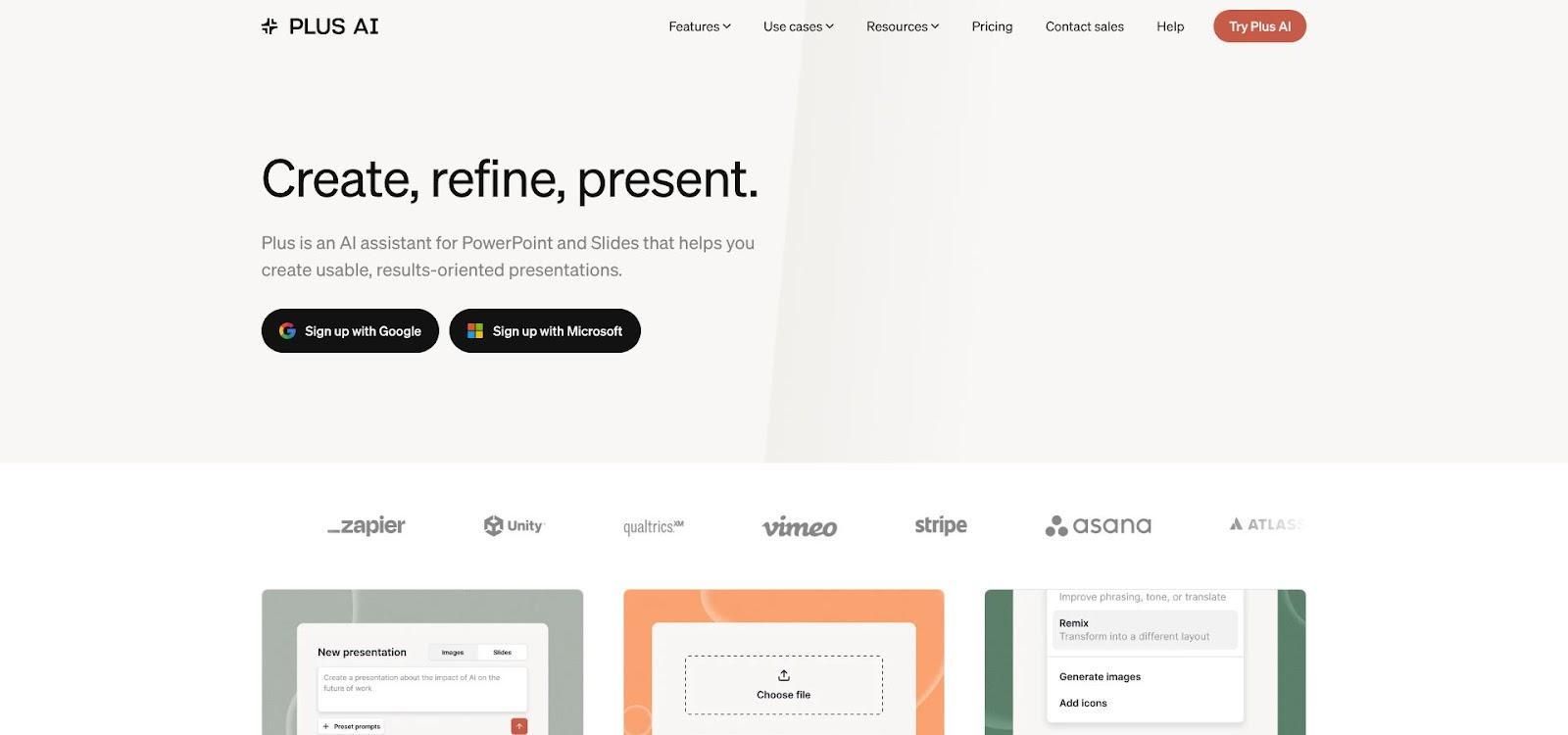
Plus AI native integration inside PowerPoint or Google Slides
Why Plus AI is the presentation default
Most pitch decks, board updates, and sales one-pagers stay in PowerPoint or Google Slides. Many AI design tools force teams onto a new canvas and break brand templates on export. Plus AI keeps you in the editors you already use. Type a prompt, pick a template, and a fully editable deck appears inside PowerPoint or Slides.
Because the output is native, designers adjust spacing, PMs swap charts, and investors never see “exported from Tool X” artifacts. Template matching and layout logic pair with language-model calls so slides ship polished instead of patched together.
What it really costs per month
Plan snapshot (U.S., 14 Oct 2026):
- Basic – $10 per user with annual billing, $15 month to month. Five monthly seats = $75.
- Pro – $25 month to month. Five seats = $125.
Basic includes 1 500 credits; Pro offers 3 000. A new deck typically burns 40–170 credits, so the Pro pool covers about 18–75 decks per month before top-ups.
Monthly billing carries a 25–50 percent premium, yet flexibility helps during fundraising sprints when head count changes weekly.
Hidden costs and smart work-arounds
- Org-wide billing. Any paid workspace counts every member as a seat. Create a “free-viewer” group for interns or contractors.
- Automation drain. API calls, Zapier zaps, or the Presentation Agent consume credits like manual prompts. Set a monthly cap to prevent runaway loops.
- Enterprise extras. Brand kits and white-glove file conversions sit behind a custom quote. Helpful for IPO-ready scale-ups, unnecessary for most seed teams.
How Plus AI stacks up
- Versus Microsoft Copilot. Copilot helps only if you already license Microsoft 365. Plus AI covers PowerPoint and Google Slides in one plan.
- Versus Google Gemini in Slides. Gemini cannot generate native .pptx files; Plus AI avoids export cleanup.
- Versus Canva. Canva excels at social graphics but exports decks as static files. Plus AI keeps every element editable.
Security and admin notes
Plus AI holds a SOC 2 Type II report, encrypts data at rest with AES-256, and supports SSO on higher tiers. Delete requests purge any training data tied to private drafts.
Best stage fit
- Bootstrap. One Basic or Pro seat for fast investor decks.
- Seed. Two to three Pro seats for founders and marketing.
- Series A. Team or Enterprise tier when brand governance matters.
If presentations drive revenue or funding, Plus AI can repay itself the first time an investor compliments the clarity—one more line in the ongoing cost of AI platforms for startups discussion.
2. OpenAI — best choice for combining an employee assistant with a product API
Why OpenAI fits both desk and product
OpenAI covers two workflows with the same models. ChatGPT Business acts as a secure team assistant inside Slack, Google Workspace, and Microsoft 365, while the OpenAI API powers customer-facing chatbots, agents, and features. Marketing polishes copy in ChatGPT; engineering ships a support bot with the identical model; security audits one vendor instead of three.
What it really costs per month
ChatGPT Business lists $20 per user per month with annual payment or $25 on monthly terms and requires two seats minimum. A five-seat workspace therefore runs $125 on monthly billing.
API usage is separate. Using GPT-6.1 Sol rates of $2 per million input tokens and $10 per million output, the 80 / 20 guide split produces:
| Traffic level | Total tokens | Monthly cost |
| Light | 3 M | ≈ $11 |
| Medium | 30 M | ≈ $108 |
| Heavy | 100 M | ≈ $360 |
A typical five-person startup that chats all day and ships a medium-traffic feature spends about $233 per month, comfortably inside the $500 ceiling for the cost of AI platforms for startups.
Hidden costs and smart work-arounds
- Tool calls. Code execution, browsing, or chart generation add per-1 000-call fees. Set spend caps before wide rollout.
- Storage. Uploads above the free quota incur per-GB charges; archive large files externally.
- Search and retrieval. After the free pool, grounded queries cost $10 per 1 000 searches; price chatbots accordingly.
- Premium models. GPT-6 Astra runs about five times Sol’s rate; reserve it for heavy reasoning, not FAQs.
- Regional premiums. US-only processing adds roughly 10 %. Confirm the region at deployment.
Tag each prompt by team or feature in the dashboard to spot runaway loops early.
Security snapshot
OpenAI supplies a SOC 2 Type II report and a data-processing addendum. Business and API data are excluded from future model training by default. Verify the same setting if any free or beta tier is enabled.
Best stage fit
- Explore. One ChatGPT Business seat lets any founder test use cases quickly.
- Build. Add the API when a prototype needs stable latency and version control.
- Scale. Mix Standard and Premium seats so power users pay for speed while casual users stay on $20 plans.
Versatility pays off only when prompts stay tight and models match ROI, so cap tool calls and monitor usage tags to keep OpenAI as a partner, not a surprise expense.
3. Anthropic Claude — best for long documents and complex analysis
Why Claude excels at wall-of-text work
Technical specs, legal agreements, and 50-page market reports rarely fit inside a short chat prompt. Claude’s huge context window accepts the whole file at once then answers with summaries, tables, or follow-up questions that show it read the brief. Guardrails favor cautious, citation-style replies, lowering the risk of hallucinations in a board memo.
Founders lean on Claude to red-line contracts and draft investor updates. Analysts use Projects to pin background PDFs so every query draws from the same knowledge base.
What it really costs per month
Plan snapshot (U.S., 14 Oct 2026):
| SKU | Price | Notes |
| Claude Pro | $20 per user monthly | No seat floor |
| Claude Team | $30 per user monthly | 5-seat minimum → $150 |
API rates — Sonnet 5 at $2 per million input and $10 per million output — match GPT-6.1 Sol. The medium scenario (30 M tokens, 80 % input) costs about $108. Stack that on Team and a document-heavy startup spends roughly $258 per month.
Batch jobs run overnight are 50 % cheaper, and cache reads cost one-tenth of writes.
Hidden costs and smart work-arounds
- Five-seat floor. Downgrade lurkers to the free tier and share summaries in Slack.
- Cache math. Write equals full price, read equals 10 % of price. Point repeat queries at read endpoints to cut bills in half.
- Model drift. Opus costs about 2.5× Sonnet. Lock defaults and require admin approval for upgrades.
- Prompt bloat. Long instructions multiply input tokens. Store boilerplate in system prompts or references instead of pasting it every time.
Security snapshot
Claude Team and API carry SOC 2 Type II and ISO 27001/42001 certifications. Commercial data never trains future models.
Best stage fit
- Seed, document-heavy. One Pro seat per founder, upgrade to Team when head count hits five.
- Series A legal or research. Team plus API, with batch processing to bank the 50 % discount.
- Regulated industries. Enterprise tier for SSO, audit logs, and custom retention.
Claude shines when reading beats writing. For startups where analysis drives value, its long-context pricing fits neatly within the broader cost of AI platforms for startups conversation.
4. Google Gemini — best low-cost AI for Google Workspace teams
Why Gemini often feels “already paid for”
If your startup runs on Gmail, Docs, and Drive, Gemini turns on like a hidden feature rather than a new expense. Click “Help me write” in a doc and it drafts email, rewrites copy, or summarizes research without leaving the editor. Slides gains image generation and speaker notes, Sheets cleans messy exports, all inside the permissions and version history you already manage.
Developers get an added perk: Gemini 3.1 Flash-Lite starts at $0.25 per million input tokens and $1.50 per million output, roughly $15 for the guide’s 30-million-token workload.
What it really costs per month
| Component | Price (Oct 14 2026) | Five-seat example |
| Workspace Business Standard (flex billing) | $16.80 per user | $84 |
| Gemini add-on | $0 through 31 Dec 2026 | $0 |
| API usage – Flash-Lite, 30 M tokens | — | $15 |
Total: about $99 per month, the lowest full-suite total in this guide.
Hidden costs and smart work-arounds
- Grounding fees. After the free pool, Search or Maps grounding costs $14 per 1 000 calls. Cache static stats in Sheets instead of querying live each time.
- Promo cliffs. The zero-cost Workspace bundle and Gemini 3.8 Flash promo end 1 Jan 2027. Model rates double; add a what-if row that includes plus $5 per seat and a 100 % token increase.
- Feature gaps. Starter tiers lack Vault retention and advanced admin. Confirm that your tier exposes the Gemini panel before moving files.
Security snapshot
Gemini inherits Google Cloud SOC 2 Type II and ISO 27001 certifications, but scope varies by SKU. Check the Trust Center to confirm your plan is in scope.
Best stage fit
- Bootstrap. Free API tier plus Workspace Starter for founders who draft investor emails.
- Seed. Business Standard for everyone, Flash-Lite API for prototypes.
- Series A. Upgrade select seats to Plus when Vault is needed, then revisit budgets when promos expire.
Gemini is a bargain for teams already living in Google. If Slack and Outlook dominate your day, Microsoft 365 Copilot may prove simpler than adding a second suite.
5. Microsoft 365 Copilot — best option for Office-first stacks
Why Copilot fits Microsoft-centric teams
When calendars, docs, and chats already sit in Microsoft 365, Copilot feels like an upgrade, not a migration. The assistant appears inside Word, Excel, PowerPoint, Outlook, and Teams, answering prompts such as “Summarize this 40-thread email.” Because it relies on existing SharePoint and OneDrive permissions, security teams avoid fresh audits each time someone pastes a link. Onboarding is a quick ribbon tour, not a new-tool rollout.
Developers build tenant-grounded agents in Copilot Studio; Finance gets pivot-table explanations; Support surfaces troubleshooting tips mid-Teams call.
What it really costs per month
Copilot is an add-on. You must already license Microsoft 365 Business Standard or higher.
| Component | Price (Oct 14 2026) | Five-seat example* |
| Business Standard (annual) | $12.50 per user | $62.50 |
| Copilot add-on (promo, annual) | $18.00 per user through 31 Dec 2026 | $90.00 |
| Subtotal | ≈ $152.50 |
*Month-to-month: Copilot rises to $25.20 per user and the bundle totals about $185.
Hidden costs and smart work-arounds
- Prerequisite licensing. Outlook-only or Office 2019 users must upgrade to Microsoft 365 first, often doubling the line item.
- Metered agents. Copilot Studio can spin up Azure Logic Apps, Functions, or Cognitive Search. Set spending alerts and throttle concurrency before launch.
- Promo cliff. The $18 rate ends 31 Dec 2026; Microsoft lists $21 as the regular annual price. Model year-two costs now.
- Annual commitments. Lowest prices lock you in for 12 months. Keep at least one seat pool on monthly terms so you can downsize after a reorg.
Quick win: license only heavy Word, Excel, or Outlook users—founders, finance, ops. Read-only staff can open Copilot-authored docs without an add-on seat.
Security snapshot
Copilot data stays inside the tenant boundary. The service inherits ISO 27001 and SOC 2 Type II attestations, though live web grounding may reach external APIs. Confirm data-location settings in the Compliance Center and disable optional web access for regulated teams.
Best stage fit
- Microsoft-native seed teams. Promo add-on for founders while interns stay on standard Office.
- Series A with strict IT. Business Premium plus Copilot for everyone, with Azure budgets capped at the resource group.
- Cross-suite hybrids. Skip Copilot unless you retire Google; paying both vendors usually inflates the total cost of AI platforms for startups.
If Monday mornings still start with “Share the deck in PowerPoint, please,” Copilot is the most friction-free way to embed AI in that workflow.
6. GitHub Copilot — best for startup software development
Why Copilot accelerates coding
Type a function header and Copilot suggests the body before you finish the comment. The extension reads surrounding code, repo history, and open files, so its completions match your architecture, not generic snippets. Junior devs ship MVPs faster, senior engineers off-load boilerplate and focus on core logic. Copilot runs inside VS Code, JetBrains IDEs, and the GitHub web editor, so the learning curve is minimal—press Tab and watch code appear.
What it really costs per month
| Plan | Seat price | Included credits | Five-seat example* |
| Business | $19 per user | 1 900 | $95 |
| Enterprise | $39 per user | 3 900 | $195 |
*Prices from GitHub Copilot page, 14 Oct 2026.
Credits cover chat, agents, and code-review comments; autocompletions remain unlimited. Overage is $0.01 per credit, pooled at the org level.
Example: A pull-request review costs about 50 credits. Ten reviews a day across five engineers equals roughly 15 000 credits, or $150 overage on top of the $95 base.
Hidden costs and smart work-arounds
- Agent sprawl. Long-running chats sip credits. Encourage devs to close sessions when tasks finish.
- Actions minutes. AI-opened PRs can trigger full CI. Gate heavy pipelines behind human approval to avoid double billing.
- Idle seats. Copilot counts org-level seats. Off-board interns promptly.
- Frontier models. Experimental models cost extra credits; keep them disabled until needed.
- Credit caps. Set an org-wide cap slightly above average use; GitHub emails admins at 75 % so you can rein in runaway tasks.
Security snapshot
Copilot Business and Enterprise hold SOC 2 Type II certifications. Admins can block suggestions that resemble public code and require reference tracking for IP audits.
Best stage fit
- Solo / hobby. Free tier with 2 k completions.
- Bootstrap. Pro seats for contractors.
- Seed and Series A. Business with pooled credits and overage caps; upgrade to Enterprise only when SAML or audit logs become mandatory.
If your backlog teems with boilerplate tickets, Copilot can repay its monthly seat cost within a sprint—just keep an eye on the credit meter.
7. Notion AI — best for knowledge bases, research, and internal agents
Why Notion turns scattered docs into answers
Early-stage teams juggle Google Docs, Slack threads, and buried PDFs. Notion AI pulls that chaos into one searchable workspace, then layers an assistant on top: ask “What did we promise Acme?” and get an answer with source links. Because the AI lives where roadmaps and meeting notes already sit, it cross-references projects automatically. The new Workers feature even runs lightweight agents that update docs from incoming tickets while the team sleeps.
What it really costs per month
| Plan | Price (Oct 14 2026) | Five-member example* |
| Business + AI | $23 per member monthly (annual) | $140 |
*Source: Notion pricing page.
Business includes a pooled credit allowance; heavier usage draws from a paid balance. A Worker run costs about $0.002. At 4 000 runs per month that adds roughly $8.
Premium-model surcharges pass through at vendor rates, so Sonnet or GPT-6 upgrades can double per-response cost.
Hidden costs and smart work-arounds
- Business gate. Free and Plus tiers tease AI but lock power behind Business. License only roles that need deep search or agents.
- Credit creep. Add “changed since last run” checks so idle loops do not nibble credits all weekend.
- Premium toggle. One switch upgrades the whole workspace to a higher-cost model; restrict that permission to admins.
Use the credits dashboard to tag each Worker by project and spot spikes before the next billing cycle.
Security snapshot
Notion Business and Enterprise carry SOC 2 Type II plus ISO 27001/27017/27018/27701. Data stays in the region set at workspace creation; external connectors follow their own vendor terms.
Best stage fit
- Bootstrap. Free tier with occasional pay-per-use prompts.
- Seed. Business for founders and ops; others stay on Plus.
- Series A. Business seats for the wider team, Workers with monthly credit caps.
When Slack repeats the same status question twice a day, letting Notion answer automatically saves real hours and keeps the overall cost of AI platforms for startups in check.
8. Zapier — best for automating AI workflows without an engineering project
Why Zapier connects your stack in an afternoon
Manually copying data between Slack, HubSpot, Stripe, or a GPT endpoint wastes hours. Zapier replaces that work with drag-and-drop automation: choose a trigger (New row in Airtable), pick an action (Generate summary via OpenAI, then post to Slack), and hit Save. With 7 000-plus integrations in the dropdown, ops leaders can launch workflows while engineers focus on product code.
What it really costs per month
| Plan | Tasks per month | Annual price | Monthly price |
| Professional | 2 000 | $19.99 | $29.99 |
| Team | 3 000 | ≈ $74 | ≈ $89 |
A three-step Zap—“Stripe payment → HubSpot lookup → Slack alert” — burns three tasks. At 100 checkouts a day you consume about 9 000 tasks, forcing an upgrade or pay-per-task overage. Premium apps (Salesforce, NetSuite) or AI steps add another surcharge, and external GPT calls bill tokens on top.
Hidden costs and smart work-arounds
- Multi-step inflation. Filters, paths, and loops each add tasks. Consolidate logic or use Transfer for bulk jobs to cut counts in half.
- Premium badges. Apps with the yellow-lightning icon require a higher tier even if the Zap fires once a month. Check every logo before publishing.
- Unhandled errors. Failed steps still count. Wrap risky calls in Zapier’s Try / Except pattern so a bad response ends runs early.
Add a dashboard that multiplies runs × actions per run for every Zap to catch runaway workflows before they inflate the overall cost of AI platforms for startups.
Security snapshot
Zapier’s Trust Center hosts its SOC 2 report and data-flow diagrams. Higher tiers support SSO and app-level permissions, but each connected tool brings its own security posture. Limit OAuth scopes to what the workflow needs.
Best stage fit
- Bootstrap. Free plan for low-volume lead capture or Slack alerts.
- Seed. Professional plan with 3–5 critical Zaps under 3 000 tasks.
- Scale-up. Compare Team against Make or n8n once tasks exceed 10 000 or when per-task costs outstrip a developer day to build native integrations.
9. Canva — best for broad marketing and creative production
Why Canva lets non-designers tell the brand story
Early-stage startups rely on strong first impressions. Canva gives every founder, SDR, and support rep a drag-and-drop studio stocked with thousands of on-brand templates. Need a LinkedIn carousel, podcast cover, or Product Hunt banner in 10 minutes? Pick a template, swap colors, export, done.
AI features speed things up. Magic Design drafts social posts from a short prompt, Magic Edit rewrites text or swaps backgrounds, and the AI Video suite turns a script into clips sized for Reels, Shorts, and Stories. Stored brand kits (logo, fonts, palette) keep outputs consistent without opening Figma.
What it really costs per month
| Tier | Price (14 Oct 2026)* | Key AI allowance | Five-seat example |
| Free | $0 | 20 Standard or Premium uses | — |
| Pro (monthly) | about $15 per user | 200 Premium + 20 Ultra | about $75 |
*Live checkout price localizes, so verify at purchase.
Pro’s allowance is generous if you batch design work, but not infinite. After the meter reaches zero you can:
- Buy the AI Pass (multiplies Premium and Ultra quotas, nearly doubling the subscription)
- Pay per additional use at dynamic local rates
Daily social teams often exhaust Premium credits. Repurpose successful templates before generating fresh art for every post.
Hidden costs and smart work-arounds
- Weighted quotas. One Ultra video can equal ten Premium images, so track unit weights.
- Local pricing and tax. Checkout price varies by region; export budgets in USD for an apples-to-apples view.
- Pay-per-use creep. Extra credits cost more than base Pro, so set a ceiling.
- Export cleanup. Canva exports decks as static files. Use Plus AI when .pptx fidelity matters.
Security snapshot
Canva Pro includes SOC 2 Type II and ISO 27001 for business users. Enterprise adds SSO, SCIM, and audit logs.
Best stage fit
- Free. Side projects or bootstrap teams with occasional assets
- Seed. Five Pro seats for founders and marketing, with Premium usage monitoring
- Growth. Add AI Pass only when monthly overages exceed the pass price
Canva keeps marketing fresh without hiring a designer, and its predictable quotas help control the overall cost of AI platforms for startups.
Conclusion: which pricing model is cheapest?
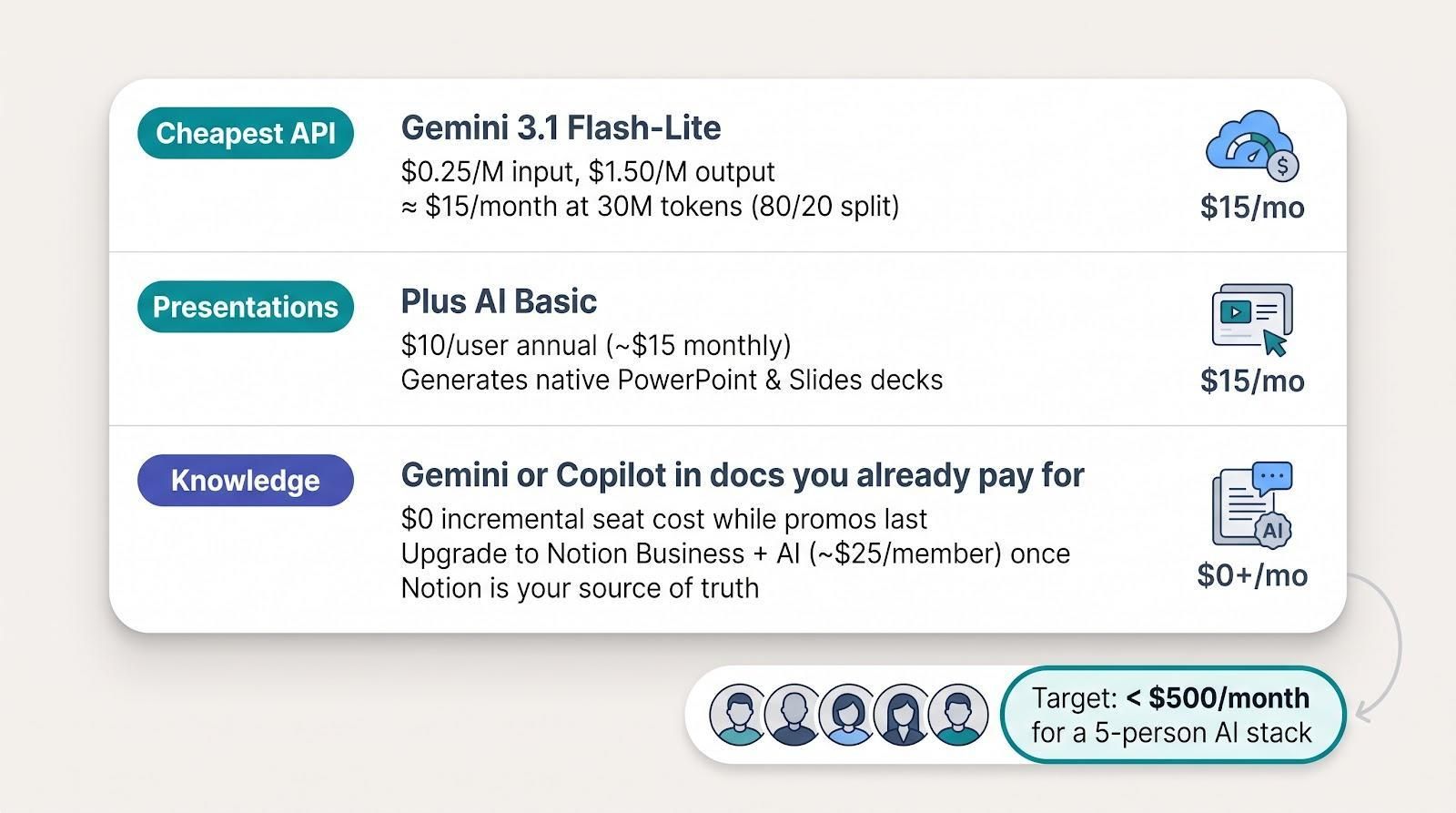
Cheapest pay-as-you-go API
Need raw model power without seats attached? Gemini 3.1 Flash-Lite leads today at $0.25 per million input tokens and $1.50 per million output. The guide’s 30-million-token medium workload (80 % input, 20 % output) costs about $15 per month—the lowest dollars-per-token in this roundup. You trade away some deep reasoning compared with premium models, so match tier to ROI.
Lowest presentation entry point
For investor decks and board slides, Plus AI Basic at $10 per user on annual billing (about $15 month to month) is the least-expensive way to generate native PowerPoint and Google Slides files. Canva Free looks cheaper at sign-up, but exported decks require cleanup in PowerPoint—time that usually costs more than Plus AI’s monthly fee.
If you build decks only once a quarter, use the seven-day Plus trial with its 1 000 free credits, then keep one Basic seat only when fundraising heats up.
Cheapest company-knowledge option
Already paying for Google Workspace or Microsoft 365? Turn on Gemini or Copilot chat inside Docs or Word first, adding $0 incremental seat cost while current promos last. Upgrade to Notion Business + AI (about $25 per member) only after Notion becomes your single source of truth. Running both suite assistants and Notion splits knowledge and inflates the total cost of AI platforms for startups without clear ROI.
Rule of thumb: choose one source of truth and bring the assistant to the docs, not the other way around.


