
business resources
AI Video Generator Free Trial: Test One Real Business Brief Before You Pay
08 Sept 2026

An AI video generator free trial is only worth the calendar time if it answers one commercial question: can this tool finish one real business brief well enough to justify paying? Most search results for this query are product pages that invite you to start immediately. That is a checkout path, not a buying method.
An AI video generator free trial can be free credits, a preview, a dated free window, or a cheap paid pass. Those four offers do not prove the same thing. TapVid publishes more than one public entry offer, and those pages do not all describe the same clock. Read the current checkout screen before you spend, then run one frozen brief as far as that offer’s remaining unit allows.
What an AI video generator free trial can actually prove
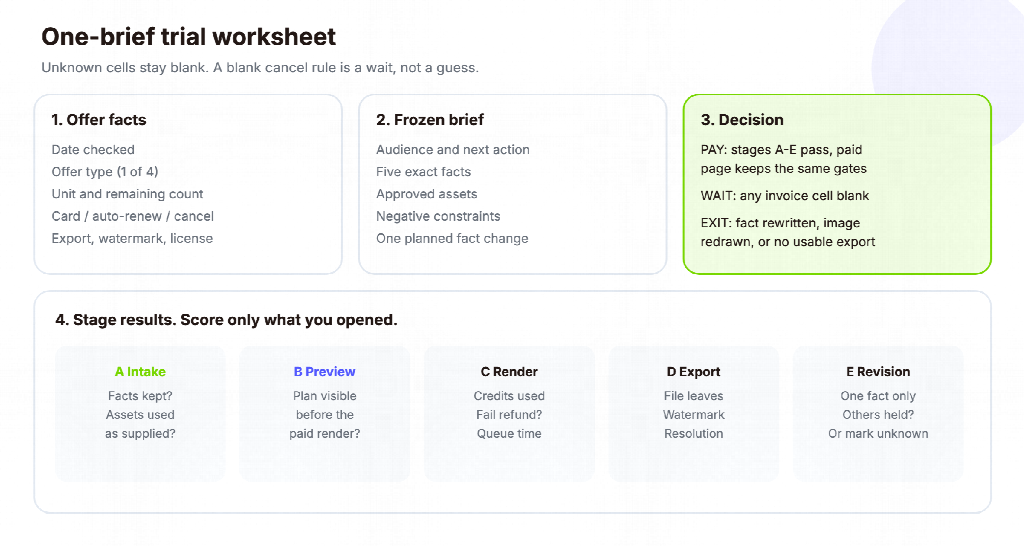
A useful trial proves a delivery path, not a vibe. The path has five inspectable stages: the tool accepts your approved inputs, it shows a reviewable plan or preview, it renders a file you can open, it lets you change one fact without restarting the whole job, and the paid plan does not silently remove a gate you just used.
That is a narrower test than a ranking of “best free AI video tools.” A ranking compares advertised allowances. A trial for a small business buyer compares one job you already need to ship: a product page video, a sales deck follow-up, or a short SOP update. If the trial cannot finish that job, more credits next month will not repair the workflow.
Current search results for this query are still mostly product landings that try to start a trial. This article is trying to stop you from paying for the wrong kind of trial. Named rankings go stale inside a day. Use the offer type and the brief, not a remembered results list.
Four offer types buyers mix up
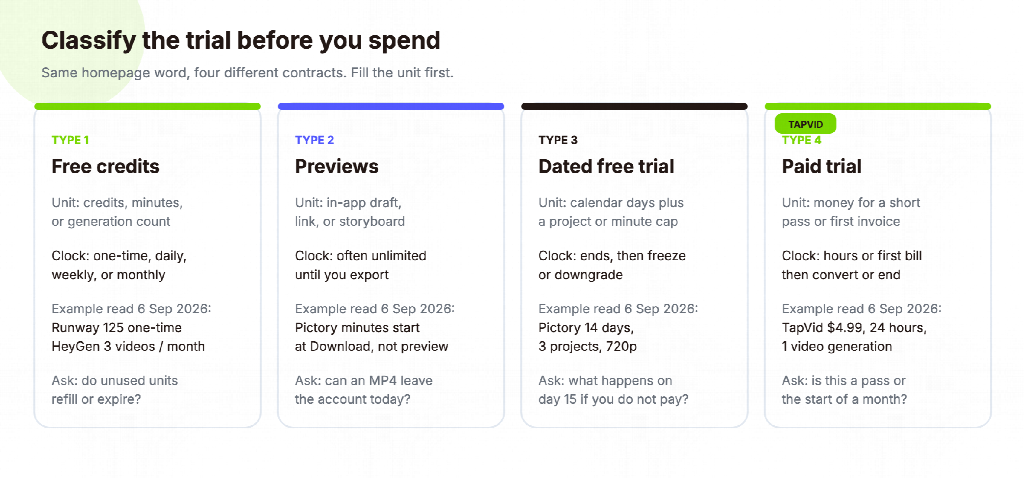
Before you paste a script, classify the offer. The same homepage word “free” can mean four different contracts.
Free credits. You receive a credit, minute, or generation count. The clock may be one-time, daily, weekly, or monthly. Runway’s public pricing page on 6 September 2026 lists a Free plan with 125 one-time credits and 5 GB of storage. HeyGen’s public pricing page the same day lists a $0 plan with 3 videos per month, each up to 1 minute, and no credit card required. Those are standing or one-time allowances, not a seven-day subscription holiday.
Previews. You can watch a draft in the browser, share an in-app link, or scrub a storyboard, but the download, watermark, resolution, or commercial license stays locked. Pictory’s official pricing FAQ says previewing and sharing inside the account does not use video minutes. Minutes are deducted when you export. If your buyer needs an MP4 in a sales email, a preview-only pass fails even when the draft looks finished.
Time-limited free trials. The vendor gives calendar access to paid-like features, then freezes or downgrades the account. Pictory’s official pricing page on 6 September 2026 still publishes a 14-day free trial, 3 video projects, and a compare row that lists 15 video minutes, a 5-minute max length, and 720p export on that trial column. A dated window is useful when you need to test review permissions. It is not the same as a refillable free plan.
Paid trials. You pay a small amount for a short pass or a first invoice that can convert later. On 6 September 2026, the TapVid homepage pricing block listed a new-user Trial at $4.99, valid for 24 hours, with 1 video generation and “Everything in Pro.” The official pricing page compare table listed the same first-time trial as “$4.99 · 1 video,” and the FAQ said the $4.99 trial pass is a one-time purchase for one video generation, valid for 24 hours. That is a paid trial, not seven free days.
Do not borrow a competitor’s clock. ReelsBuilder’s public product page uses a “Start 7-Day Free Trial” label. Some tool pages use the same query as a title without publishing a stable day count, credit number, or card rule. If the checkout screen does not state the unit, treat the offer as unclassified.
Verify the current checkout, not last week’s headline
Vendor pages disagree with each other, and search snippets go stale. This article does not include a documented or hands-on TapVid test of a generation run. Public pages for the same offer were compared on 6 September 2026: the live homepage, the official pricing page, and the free-tool page. Three statements on those pages must stay separate.
On the homepage and pricing page, the first-time trial is a $4.99, 24-hour, one-video pass. The pricing FAQ also says unused subscription credits do not roll over, add-on packs stay valid for 12 months, and canceling a plan leaves the account active until the end of the current billing period, then reverts to Free. Failed or timed-out renders return credits.
On the free AI video generator page, TapVid describes a different entry: 300 one-time credits, valid for 7 days, no credit card to start, about one short video, 720p export, a watermark, and a 1-minute clip cap. That is a time-boxed free credit grant. It is not a seven-day free trial of Pro, Max, or Ultra, and it is not the $4.99 pass.
Those two TapVid entries are not the same measurement instrument. The $4.99 pass includes one video generation. On that offer, Stage E is unknown by construction. Do not use it to judge editing cost, and do not mark PAY if a second render would change the invoice. The 300-credit grant is a time-boxed free allowance. At the published rate of 3 credits per second, a 45-second brief uses about 135 credits, so one short revision may still fit. Leftover credits are still not a week of Pro.
Those pages also disagree on adjacent plan copy. The free-tool comparison table showed Pro at $39 per month, while a later card on the same page, plus the homepage and pricing page, showed Pro at $49 per month on the monthly toggle. Use the checkout you are about to pay, not a remembered number from another URL.
The same caution applies to other vendors. Product landings often sell the word “free.” Only the current plan page plus the in-app credit and export screens decide what you can actually download. If the public page and the account screen disagree, believe the screen that appears after you click Generate or Export, and keep the discrepancy in your notes.
Build one real business brief before you spend
Do not evaluate a trial with a prompt you would never publish. Write one brief that already has an owner, an audience, and a next use.
Use this frozen pack:
- Audience and next action. Who watches, and what should they do in the next 24 hours?
- Approved facts. Product name, model code, one number with a unit, one price, one policy sentence.
- Approved assets. One still, one logo or UI crop, and the source document or URL those facts came from.
- Negative constraints. Claims you must not add, images you must not invent, and words that cannot be rewritten.
- Delivery rules. Aspect ratio, caption need, language, watermark rule, and whether the file must leave the tool.
- One planned change. The single fact you will edit after the first render, such as a price or a model code.
Example brief, labeled as an example, not a customer case. A four-person industrial hardware team needs a 45-second page video for a drive-wheel SKU. The audience is a purchasing engineer. The next action is a quote request. The frozen facts are: product name “Apex Drive Wheel,” model DW-4408, continuous torque 18 N·m, list price $219, and the sentence “IP rating is specified per order, not in this video.” The assets are one approved product photo and the public spec PDF. The constraint is: do not say waterproof, do not invent a second SKU, and do not redraw the product. The planned change is $219 to $229 after legal updates the list price.
That brief is small enough for a first export on either TapVid entry. Only the 300-credit grant is likely to have leftover units for the planned price change. The $4.99, one-video pass can hold the first cut. It cannot finish the revision stage. If your real job is a talking-head thought piece or a cinematic product film, write that brief instead. The method stays. The inputs change.
Run the brief through preview, render, export, and one revision
Spend the trial in order. Do not burn the only paid generation on a vague prompt.
Stage A: intake. Upload the real assets and paste the approved sentences. Record whether the tool asks for a script, a prompt, a URL, or a document. Record whether it rewrites the model code or “improves” the policy sentence. A rewrite here is already a fail for product, legal, or training content.
Stage B: preview or plan. Look for a script, outline, scene list, or in-browser preview before the chargeable render. If the only next button is Generate, you are buying a lottery ticket. If you can see which sentence sits on which asset, a reviewer can reject the plan for free.
Stage C: render. Use the shortest duration that still includes the model code, the number with a unit, and the price. Record credits or minutes consumed, queue time, and whether a failed job returns the balance. TapVid’s pricing page states failed or timed-out renders return credits. Other vendors need their own current terms.
Stage D: export. Download the file. Check resolution, watermark, captions, and whether the MP4 can leave the account. HeyGen’s Free plan page does not advertise watermark removal. That removal appears on Creator and above. Pictory’s trial compare row lists 720p. TapVid’s free-tool page lists 720p with a watermark. TapVid’s paid-plan table lists 1080p and watermark-free exports. If you need a clean file for a landing page, the free or trial export rule is the test, not the homepage demo reel.
Stage E: one revision. Change only the planned fact. Ask the tool to keep every other sentence and the supplied photo. Record whether one scene updates or the whole video regenerates, whether you can compare versions, and whether the second render spends another full credit. A 24-hour, one-video paid trial has no budget for this stage. Stop after export and leave revision blank. Do not invent a passing score. Run Stage E only when unused units remain after export, as they may on a 300-credit grant.
Fill the worksheet with what you saw. Leave gaps blank. Blank is more useful than a guessed “looks easy to edit.”
What a short trial cannot tell you
A one-video or three-video pass cannot prove monthly capacity, team review, or next quarter’s model access. Queue priority, collaboration, commercial terms, data retention, and support often change on paid plans. The TapVid pricing FAQ says add-on packs are available to subscribers only. A trial that feels generous can still block the top-up you would need in week three.
A trial also cannot certify conversion, search rankings, or “no review needed.” Those claims need a later measurement or a contract. The useful outcome of a trial is a smaller uncertainty: this tool can or cannot take our approved pack to an export we would actually send.
If the vendor’s free page and paid page describe different products, re-run the brief after you pay, or refuse to pay until the sales note lists the model, export, and revision behavior in writing. Do not assume the $4.99 pass, the 7-day credit grant, and the $49 month are the same workflow with the watermark removed.
How this differs from free-tool lists and nine-test buying guides
TapVid’s owned guide “Free AI Video Generator in 2026: What’s Actually Free vs. a Trial” classifies recurring free plans, one-time credits, in-app quotas, and self-hosted models across several vendors. Use that page when the job is to keep working at $0. This article assumes you are already close to paying and need one brief to decide.
A published guest article, “AI Explainer Video Generator Buying Guide: 9 Tests Before You Commit,” scores source-pack fidelity, negative constraints, scene correspondence, reviewable plans, change blast radius, job isolation, failure handling, formats, and approved-video cost. Those tests are for choosing production software. Do not rerun all nine inside a 24-hour, one-video pass. You will fake completeness.
This trial method has a different unit: one brief, four offer types, five stages, and a pay or exit rule. If you later shortlist two tools, you can promote the winner into a longer buying pilot. Do not start with the long pilot while the offer type is still unknown.
Pay, wait, or exit
Pay when intake, preview, and export passed, the paid plan’s public page still includes those gates, and Stage E either passed or is not part of this purchase. Confirm cancel, rollover, and commercial terms on that page the same day. A one-generation pass cannot prove Stage E. If a later edit would change the invoice, that pass is a WAIT, not a PAY.
On TapVid’s $4.99, 24-hour, one-video pass, stop after export and leave revision blank. On the 300-credit grant, run Stage E only if unused credits remain. Do not treat leftover credits as a Pro month.
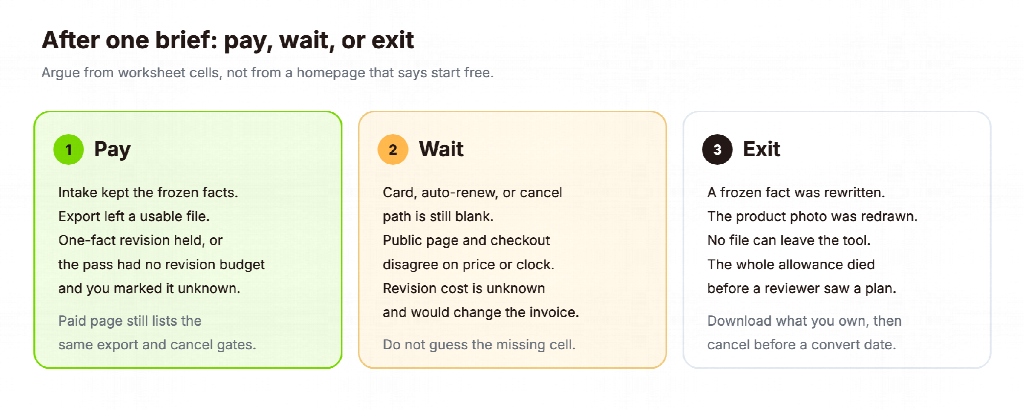
Wait when any cell that would change the invoice is blank: card capture, auto-renew, watermark, commercial use, or whether a revision spends a second full charge. A blank cancel rule is a procurement issue, not a creative issue.
Exit when the tool rewrites a frozen fact, redraws the supplied product image, cannot export a file your channel accepts, or spends the whole allowance before a reviewer sees a plan. Exit is cheaper than a month of cleaning invented claims.
If you still have unused credits after an exit, download whatever you own and cancel before a reminder converts into a subscription. Pictory’s FAQ says videos are yours to keep, but you must download them before cancellation because projects are deleted. Other vendors need their own current policy. Check that sentence before you click Cancel.
A trial is a measurement instrument. Use it on one real brief, then keep the worksheet. The next purchase meeting should argue from those cells, not from a homepage that says “start free.”
Frequently Asked Questions
Does TapVid offer a seven-day free trial?
Not as a seven-day free subscription of a paid plan, based on the official pages read on 6 September 2026. The homepage and pricing page describe a $4.99, 24-hour, one-video trial pass for new users. The free-tool page describes 300 one-time credits that stay valid for 7 days. Those are different offers. Do not treat a credit expiry window as a week of Pro. The $4.99 pass cannot finish Stage E. The credit grant may have leftover units for one short revision. Neither is a week of paid-plan features.
Is a free AI video generator the same thing as a free trial?
No. A free generator can be a standing $0 plan, a one-time credit dump, or a preview. A free trial is usually a dated window or a limited project count that ends. HeyGen’s $0 plan with 3 videos per month is a free plan. Pictory’s 14-day, 3-project offer is a time-limited trial. Classify the unit before you plan a weekly workflow around it.
Should I enter a credit card to start?
Only after you read the cancel and convert language on the checkout screen. HeyGen’s Free FAQ says no card is required. Pictory’s trial copy also says you can start without a card. A paid trial such as TapVid’s $4.99 pass is a purchase. If the screen starts a subscription after 24 hours or 14 days, record the date and the cancel path before you generate.
How long should the test video be?
Long enough to include every frozen fact, short enough to leave budget for export and, if possible, one revision. For the example drive-wheel brief, 30 to 45 seconds is enough to hold a model code, a torque figure, a price, and a policy sentence. A 5-second cinematic clip cannot test those facts.
What if the trial includes only one generation?
Use it on the frozen brief, not on a style experiment. Skip the revision stage and mark it unknown. A one-generation paid trial can still fail the job at intake or export. It cannot prove editing cost. Do not mark PAY if that missing cell would change the invoice. TapVid’s $4.99 pass is this case.
Can I compare five tools in one afternoon?
You can open five pricing pages. You cannot run five honest briefs. Two tools and one shared brief beat five unfinished signups. If search keeps sending you to new “free trial” landings, stay with the worksheet instead of collecting accounts.
What should I do after a passing trial?
Buy the smallest plan that keeps the export and revision behavior you just used, then rerun the same brief once on the paid plan. If the paid model, watermark, or editor changes, you learned that in the first invoice instead of the third campaign. If Stage E stayed blank, do not call the trial a pass on editing. Confirm revision on the paid plan or keep waiting.


