
resources
How to Translate Marketing Videos Without Localizing Your Whole Library
08 Sept 2026

The way to translate marketing videos at a sensible cost is to translate fewer of them. Sort the library first, and the sorting rule is not price per minute. It is whether each video will have a page that can rank in that market, and whether the value of the video sits in the words at all.
This is for B2B marketing teams with a library that already exists and a request to make it work in three or four more markets. It assumes the videos are made and published. Commissioning new footage per market, and translating a video someone else owns, are different problems.
Key takeaways
- Cost per minute is the wrong first question. Coverage is a budget decision; sequence is a results decision.
- Google will not index a video whose watch page is not already performing. Translating the audio and leaving the page in English wastes both.
- The audio is the part that automates. On-screen graphics, end cards and captions are the work that stays with you.
How do you translate marketing videos without doing all of them?
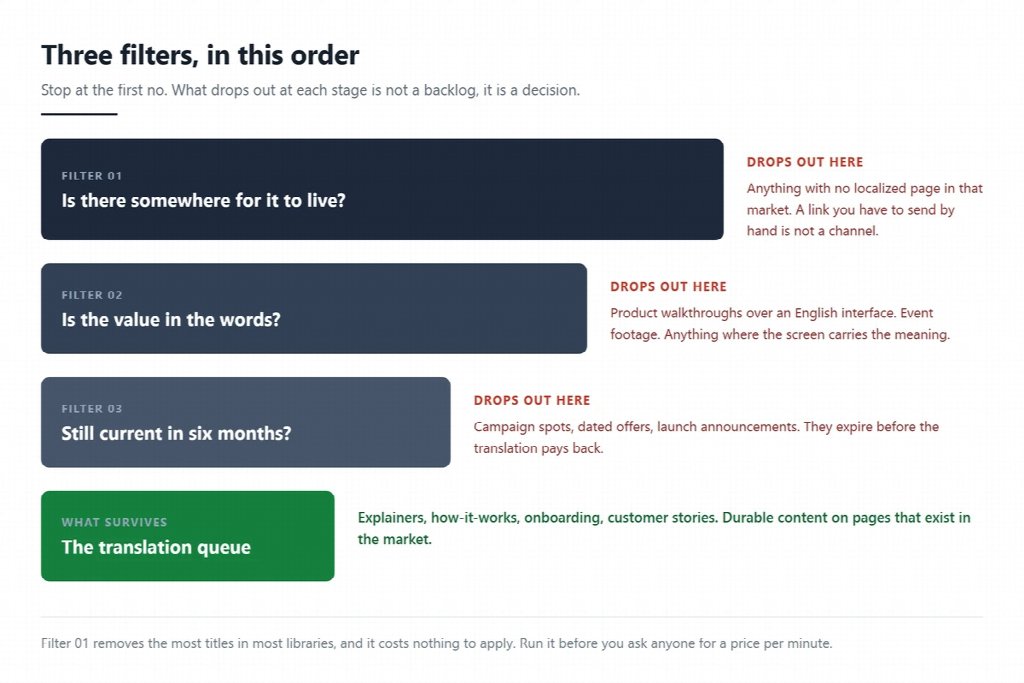
Run the library through three filters, in this order, and stop at the first no.
- Is there somewhere for it to live? A translated video needs a translated page. If nothing in that market will host it, the clip has no route to an audience beyond a direct link you send manually.
- Is the value in the words? A talking-head explainer is almost entirely words. A product walkthrough is mostly a screen, and translating the voice over an English interface leaves the viewer no better off.
- Will it still be current in six months? A campaign video with a dated offer will expire before the translated version earns anything back. An onboarding or how-it-works video will not.
Three yeses and it goes in the queue. One no and it waits, which is a decision rather than a backlog.
Score the library before you spend anything
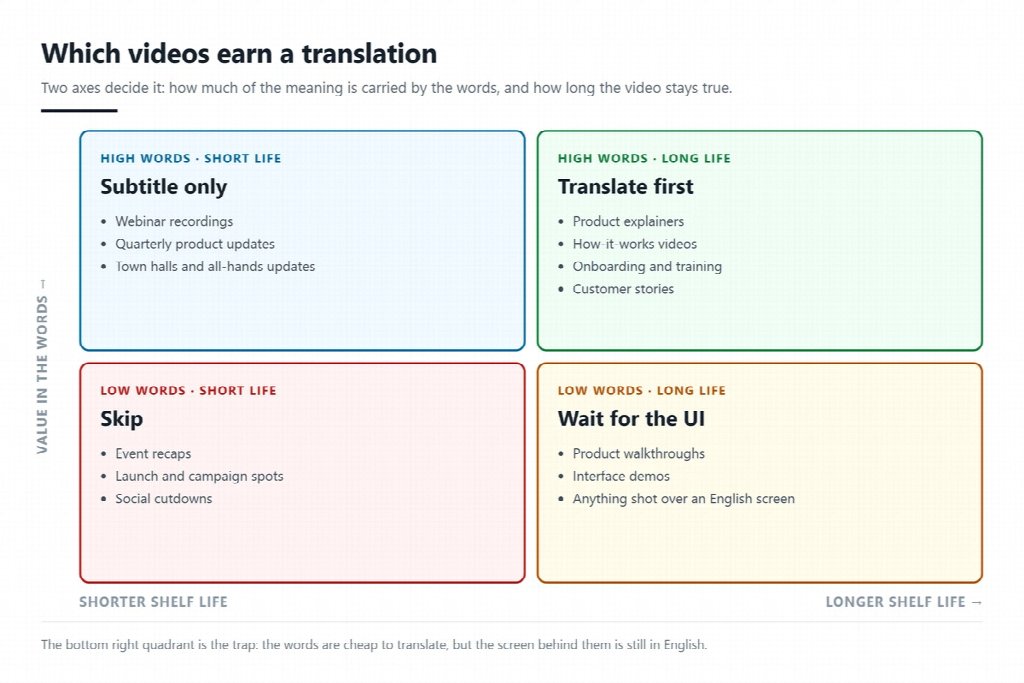
Filters get you a shortlist. Scoring gets you an order. Rate each surviving video on three axes and start at the top.
| Video type | Value in the words | Shelf life | Has a localized page | Verdict |
|---|---|---|---|---|
| Product explainer, talking head | High | Long | Usually yes | Translate first |
| How-it-works or onboarding | High | Long | Usually yes | Translate first |
| Recorded webinar | High | Short | Rarely | Subtitle it, and only build the page if the topic recurs |
| Customer story | High | Long | Sometimes | Worth it, but check consent covers a dubbed version |
| Product walkthrough with live UI | Low | Long | Sometimes | Wait until the interface itself is localized |
| Campaign or launch spot | Low | Short | Yes, briefly | Skip unless the campaign is running in that market |
| Event recap, conference footage | Low | Very short | No | Skip |
The pattern is consistent. Videos that explain something durable are worth translating. Videos that announce something are not, because the announcement expires faster than the localization pays back.
A translated video still needs a page that can rank
This is the filter most teams skip, and it is the one Google is explicit about. In its video best practices, Google states that "the watch page must be indexed" and, more pointedly, that "the indexed watch page must be performing well in Search before its video can be considered for indexing." The video does not carry the page. The page carries the video.
Google also asks you to declare the relationship between language versions rather than leaving it to be inferred. Its guidance on localized versions says to "use hreflang to tell Google about the variations of your content, so that we can understand that these pages are localized variations of the same content," and notes that while Google "might still find alternate language versions of your page, it is usually best for you to explicitly indicate your language- or region-specific pages."
Practically, that reorders the project. Translating the page comes first, the video second. If you are going to translate videos into other languages this quarter, spend the first week on which pages will exist in those markets, because a dubbed clip sitting on an English page is a file, not a channel.
What the AI hands back, and what it leaves you
Current tools translate the spoken audio, generate subtitles, and increasingly handle on-screen text and optional lip sync in the same pass. That is a real change in the cost of the audio. It is not the whole job.
What still lands on your desk:
- Graphics baked into the footage. Anything rendered into the frame at edit time, such as a lower third, a chart label or a pricing card, has to be re-rendered from the project file.
- The end card. The call to action, the URL and the offer usually differ by market, and it is the one frame most likely to be wrong.
- Length. A sentence in German or Spanish runs longer than the English it replaces, so any edit that was cut to the English voice will land early or late.
- Captions as an accessibility requirement, not a nice-to-have. WCAG success criterion 1.2.2 Captions (Prerecorded) sits at Level A and requires that "captions are provided for all prerecorded audio content in synchronized media." It also asks for more than a transcript: captions "not only include dialogue, but identify who is speaking and include non-speech information conveyed through sound, including meaningful sound effects."
Budget the re-edit, not just the translation. On a library of twenty videos that difference is what decides whether the project finishes.
FAQ
Should I use subtitles or dubbed audio?
Subtitles are cheaper, faster and required anyway for accessibility. Dubbed audio earns its place when the viewer needs to watch the screen rather than read, which is most product demonstrations, or when the video is the first impression a market gets of the brand. Many teams ship subtitles everywhere and dub the top five videos.
How many languages should I start with?
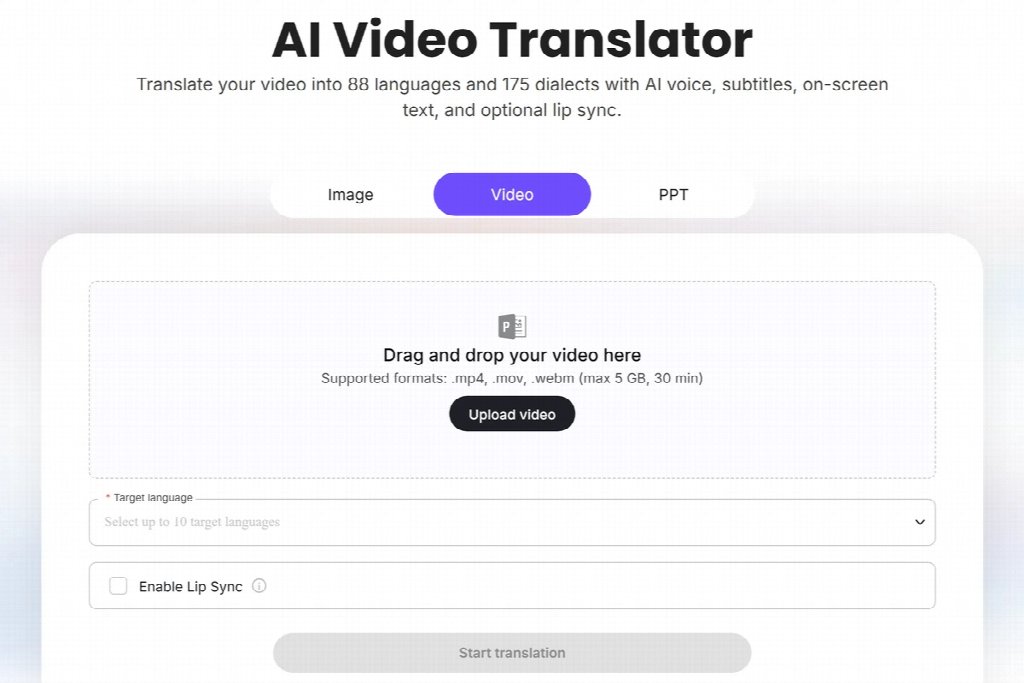
Start with the markets where you already have localized pages and existing demand, not the ones on the expansion slide. Tools can produce several languages in one run, which makes it tempting to select everything at once. Leadde's video translator allows up to 10 target languages per run and covers 88 languages and 175 dialects, but the constraint is rarely the tool.
What file sizes and lengths do these tools accept?
It varies, and it is worth checking before you plan a batch. On Leadde the ceiling is 30 minutes or 5 GB per file in MP4, MOV or WebM. That is enough for any ad, demo or explainer, and not enough for a full recorded conference day.
Ten videos to translate first
Open the analytics for your video library, sort by views from outside your home market, and look at the top ten. Those are videos with proven demand you are currently serving in the wrong language, and they almost always score better on the three filters than whatever is on the marketing roadmap. Translate those, publish them on pages that exist in the market, then decide whether the next ten are worth it.


