


business resources
How to Assess AI Generators and Models for Advanced Anime Art Workflows
12 Oct 2026

There are always new models appearing, and it’s tempting to assume the latest release will automatically give you better results. But the model that works well for a polished character portrait may behave very differently when you ask for two characters interacting, a complicated camera angle, or a scene with several specific details.
The more demanding your workflow becomes, the more useful it is to choose a model based on the task in front of you. You need to know what the model handles well, where it starts to lose details, and whether it fits the kind of images you actually want to create.
In this guide, we’ll look at how different anime AI models behave across several common tasks. We’ll do this using several of the models available in PixAI, comparing them with the same prompts.
What does an AI model actually control?
Besides the overall look of an image, the AI model affects how the generator interprets your prompt, how it builds faces and anatomy, and how it organizes the composition. Some models may also behave differently when you introduce multiple characters or text.
This matters because the strengths you notice in a simple character portrait may not carry over to a more complicated task.
When comparing models, pay attention to:
- Visual style: linework, rendering, color, shading, and overall anime aesthetic
- Prompt interpretation: how accurately the model follows the details you specify
- Character quality: faces, anatomy, clothing, hair, and other defining features
- Composition: camera angle, framing, object placement, and scene structure
- Scene complexity: how well it handles multiple characters and interactions
- Specialized abilities: reference-based generation, editing, manga layouts, or text
Essentially, instead of asking which model produces the prettiest image, you should consider whether it handles the particular kind of work you need it to do.
AI model vs LoRA: What is the difference?
Models and LoRAs can both affect the final look of an anime image, but they play different roles in the generation process.
A model provides the broader visual foundation: how it interprets prompts, renders characters, handles composition, and generally behaves when creating an image.
A LoRA is more targeted. It can add control over a particular character, style, concept, or visual feature when used with a compatible model and workflow. This makes LoRAs useful when you want to push an image in a specific visual direction, but it’s not a replacement for the underlying model.
For example, you might choose an AI anime model because it handles your preferred anime style and composition well, then use a LoRA to bring a particular character or visual concept into that workflow.
If you're trying to find the right AI model for character art, compare the models themselves under similar conditions first. Once you know which foundation fits your task, you can look at LoRAs and other controls to refine the result. PixAI gives you access to both, so you can treat model selection and targeted customization as separate decisions.
Choose by anime style and general illustration quality
When you run the same prompt through several models, you’ll get noticeably different approaches. Even when all of them follow the basic idea, the finished images will likely have a very different character.
For a more accurate comparison, start with one detailed prompt that describes a single character, their clothing, environment, pose, camera position, lighting, and atmosphere.
Let’s try this with the same female astronomer prompt using three different PixAI models: Tsubaki.3, Haruka v2, and Hoshino v2.
anime illustration of a young female explorer standing on a mountain observatory deck at night, long dark auburn hair, amber eyes, wearing a dark blue expedition coat, red scarf, leather boots and a small shoulder bag, holding an open star map in one hand. A large brass telescope stands beside her. Snowy mountains and a star-filled sky in the background, crescent moon, warm light coming from the observatory windows, cool moonlight on the character, cinematic three-quarter view, detailed anime style
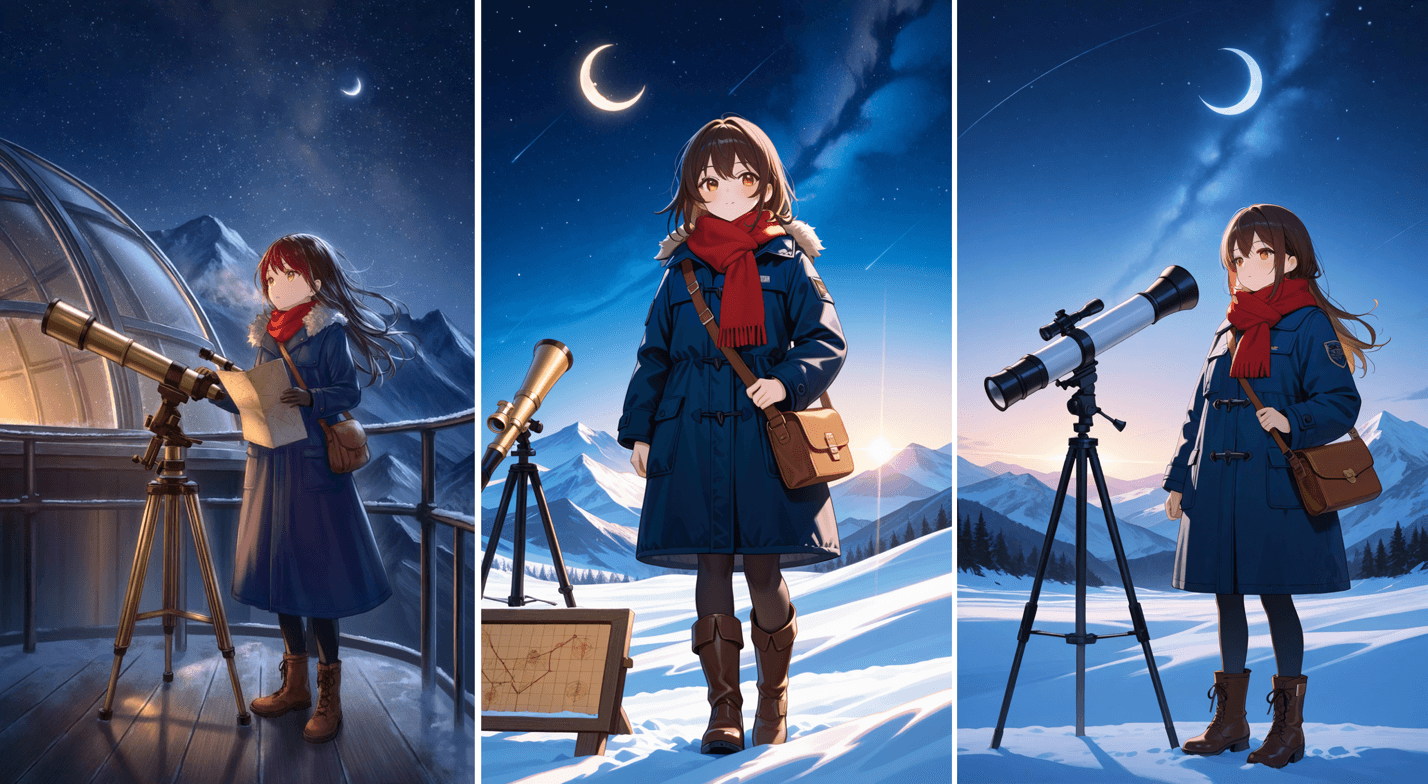
As you can see, Haruka v2 provides great aesthetics, but interpretation is quite different across all models.
This means that you need to look beyond the image that catches your eye first. Compare:
- How closely each model follows the character description
- Whether the face and anatomy remain coherent
- How accurately clothing details are reproduced
- Whether the composition matches the requested camera and framing
- How the model handles the environment and lighting
- Whether the overall rendering fits the style you want
A polished character portrait, a dramatic scene, and a softer illustrated style can all call for different model characteristics.
Choose by prompt following
A model can produce an attractive anime image while still missing important parts of the prompt. This becomes more noticeable when you give it several conditions that need to work together. A specific pose, camera angle, object placement, or scene layout may all need to be understood for the result to match the intended task.
Let’s compare how Tsubaki.3 and Haruka v2 handle these instructions without judging which finished image looks better. We’ll judge by how a model follows the:
- Pose
- Direction
- Camera angle
- Objects and their placement
- Clothing details
- Relationships between the character and the surrounding scene
Here’s our prompt:
Anime illustration of a young female astronomer with long dark auburn hair and amber eyes, wearing a dark blue expedition coat and red scarf. She stands on an observatory deck at night. Show her in a low-angle three-quarter view. She holds an open star map in her right hand and points to the moon with her left hand as she looks up. A telescope sits beside her. Snowy mountains in the background under a star-filled sky.
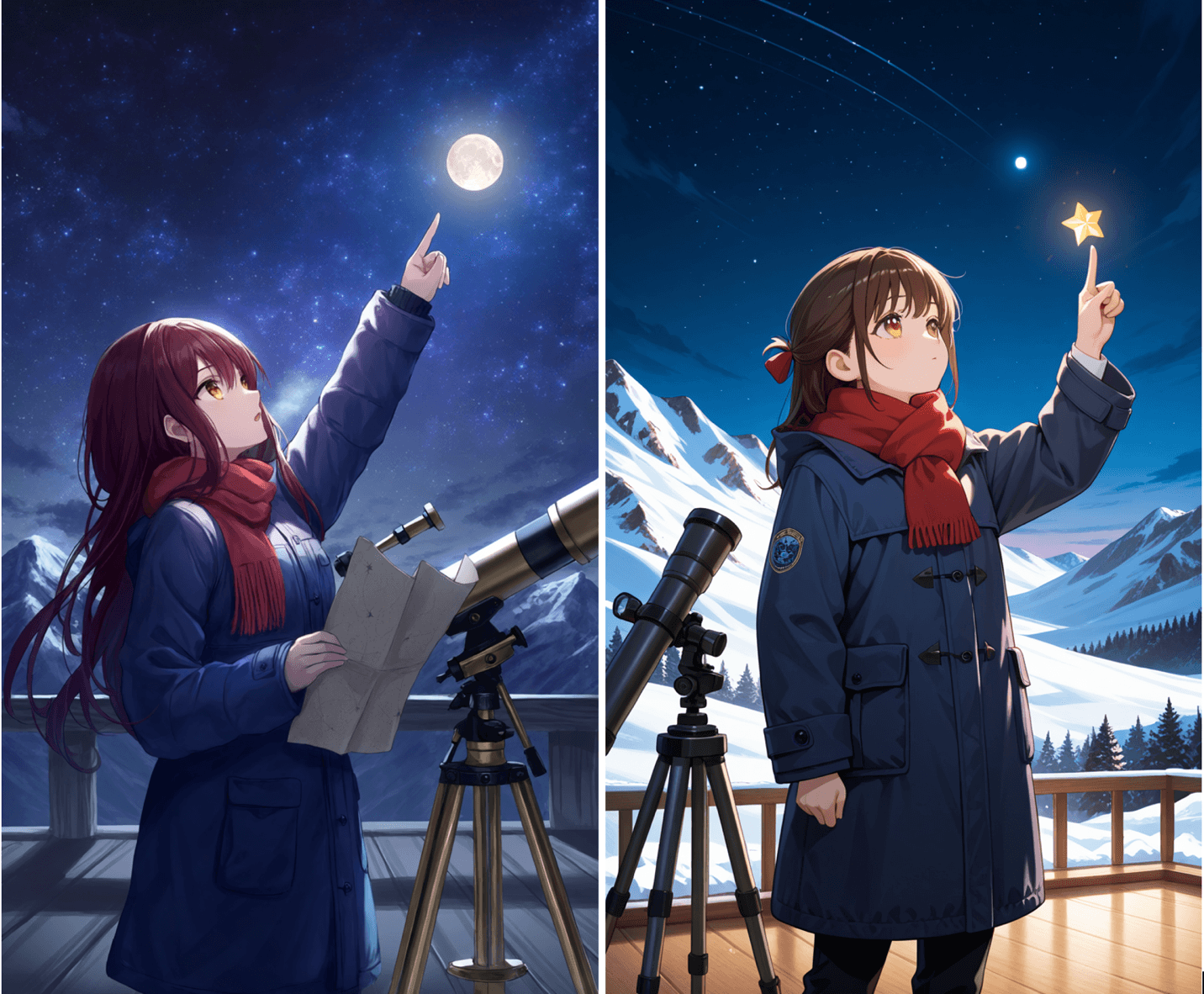
As you can see, Tsubaki.3 was more useful because it followed all the different instructions in the prompt while keeping the overall scene coherent.
This is important because if a model consistently ignores specific instructions, you may spend more time regenerating or editing the image to get the result you want.
Choose by character consistency
If you plan to use the same character throughout a project, you also need to consider how reliably you can bring that character back in different poses, outfits, settings, and scenes.
Character consistency can depend on several parts of your workflow:
- References: Giving the generator a visual reference can help preserve the character's appearance across new images.
- LoRA: A character-specific LoRA can provide more targeted control when you need to reproduce the same character repeatedly.
- Prompt design: Consistent descriptions of distinctive features, clothing, hair, and other traits give the model a clearer foundation to work from.
- Editing workflow: Starting from an existing image and making controlled changes can sometimes be more useful than generating the character from scratch each time.
This is why it can be misleading to judge consistency as a quality that belongs entirely to one anime AI model. The model is part of the workflow, but so are the references and tools you use around it. That’s why PixAI allows you to combine these approaches as you develop a character.
Choose by multi-character performance
When you put two or more characters into the same scene, the model needs to keep track of who is who, what each person is wearing, and how they are interacting.
You can test how two models behave in this aspect by giving each character a distinct appearance, outfit, pose, and action.
Some common problems to look for include:
- Character traits mixing between the two characters
- Clothing or accessories appearing on the wrong character
- The characters interacting incorrectly
- Confused or merged poses
- Anatomy problems, especially where the characters overlap
Here’s the prompt we’ll use with Tsubaki.3, Haruka v2, and Hoshino v2, respectively:
Anime illustration of our young female astronomer with long dark auburn hair, amber eyes, dark blue expedition coat, and red scarf standing beside a young male astronomer with short black hair, green eyes, a brown field jacket, and a cream scarf. They are standing together on an observatory deck at night, looking at an open star map they are holding between them. Snowy mountains and a star-filled sky in the background, detailed anime style.
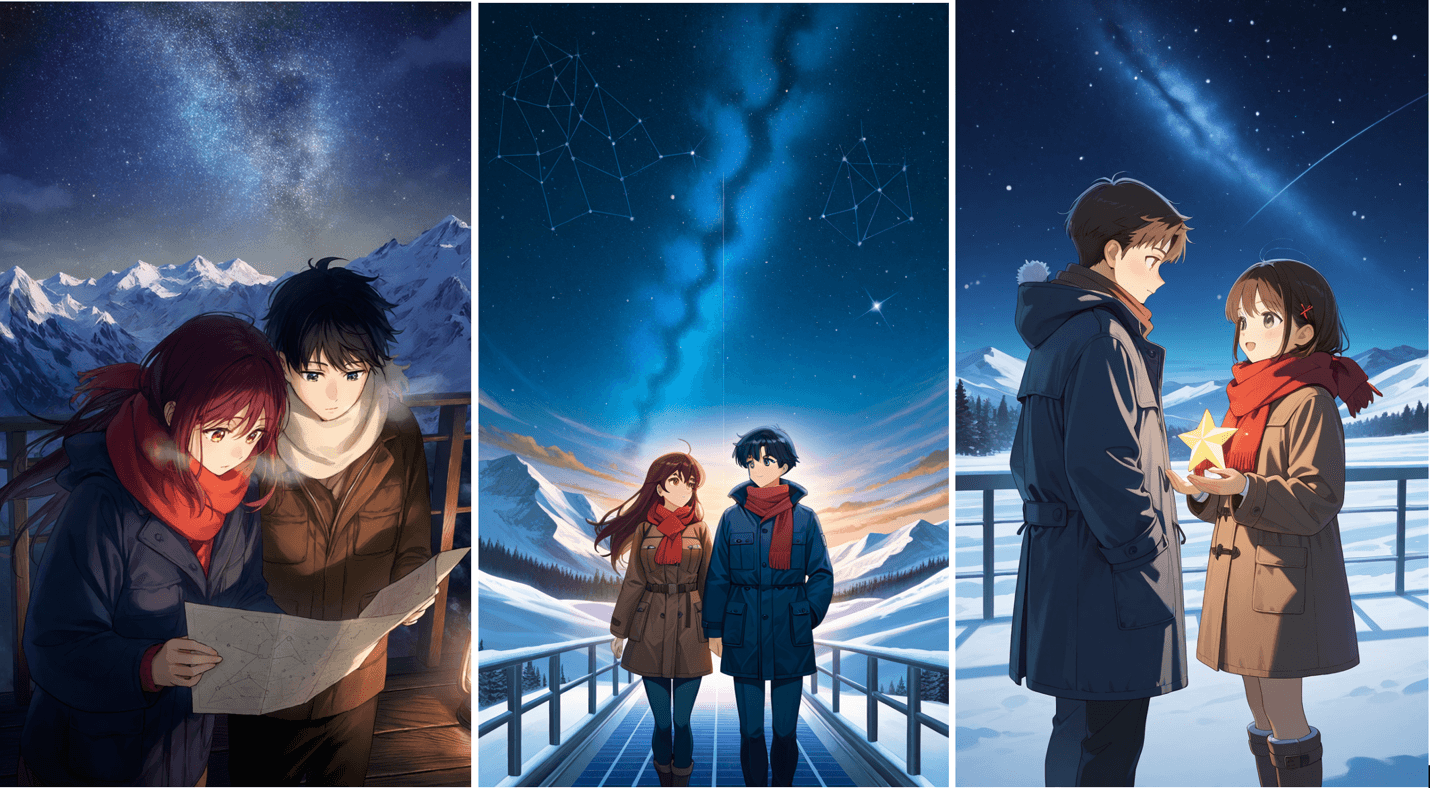
Only Tsubaki.3 gets the clothing and positioning right. It’s an important test when your work involves couples, group scenes, manga, or visual storytelling.
And as you can see, testing it before settling on a model can save you from building a workflow around a model that becomes difficult to control as your scenes become more complex.
Choose by reference and editing needs
Choosing a model also depends on what happens after the first generation. If your workflow involves reference images, character continuation, or repeated edits, you need to know how well the model fits those tasks.
Consider:
- How well it uses a reference image
- Whether the character remains recognizable in a new scene
- How much of the original composition it preserves
- Whether edits affect only the area you intended to change
- How easily you can make several revisions without starting over
For example, let’s test PixAI’s Smart Reference that’s available on most models. We’ll use Tsubaki.3 and Haruka v2 to edit our characters using Smart Reference.
As you can see below, Haruka v2 doesn’t do a great job based on the prompt:
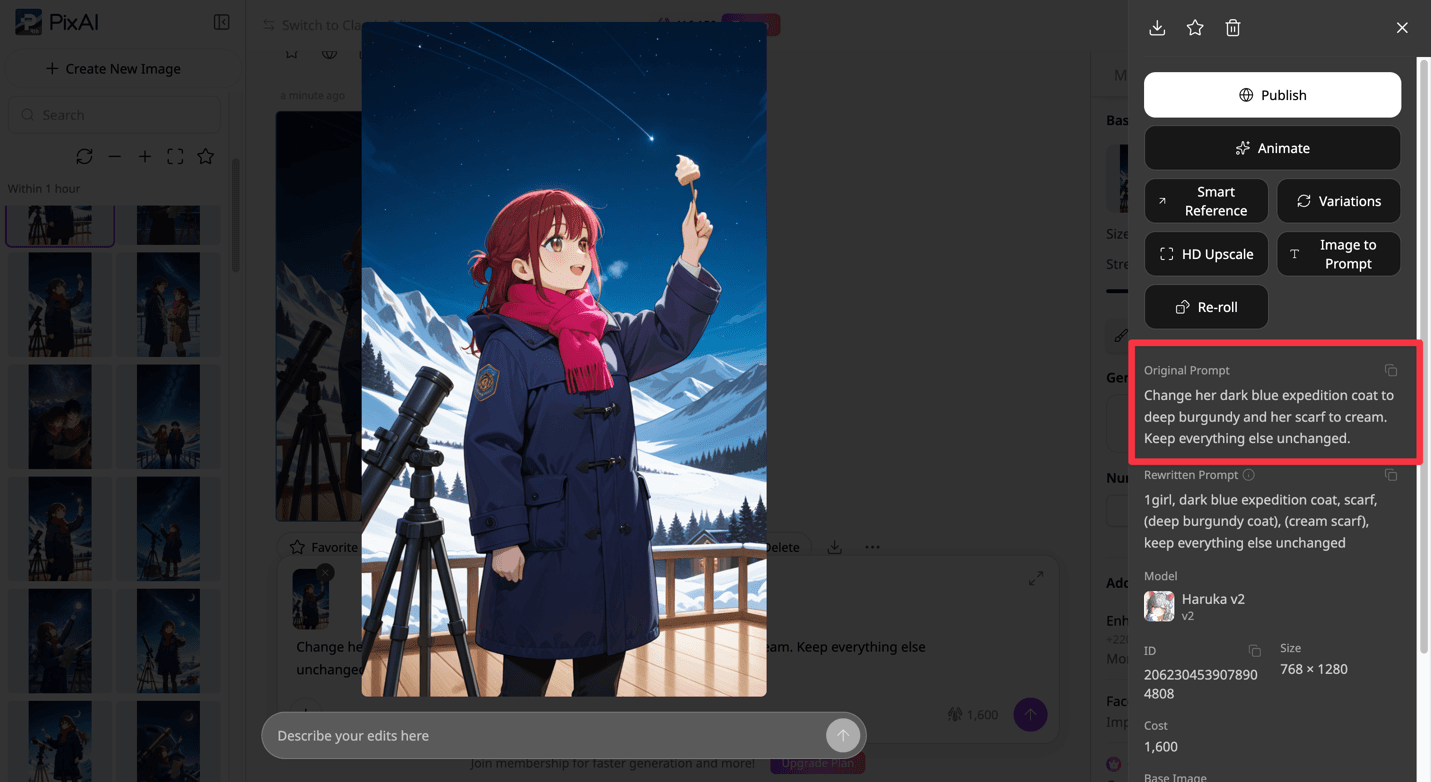
Tsubaki.3, on the other hand, is flawless in its execution.
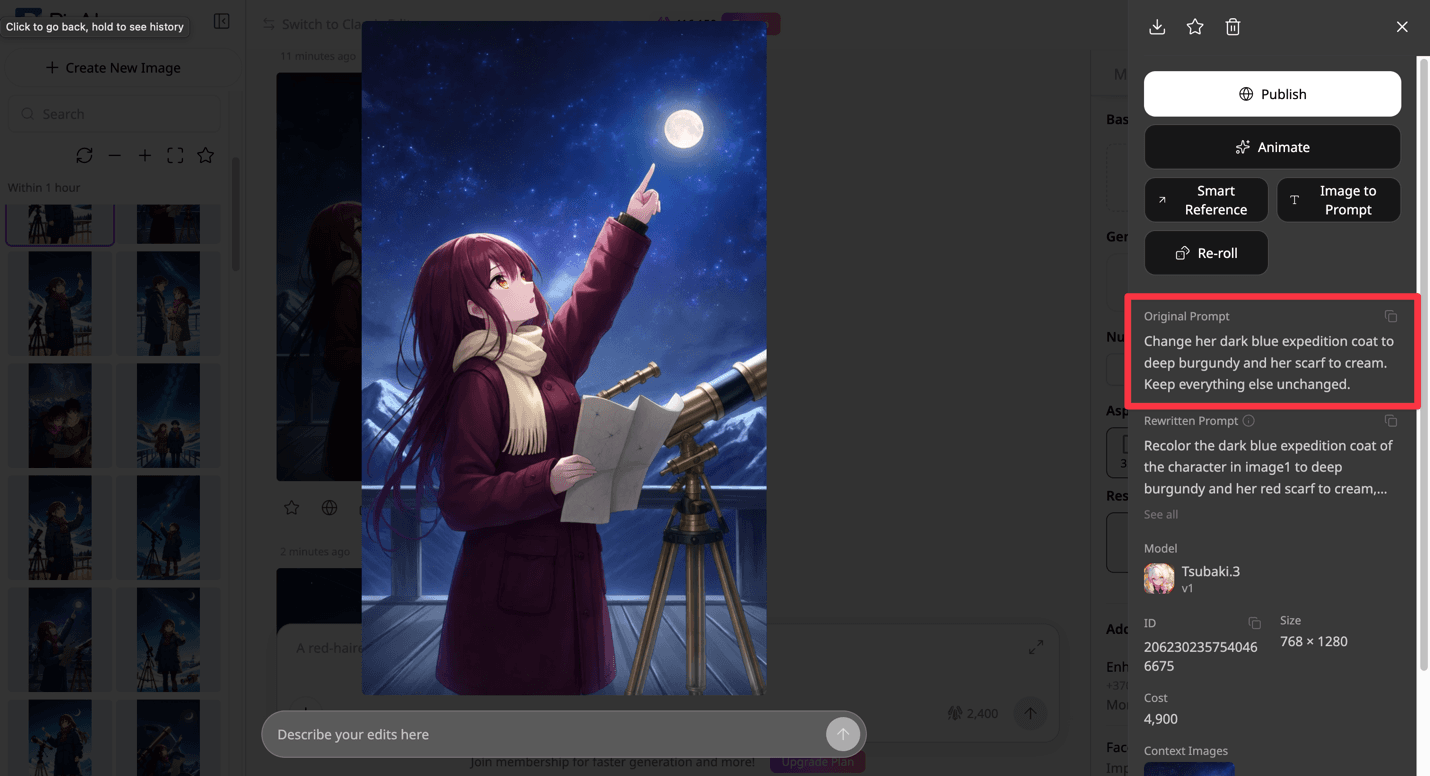
This means that when selecting a model, you’ll need to consider whether you're generating from scratch, continuing an existing character, or making a few changes to an image.
Choose by manga or text requirements
Manga and text-heavy images are worth testing separately from standard anime illustration. A model can produce convincing characters and detailed scenes while struggling with speech bubbles, signs, posters, or other text that needs to appear correctly in the image.
This matters if your work includes:
- Manga panels
- Posters
- UI-style images
- Speech bubbles
- Signs, labels, or other visible text
To test things, you can create a simple manga-style scene with a small amount of visible text, then check whether the model handles both the illustration and the text as requested. Look at the panel composition, character placement, speech bubbles, and whether the words are readable and correctly placed.
How to test an anime AI model yourself
You don't need a complicated testing process to compare models. Just try to recreate the kinds of tasks you actually work on and keep the conditions consistent enough that the differences are meaningful.
Step 1: Choose one task you create frequently
Start with a task that represents your normal workflow. It could be a character portrait, a detailed scene, a multi-character illustration, or a manga panel. Testing something you regularly create will tell you much more than comparing models on a task you rarely need.
Step 2: Write one prompt with clear requirements
Create a prompt that gives the model enough information to complete the task. Include the details you care about, such as the character, pose, composition, clothing, objects, or lighting. Make the requirements clear enough that you can check them against the finished image.
Step 3: Keep the prompt and settings as consistent as possible
Use the same prompt and relevant generation settings for each model. When the test is consistent, the comparison is fairer and makes it easier to tell whether a difference comes from the model rather than from the way you generated the images.
Step 4: Compare 2–3 models
You don't need to test every available model. Pick two or three that are relevant to your task and run the same test with each one. This gives you enough results to see meaningful differences without turning the process into a huge project.
Step 5: Judge specific criteria
Decide what matters before you look at the results. Depending on the task, you might compare prompt following, character quality, composition, anatomy, visual style, consistency, or a specialized ability such as handling multiple characters or text.
Step 6: Repeat with a second task before deciding
Don't base your choice on one lucky generation. Take the models that performed well in your first test and try them on another type of task. A model that works particularly well for one kind of image may behave differently when the requirements change.
Recommended model selection table
Once you've compared the models across the tasks that matter to you, use the results to see which models fit different parts of your workflow.
| Task | What to look for |
| General anime illustration | Style, faces, anatomy, composition, detail |
| Detailed prompts | Pose, camera angle, objects, clothing, scene relationships |
| Character consistency | References, distinctive features, repeatability |
| Multi-character scenes | Character separation, interactions, anatomy, spatial relationships |
| Reference and editing | Reference accuracy, preservation, controlled changes |
| Manga and text | Panel composition, speech bubbles, text placement and readability |
Final thoughts
Choosing an anime AI model gets easier when you stop looking for one model that does everything and start testing the tasks that matter to your work. A model that handles detailed prompts well may behave differently with multiple characters, references, editing, or text.
PixAI gives you a practical environment for making these comparisons, with different models and tools available within the same creative workflow. Test a few models with your own prompts, keep the conditions consistent, and pay attention to the areas where you need the most control. That will give you a much clearer idea of which models belong in your workflow.


