


citiesabc
Swift vs. Unity: Choosing the Right Technology for Your Mobile Game Project
07 Sept 2026

Introduction: Swift vs. Unity for Mobile Game Development
Choosing a technology stack for a mobile game shapes nearly every decision that follows, from budget to release timeline to which app stores a game can reach on day one. Swift and Unity represent two different philosophies of game building. One is a programming language built by Apple for native app development. The other is a full game engine designed to publish across many platforms from a single codebase. Studios and independent developers often assume this choice is simple, but it depends heavily on the type of game, the target audience, and long-term plans for the project. Understanding what each option actually offers, and where each one falls short, makes the choice much clearer.
What Is Swift? Native iOS Game Development Explained
Swift is Apple's programming language, introduced in 2014 as a replacement for Objective-C. It was designed to be safer, faster, and easier to read than its predecessor, while still giving developers full access to Apple's frameworks. For game development, this means direct integration with SpriteKit, SceneKit, Metal, and ARKit, all of which are built and maintained by Apple itself.
Games built with Swift run natively on iOS hardware, without a layer of engine code sitting between the game and the operating system. This tends to result in smoother performance, particularly on graphics-intensive tasks, and gives developers early access to new iOS features the moment Apple releases them. The tradeoff is scope: Swift is built for Apple's ecosystem alone, which means a Swift-based game targets iPhone and iPad users exclusively, unless a separate codebase is built for other platforms.
What Is Unity? The Cross-Platform Game Engine Overview
Unity is a game engine, not a language. Developers write game logic in C#, and Unity's editor handles rendering, physics, audio, animation, and platform-specific packaging behind the scenes. A single Unity project can be exported to iOS, Android, Windows, macOS, consoles, and web browsers with relatively minor adjustments for each target.
This cross-platform reach is Unity's defining strength. The engine includes a visual editor for building scenes, a large asset store stocked with pre-built models, scripts, and tools, and an active community that has documented most common problems developers run into. Unity supports both 2D and 3D game development, which makes it flexible enough for everything from simple puzzle games to complex 3D titles. Because the engine is used across so many industries beyond gaming, studios looking to staff a project quickly often find that Unity developers for hire come with varied backgrounds, from mobile casual games to simulation and training software, which helps when a project calls for a specific mix of skills.
Swift vs. Unity: Key Differences in Performance and Platform Support
The comparison between Swift and Unity comes down to two central factors. The first is raw performance. The second is where the game actually needs to run. Swift offers native speed but stays locked to Apple's ecosystem. Unity trades a small amount of performance for reach across many platforms. Both factors deserve a closer look before making a final call. The right answer often depends on which factor matters more for the specific project at hand.
Performance Benchmarks: Native Swift vs. Unity Engine
Swift, paired with Metal for graphics rendering, gives developers direct access to Apple's hardware without an intermediary layer. This typically produces lower latency and more efficient memory use on iOS devices, which matters for games with demanding visuals or precise timing requirements. Unity, by contrast, runs its own rendering pipeline on top of the operating system. Modern versions of Unity have narrowed this gap considerably, and for most mobile games, the difference in frame rate or responsiveness is not something the average player would notice. For titles that push hardware limits, such as high-fidelity 3D games or AR experiences with heavy real-time computation, native Swift development still holds an edge.
Cross-Platform Compatibility: iOS-Only vs. Multi-Platform Deployment
This is where the two technologies diverge most sharply. Swift produces iOS-only applications. Reaching Android, or any other platform, requires writing and maintaining a separate codebase, effectively doubling development and maintenance work. Unity solves this by design. A project built in Unity can be compiled for iOS and Android simultaneously, along with several other platforms, using largely shared code. For any project where Android represents a meaningful share of the target audience, this difference alone often settles the decision in Unity's favor.
Development Cost and Time: Swift vs. Unity for Game Projects
Budget and timeline considerations follow directly from the platform question above. Building a game twice, once in Swift for iOS and once in Kotlin or Java for Android, requires two separate development efforts, two testing cycles, and ongoing maintenance across two codebases. That adds real cost, even when both versions are relatively simple.
Unity avoids most of this duplication. A single codebase, shared assets, and shared game logic mean smaller teams can support multiple platforms without proportionally increasing their workload. Unity's learning curve is also generally considered gentler for developers already familiar with C# or object-oriented programming, and its visual editor reduces the amount of code needed for common tasks like animation or UI layout. Swift has a smaller learning curve for developers who already work within Apple's ecosystem, but that advantage only applies to iOS-focused teams. Businesses assembling a team from scratch should weigh talent availability as well: Swift developers for hire tend to specialize deeply in Apple's platform conventions, which pays off for iOS-first products but adds less value on projects with broader platform ambitions.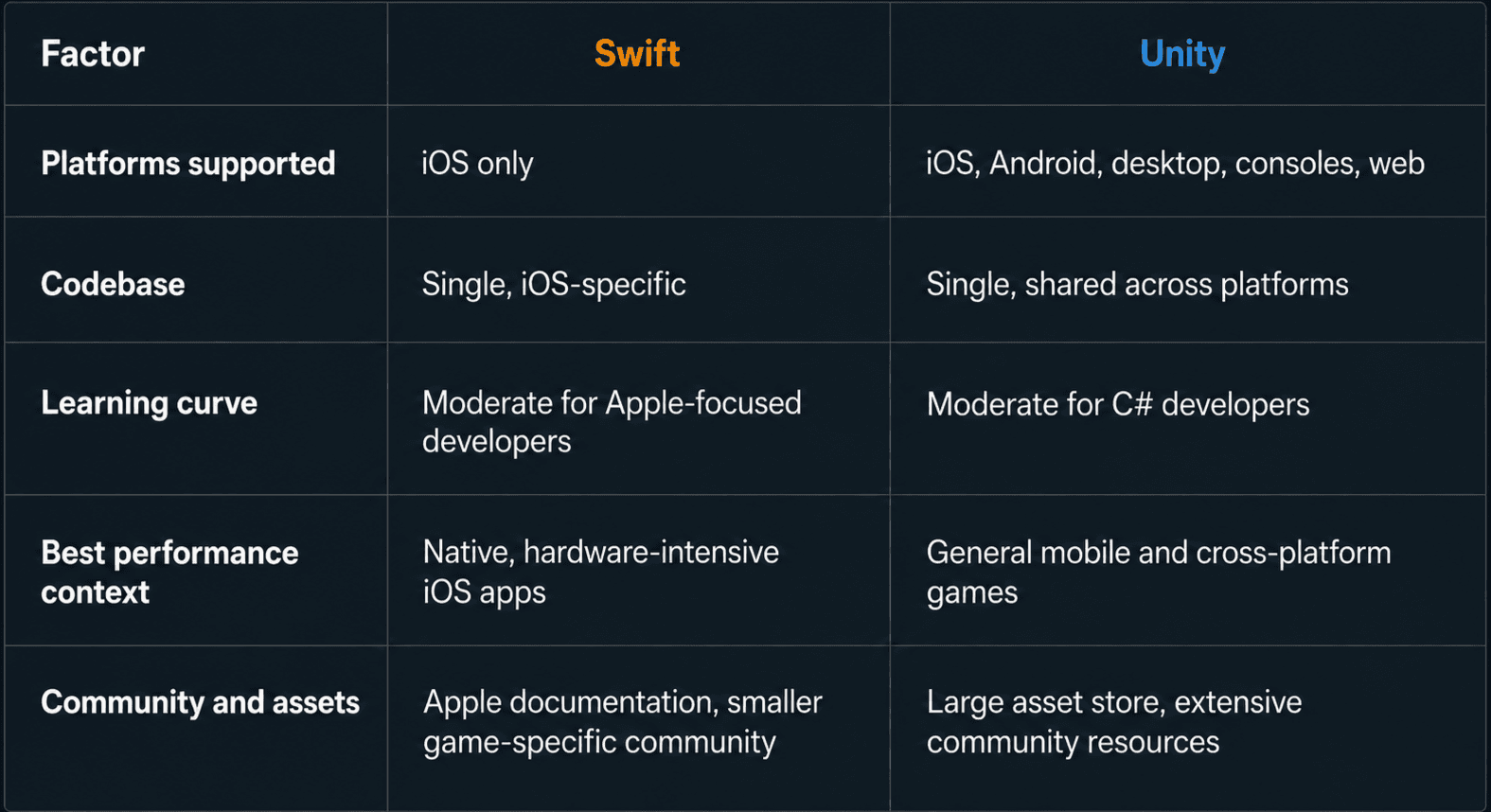
When to Choose Swift for Your Mobile Game
Swift makes the most sense for teams building exclusively for Apple's ecosystem, particularly when the game depends on features unique to iOS hardware or software. Specific scenarios where Swift holds a clear advantage include:
- Games designed exclusively for iPhone or iPad, with no plans for Android release
- Titles built heavily around ARKit, where deep integration with Apple's augmented reality framework improves tracking accuracy and responsiveness
- Projects requiring tight integration with Apple services such as Game Center, iCloud, or Apple Pay, where native code simplifies implementation
Studios in this position benefit from working with specialists who understand Apple's frameworks in detail rather than generalists spreading attention across multiple platforms.
When to Choose Unity for Your Mobile Game
Unity fits a wider range of projects, particularly those where reach matters as much as polish. Common situations where Unity is the stronger choice include:
- Games planned for simultaneous release on iOS and Android, where a shared codebase reduces both cost and time to market
- 2D or 3D titles that can benefit from Unity's asset store, prebuilt physics systems, and animation tools rather than building everything from scratch
- Projects with tight deadlines where a small team needs to move quickly across multiple platforms without duplicating work
Teams choosing Unity for these reasons typically find that available talent scales well with project size, since the engine's popularity extends the pool of developers who can step in as scope grows.
Conclusion
Neither technology is universally better. Swift suits projects with a clear, exclusive focus on Apple's platform, where native performance and deep integration with iOS features outweigh the cost of skipping Android entirely. Unity suits projects aiming for broad reach, faster multi-platform development, and access to a large ecosystem of tools and pre-built assets.
The right choice comes down to answering a few direct questions before writing a single line of code: Does the game need to run on Android as well as iOS? Does it depend on ARKit or other Apple-exclusive frameworks? Is the team already skilled in one technology over the other? Working through these questions honestly, rather than defaulting to whichever technology is more familiar, produces a stronger foundation for the project ahead.


